Scam-Proofing the People You Love: Part 4
Build Your Family's Fraud Plan: Stop, Verify, Tell (and What to Do If It Already Happened)
By Larry Betz | Prepared Not Paranoid https://www.preparednotparanoid.com/
When I was a Safety Director, the best safety rules were the ones everyone followed, from the newest apprentice to the most experienced mechanic. Nobody was singled out. It was just how we did things.
That's the secret to protecting older adults from fraud. Don't make it a rule for Grandma. Make it a rule for the whole family.
In Parts 1 through 3, we covered how scams work and the most common ones to watch for. Now let's build the plan, and cover exactly what to do if a scam gets through.
Stop, Verify, Tell
Three words. Easy to remember under pressure.
STOP. Pause. Don't click, pay, move money, share a code, or let anyone into your computer. Hang up or close the message. A real organization will give you time to check.
VERIFY. Use a separate, trusted channel. Call a number you already know, open the official app, call a family member, or go in person. Never use contact information from the suspicious message.
TELL. Talk to someone you trust before you act. Scammers need you isolated. A second person can spot what doesn't add up, calm the pressure, and help you write down what happened.
Build Your Family's Fraud-Prevention System
Choose a family code word and keep it private. It's one tool, not the only proof.
Agree that nobody gets criticized for pausing a request or calling to check. Ever.
Set a household rule: any unexpected request for money needs a second person and a separate way to verify.
Add a trusted contact at the bank and brokerage. A trusted contact can be alerted if the institution suspects exploitation, but doesn't get control of the money.
Turn on alerts for transactions, logins, password changes, and new payees.
Use a password manager and two-factor login on email and financial accounts.
Freeze credit at all three credit bureaus when new credit isn't needed. It's free, and you can lift it temporarily when you need to.
Limit what's online: travel dates, birthdays, family relationships, phone numbers, and public videos with your voice.
Review statements together: bank and card statements, credit reports (free at AnnualCreditReport.com), Medicare notices, and subscriptions.
Plan ahead for help with finances. Talk to a qualified attorney before setting up or changing powers of attorney, trusts, joint accounts, or estate documents.
How to Help Without Taking Over
This is where many families go wrong. Starting with "You can't handle this anymore" creates secrecy, defensiveness, and fear of losing control. And a parent who feels judged won't tell you when something goes wrong.
Instead:
Ask permission before looking at accounts or devices, unless it's an emergency
Offer choices: "Would you rather call the bank together, or go to the branch?"
Focus on the criminal's behavior, not your parent's judgment
No blame, no "I told you so." Shame helps the scammer by keeping the victim quiet.
If you're worried about memory or decision-making, get professional guidance instead of trying to take control yourself
What to Say
"Dad, scams are getting more convincing for all of us. How about we use the same rule? If either of us gets an unexpected request for money or account information, we pause and check with each other first."
If a Scam Already Happened: Act Fast
Speed matters. Your rights and the chances of getting money back can depend on how quickly you report it.
Stop all contact and payments. Don't pay a "release fee," "tax," or "recovery fee."
Call the bank or payment company immediately through a verified number. Say it was fraud, and ask if the payment can be stopped, recalled, frozen, or disputed. This includes card issuers, payment apps, wire services, gift card companies, and crypto platforms.
If someone had remote access, disconnect the device from the internet, get trusted help removing the software, and change passwords from a different device.
Secure email first, then financial, shopping, social media, and phone carrier accounts. Turn on two-factor login and sign out unknown devices.
If personal information was exposed, go to IdentityTheft.gov for a recovery plan, and place a credit freeze or fraud alert.
Save the evidence: screenshots, phone numbers, emails, receipts, gift cards, transaction details, and a written timeline.
Report it (see the directory below).
Watch for the second wave. Victims are often targeted again by "recovery" scammers who promise to get the money back for a fee. It may be the same criminals.
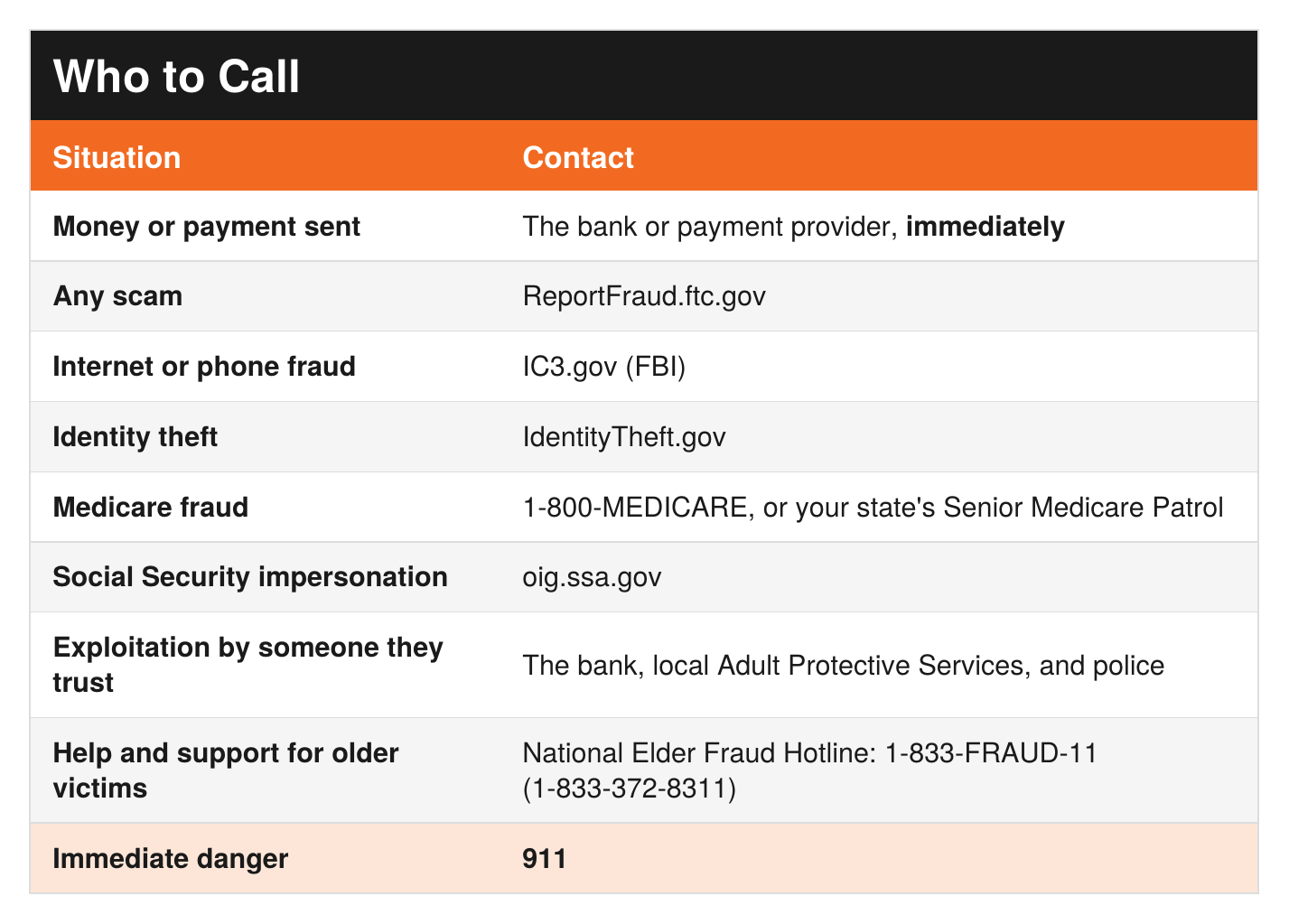
The Family Conversation
Sit down together and talk through these:
What will we do if someone calls asking for money or account information?
Who are the two people each of us will call before acting?
What's our family code word?
How will we check if a call is really from the bank, the government, the police, or a relative?
Which bank alerts and trusted contacts should we set up?
Where will we keep the reporting numbers?
Ask Yourself
Have we set up a trusted contact and account alerts for my parents?
If my parent got scammed tomorrow, would they call me, or hide it?
Do we have the reporting numbers written down somewhere we can find them fast?
Remember: The goal isn't to distrust everyone. It's to recognize the moment when trust is being used against you. And if it happens, asking for help is a protective step, not a failure.
Get Started Today
My free guide, Protecting Older Adults from Scams & Financial Exploitation, includes the Stop, Verify, Tell method, the family conversation questions, and the full reporting directory, ready to print.
[CTA: Comment or DM "[KEYWORD]" / or download it here: LINK]- COMING SOON
Go Deeper
The Family Safety Toolkit includes a Senior Safety section with checklists for fraud prevention and fall prevention. [Get the Toolkit here: LINK]
Cyber Safety: A Beginner's Guide to Protecting Your Digital Footprint walks through passwords, account security, and identity theft recovery. [Get Cyber Safety here: LINK]
Coming soon: the Prepared Not Paranoid Family Readiness Binder. It keeps your parents' accounts, contacts, medical information, and legal documents organized in one place, with color-coded access levels so the family agrees ahead of time who can see what. [Join the list: LINK]
Tools I recommend: Visit my Senior Safety store on Amazon for the products I recommend to help older adults stay safe, secure, and independent at home. [AMAZON STORE LINK]
Related reading:
Staying Steady: Fall Prevention series [LINK]
Red Cell Your Family, Part 7: Just in Case [LINK]
References
Federal Trade Commission, What To Do if You Were Scammed: https://consumer.ftc.gov/articles/what-do-if-you-were-scammed
Consumer Financial Protection Bureau, Reporting Elder Financial Abuse and Trusted Contact information: https://www.consumerfinance.gov/consumer-tools/educator-tools/resources-for-older-adults/
FINRA, Trusted Contact Person: https://www.finra.org/investors/insights/trusted-contact
U.S. Department of Justice, National Elder Fraud Hotline: https://www.ovc.ojp.gov/program/stop-elder-fraud/providing-help-restoring-hope
Social Security Office of the Inspector General, Report Fraud: https://oig.ssa.gov
Disclaimer
This article is for general informational and educational purposes only. It is not legal or financial advice. Consult a qualified attorney before creating or changing powers of attorney, trusts, joint accounts, or estate documents. If you suspect a family member is being exploited, contact their bank, your local Adult Protective Services, or law enforcement.
If you are in immediate danger, call 911. Do not confront a suspected exploiter alone.
The prepared protector is someone who's decided that loving someone means being ready for them, not just hoping things go fine.
Prepared Not Paranoid. Protecting the Most Vulnerable Among Us.