What the Phone in Your Pocket Can Do When the Network Can't
By Larry Betz | Prepared Not Paranoid https://www.preparednotparanoid.com/
The best emergency radio you own is probably in your pocket right now. Your smartphone in an emergency can text 911, show responders your medical information, share your exact location, and on many newer phones, send a text by satellite when there's no cell signal at all. Most people never find out what their phone can do until the day they need it. Let's fix that today, while everything is working.
In Part 1, you built your family communication plan. For most families, the phone is the Primary layer of that plan. This post makes sure it's as strong as it can be, and shows you exactly where it stops working.
Read Your Phone's Signal
The top corner of your phone tells you which kinds of communication will work right now. Most of us glance right past it. Here's what each one means.
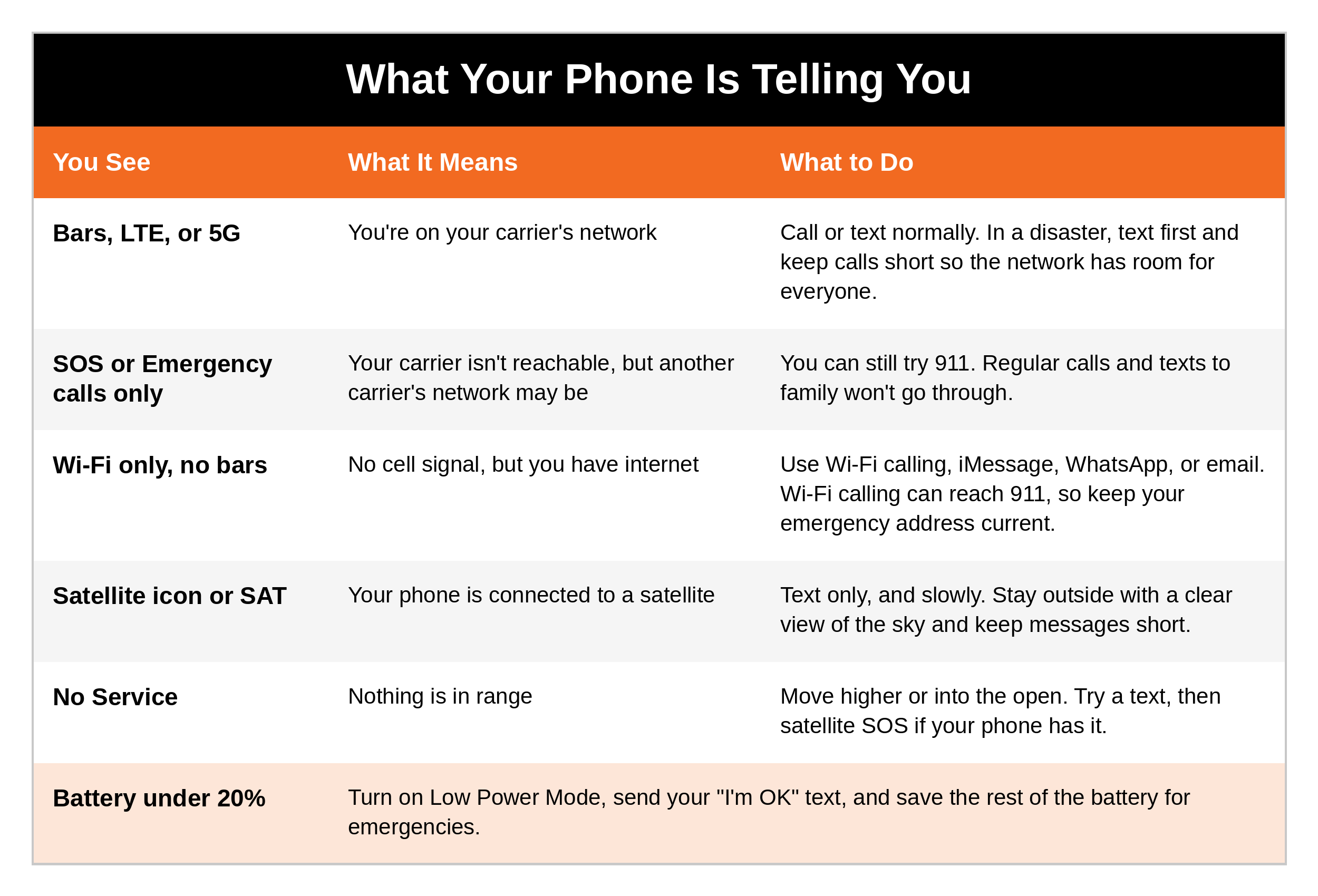
"SOS" doesn't mean your phone is broken. On an iPhone in the U.S., "SOS" or "SOS only" means your phone can't reach your own carrier but can still try an emergency call on another carrier's network. Your regular calls and texts to family won't go through, but 911 may. Android phones often say "Emergency calls only." Know what it looks like now, so it doesn't surprise you later.
Texting by Satellite
When you're outside cell coverage, many newer smartphones can now connect to satellites. This is a major step forward in personal safety, and it's changing fast.
Here's what's available as of October 2026.
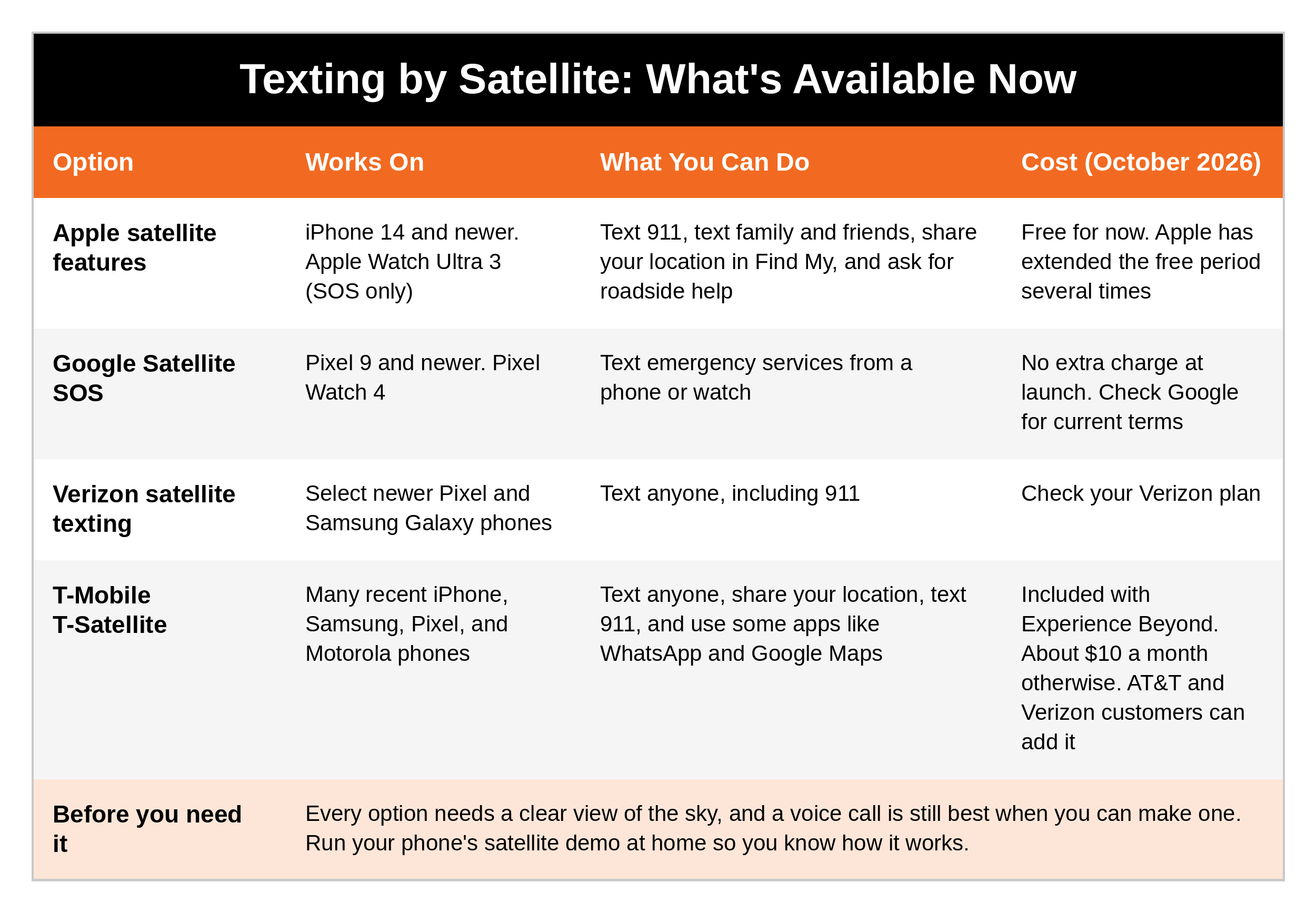
Apple iPhone (iPhone 14 and newer). Emergency SOS via satellite lets you text emergency services when you're out of cell and Wi-Fi range. Your phone guides you to point it toward a satellite, asks you a few quick questions, and relays your answers to responders. Newer software adds Messages via satellite (texting family and friends), Find My via satellite (sharing your location), and Roadside Assistance via satellite. The Apple Watch Ultra 3 can also send satellite SOS.
Google Pixel (Pixel 9 and newer). Satellite SOS connects you to emergency services by text. The Pixel Watch 4 can do it too, even without your phone.
Samsung and other Android phones. Satellite texting on these phones usually comes through your carrier, so it depends on which phone and which plan you have.
Your carrier. Verizon offers satellite texting on select newer Pixel and Samsung Galaxy phones. T-Mobile's T-Satellite works on many recent phones from Apple, Samsung, Google, and Motorola, and AT&T and Verizon customers can add it too. AT&T has been testing satellite service. Call your carrier and ask one question: "Can my phone text by satellite, and does my plan include it?"
What Satellite Texting Can't Do
These limits apply to every phone, iPhone and Android alike:
It's mostly for texting. Satellite service on phones is built for short text messages. You can't count on making a voice call.
It needs a clear view of the sky. Dense trees, canyons, buildings, and being indoors can block it. Heavy weather can slow it down.
It's slow. A message can take several seconds to a few minutes, especially if a satellite isn't overhead.
It only works in some countries. Coverage depends on your phone, your carrier, and where you are. Part 8 covers using your phone overseas.
It drains your battery. Searching for a satellite uses a lot of power.
It may use prompts instead of a free-form message. Apple's emergency texting asks you questions with ready-made answers, which gets the key facts to responders faster.
It won't always connect when your regular network is up. Most phones only switch to satellite when there's no cell or Wi-Fi service at all.
Try it before you need it. iPhones and Pixels both have a satellite demo in Settings that lets you practice connecting without calling for help. Do it once in your backyard, with your kids watching. Then you'll know where to point the phone and how long it takes.
Can You Text 911?
In many parts of the U.S., you can text 911 directly. It isn't available everywhere yet, so know how it works and what to expect.
How to text 911:
Open your phone's messaging app
Type "911" in the "To" field
In your first message, clearly state:
What's happening (the nature of your emergency)
Exactly where you are (address, intersection, mile marker, or landmarks)
Answer follow-up questions quickly, in short, plain words
Key notes:
Call if you can, text if you can't. The FCC says a voice call is still the most reliable way to reach 911. Texting is for when it isn't safe to talk, you can't speak or hear, or a call won't go through.
No app or special setting is needed.
You need a cell signal. Don't count on texting 911 over Wi-Fi alone.
It's not available everywhere. If your area doesn't take texts, you'll get an automatic bounce-back message telling you to call instead.
Don't send it to a group. Text 911 by itself, not in a group text.
Can 911 See Your Location?
Don't count on it. When you call 911 from a cell phone, your location is often sent along with the call. With a text, it may not be. That's why your location goes in your first message.
If you don't know where you are:
Look for street signs, intersections, business names, landmarks, or mile markers
Open your map app and read off your address or your coordinates
Describe what you can see and which direction you were heading
Preparedness tip: whether you're using a cell signal or a satellite, your exact location is the most important thing you can give responders. Make a habit of noticing where you are, especially when you're hiking, traveling, or somewhere new. Ask your kids, "If you had to tell someone where we are right now, what would you say?"
Set Up Your Phone Before You Need It
Fifteen minutes at the kitchen table now saves precious time later. Do this on every phone in your family, including your parents' phones.
Medical ID (iPhone) or Emergency information (Android). Add medical conditions, allergies, medications, and emergency contacts. Turn on "Show When Locked" so responders can see it without unlocking your phone.
A labeled emergency contact. Save at least one contact with "Emergency" in front of the name, like "Emergency - Mom," as we set up in Part 1.
Emergency SOS shortcut. Learn it now. On an iPhone, press and hold the side button and either volume button. On most Android phones, press the power button 5 times quickly. Check your phone's settings to see exactly how yours works and whether it automatically texts your emergency contacts.
Wi-Fi calling. Turn it on, and make sure the emergency address saved for it is your current home address. If you call 911 over Wi-Fi, that's the address responders may get.
Location sharing. Share your location with your spouse or family through Find My, Google's location sharing, or a family app. Apple's Check In in Messages can let someone know when you arrive, and alerts them if you don't.
Offline maps. Download a map of your area in your map app, so you can still see where you are with no signal.
Emergency alerts. Leave emergency and public safety alerts turned on. We'll cover alerts in detail in Part 7.
Satellite demo. If your phone has satellite features, run the demo once.
Free printable: my Phone Emergency Setup Checklist walks you through every one of these steps, with where to find each setting on an iPhone and an Android phone, plus a family check-off chart so you know whose phone is done. Print it, sit down with your family, and knock it out in one evening. [LINK]
When the Cell Network Is Down but You Have Power or Internet
A phone doesn't have to rely only on cell towers.
Wi-Fi calling. If your home internet is working but the cell signal isn't, Wi-Fi calling lets you call and text over your internet connection. Apps like iMessage, WhatsApp, Signal, and FaceTime work over Wi-Fi, too. Keep your router and modem on a small battery backup so your Wi-Fi stays on when the power blinks. (Lights Out and my Backup Power series show you how.)
A corded landline. An old-fashioned corded phone plugged into a traditional copper phone line usually keeps working in a power outage, because the line carries its own power. Cordless phones need electricity, so they go dead with the lights. Here's the catch: most home phone service today runs over your internet or fiber line, not copper. That service needs power at your house. Your provider is required to offer you a backup battery for it (8 hours, with a 24-hour option), but you usually have to ask for it and buy it. Call your provider and ask: "If the power goes out, will my home phone still work, and for how long?"
Save Your Battery
In an emergency, your battery is your lifeline. Every percent counts.
Turn on Low Power Mode (iPhone) or Battery Saver (Android) as soon as the power goes out
Text instead of calling, and send one clear "I'm OK" text rather than ten short ones
Turn down screen brightness and close apps you don't need
Use Airplane Mode between check-ins if the signal is weak, since searching for a signal drains the battery fast
Keep a charged power bank and the right cable in your go bag, your car, and next to your bed
A Special Note About Smartphones and Kids
The Dangers of Smartphones for Children, and a Safer Alternative
Smartphones offer convenience and connection, but they also pose serious risks for children and teens. Unrestricted access to the internet, social media, and messaging apps can expose kids to cyberbullying, online predators, and inappropriate content far earlier than most parents realize.
Social media, in particular, can fuel anxiety, poor self-esteem, and constant comparison, and it opens the door to harmful trends, grooming, and exploitation. Even with parental controls, many apps are designed to keep kids hooked, and hidden features or secret second accounts (known as "Finstas") often get around basic oversight.
A safer alternative: the Bark Phone. The Bark Phone is a smartphone designed for kids, with built-in monitoring, time limits, and content filtering. It gives parents real oversight while still letting kids stay connected and learn digital responsibility.
Text and app monitoring, with alerts for concerning activity
Calls, texts, and app permissions set by the parent
Kids can't delete the Bark app or turn off monitoring
Location tracking and screen time limits
Built on a Samsung phone, so it looks and works like a "real" phone
For families who want their kids reachable in an emergency without the full risk of an unfiltered smartphone, it's a practical option. For more on keeping kids safe online, see [LINK: Child Safety post or Hooked: The Dangers of Social Media].
Starlink: Satellite Internet for Home and the Road
Starlink, from SpaceX, is high-speed satellite internet delivered by thousands of satellites in low orbit. Unlike older satellite internet, it's fast enough for video calls, browsing, remote work, and internet phone service.
At home. Starlink can be your main internet connection, especially in rural areas without cable or fiber, or a backup connection if your regular internet goes down.
On the road. Starlink's portable plans let you take your internet with you, which is useful for:
Road trips and overlanding
Remote work from rural areas or national parks
Off-grid properties and RVs
Staying connected during an evacuation
Starlink When the Grid Goes Down
Starlink doesn't depend on local cell towers or phone lines, but it still needs electricity. In a power outage, you'll need a backup power source, such as:
A portable power station (often called a solar generator)
A battery and inverter system
A fuel-powered generator
For a full breakdown, see my Backup Power series.
With power, Starlink can keep you connected when local networks fail, so you can:
Check emergency alerts and weather updates
Communicate by email, internet calling, or video
Coordinate with family, neighbors, or responders
One more lesson: on July 24, 2025, Starlink had a worldwide outage that lasted about 2.5 hours, caused by a software failure. Starlink's VP of Engineering confirmed the cause. No system is perfect, and that's the whole point of a PACE plan. Every layer can fail, so never depend on just one.
Coming Up Next
In Part 3, we'll go beyond the phone: satellite messengers like the Garmin inReach, satellite phones, and cell-based push-to-talk radios, and which ones keep working when the cell network doesn't.
Ask Yourself
Does my phone have satellite features, and have I ever tested them?
If I texted 911 right now, could I tell them exactly where I am?
Does everyone in my family, including my parents, have a Medical ID and a labeled emergency contact set up?
Remember
Your phone is the strongest tool most families own, and the weakest if it's the only one. Set it up now, learn what "SOS" means, test the satellite demo, and put your location in the first line of every emergency text. Then build the next layer, because the prepared protector never counts on one thing working.
Get Started Today
FREE GUIDE: Lights Out, The Prepared Not Paranoid Blackout Plan. What to do in the first 30 minutes, the first 24 hours, and beyond when the power goes out, including how to keep your phones charged and your family connected. [CTA: Comment or DM "KEYWORD" / or download it here: LINK]
Go Deeper
The Family Safety Toolkit. This post gets your phone ready for an emergency. The Toolkit gives you 20 checklists covering every area of family safety and preparedness, from your go bag and your vehicle to first aid and home safety, all for $19.99. [Get it here: https://www.preparednotparanoid.com/family-safety-toolkit]
The Family Emergency Preparedness Manual is coming soon.
Tools I recommend: The power banks, satellite messengers, walkie-talkies, and weather radios I recommend are in my Backup Communications Amazon store. https://link.amazon/B09z0lfEb
Related reading:
Emergency Communications, Part 1: Your Family Communication Plan https://www.preparednotparanoid.com/pnp-library/emergency-communications-family-plan
Emergency Communications, Part 3: Satellite Messengers, Satellite Phones, and Cell-Based Radios https://www.preparednotparanoid.com/pnp-library/emergency-communications-lesson2
Backup Power, Introduction https://www.preparednotparanoid.com/pnp-library/alternative-power
Mobile Command Center, Part 5: Navigation and Communications https://www.preparednotparanoid.com/pnp-library/mobile-command-navigation-communications
References
Apple Support. Use Emergency SOS via satellite; Use Messages via satellite; Set up your Medical ID.
MacRumors. "Apple Extends Free Satellite Access for iPhone 14, 15, and 16 Users" (September 9, 2026) and "Emergency SOS via Satellite Expands to Two More Countries" (July 23, 2026).
Via Satellite. "Google Announces Pixel 10, With Satellite Messaging Options" (August 20, 2025).
9to5Google. Verizon satellite texting on Pixel 9 and Galaxy S25 (March 19, 2025).
SatelliteInternet.com. Starlink Direct to Cell and T-Satellite Guide (2026).
FCC. What You Need to Know About Text-to-911; 17th Annual 911 Fee Report (2026).
FCC. Backup power requirements for IP-based home phone service (2015).
TelecomsTechNews. Starlink global outage caused by software failure (July 2025).
Disclaimer
These suggestions are intended to help you and your family build awareness, confidence, and safer decision-making habits. No safety plan, checklist, or device can guarantee 100% protection. Phone features, satellite services, and prices change often, so check with your phone maker and carrier for current details. This article is for general informational purposes only. Follow the instructions of local officials during an emergency. Affiliate disclosure: I've linked to products from my Amazon store that I personally recommend. As an Amazon Associate, I earn from qualifying purchases, at no extra cost to you. Thank you for supporting my work.
In an emergency, call 911. If a call won't go through, try texting 911 where it's available, and include your location in the first message.
Awareness gives you time. Time gives you options.
The prepared protector is someone who's decided that loving someone means being ready for them, not just hoping things go fine.
Prepared Not Paranoid. Protecting the Most Vulnerable Among Us.