What Keeps Working When Your Phone Can't
By Larry Betz | Prepared Not Paranoid https://www.preparednotparanoid.com/
Your phone is a great first layer, but it's still just one layer. It runs on a battery that dies, it lives in a pocket where it gets dropped, and most of what it does depends on cell towers. A satellite messenger, a satellite phone, or a personal locator beacon gives you a way to reach help that doesn't depend on any of that. In this post, we'll look at what each one does, what it costs, and which one makes sense for your family.
In your family PACE plan from Part 1, these devices are usually your Contingency or Emergency layer: the tools you reach for when the phones stop working.
Start With the Big Question: Does It Need Cell Towers?
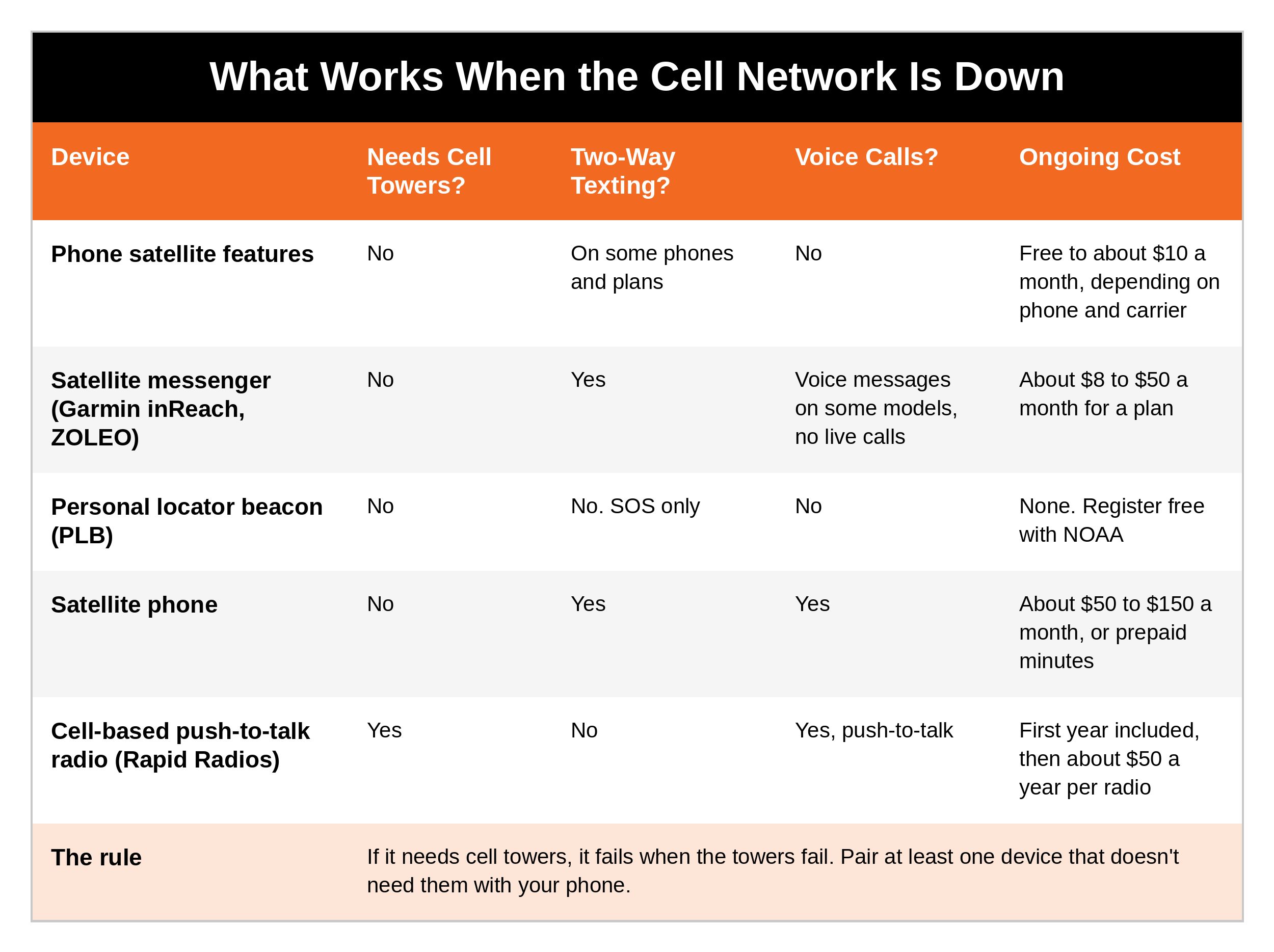
This is the most important question to ask about any communication device. If it needs cell towers, it fails when the towers fail. Some devices in this post talk straight to satellites. One does not.
Here's how they compare.
Satellite Messengers: The Garmin inReach
A satellite messenger is a small, rugged device that sends and receives text messages, shares your location, and calls for help by satellite, from almost anywhere on Earth. It's cost-effective, easy to use, and one of the best tools a family can own for times when you're beyond cell service.
Garmin has set the standard in satellite communication and GPS, and its inReach line is trusted by hikers, overlanders, boaters, and preparedness professionals alike. The current lineup includes:
inReach Mini 3 (about $450): two-way texting, SOS, location sharing, and weather forecasts in a device about the size of a deck of cards
inReach Mini 3 Plus (about $500): adds a color touchscreen and voice and photo messages
inReach Messenger (about $300): a simple texting device that pairs with your phone
If you already own an inReach Mini 2, it still works with Garmin's service.
Global Use Without Carrier Hassles
One of the most valuable features of a Garmin inReach is that it works almost anywhere in the world without switching carriers, SIM cards, or internet plans. inReach devices use the Iridium satellite network, which covers the entire planet, including oceans, deserts, remote wilderness, and the poles.
As long as you have an active Garmin plan, your inReach works across borders, keeping you connected where there's no cell service at all.
International Messaging
With a clear view of the sky, you can send and receive two-way text messages from almost anywhere. You can reach:
Mobile phone numbers, including international numbers
Email addresses
Other Garmin inReach users
Note: just like regular texting, you can't send messages to a landline, since landlines can't receive texts.
How SOS Works on a Garmin inReach
The most important feature on an inReach is its SOS button, which gets you to emergency help from almost anywhere in the world. When you press it:
A distress signal goes out over the Iridium satellite network, with no need for cell towers or Wi-Fi. That means it can get out from the most remote places.
Garmin Response receives it. This is Garmin's 24/7 emergency response center (formerly called the IERCC, run by GEOS, a professional emergency dispatch service that Garmin bought).
The response team contacts you right away, by two-way messages on your device when possible, to learn what's happening.
They coordinate with local emergency services or search and rescue, based on your location and your emergency.
You can keep messaging them to update your situation, get instructions, or learn when help will arrive.
Garmin's emergency center has supported thousands of rescues around the world, from medical emergencies to lost hikers to disaster evacuations.
Key notes:
SOS works worldwide, as long as you have a clear view of the sky
You need an active Garmin plan for the device to work, so keep your account current
The SOS button has a cover to prevent accidental presses
If you trigger SOS by mistake, cancel it on the device and message the response team that you're safe
What a Garmin Plan Costs
Garmin's plans currently range from about $8 a month (pay as you go) to $50 a month (unlimited), plus a one-time activation fee of about $40. Most families do fine with a lower-tier plan that includes some texts and unlimited preset check-ins. Plan prices change, so check Garmin's site before you buy.
Important Things to Know Before You Travel With One
Pick a plan that fits how you'll use it: messaging, tracking, or mostly SOS
Messages can be delayed under thick tree cover, in deep canyons, or inside buildings
Some countries restrict or ban satellite devices. China and North Korea are two examples, and travelers have been arrested in India for carrying them. Always check local laws before you pack one. Part 8 of this series covers this in detail.
Other Satellite Messengers
Garmin isn't the only option. ZOLEO pairs with your phone and gives you a dedicated number, so family can text you whether you're on cell, Wi-Fi, or satellite. Other brands come and go, so compare current plans and check reviews before you buy. Whatever you choose, look for a dedicated SOS button, two-way messaging, and a 24/7 response center.
Why Carry a Separate Device If My Phone Has Satellite SOS?
As we covered in Part 2, many newer phones can text by satellite. That's a big step forward. But a dedicated satellite messenger still has real advantages:
Its battery lasts days or weeks, not hours, and it's still charged when your phone is dead
It has a real SOS button you can press by feel, even if you're hurt
It works in more places, including many countries where phone satellite features aren't available yet
It can stay in the car or the go bag, ready for whoever needs it
It's simple enough for a teen or an aging parent who might not know where the satellite feature is on their phone
Personal Locator Beacons: SOS With No Subscription
A personal locator beacon (PLB) does one thing, and it does it very well: it calls for rescue. When you deploy the antenna and press the button, it sends a powerful distress signal with your GPS location over the international Cospas-Sarsat search and rescue satellite system, the same system used by ships and aircraft. When rescuers get close, it also sends a homing signal and flashes a strobe to help them find you.
No subscription. You buy it once.
You must register it with NOAA. Registration is free and required, and it tells rescuers who you are and who to call.
The battery lasts about 5 years and is replaced at a service center, so there's no charging to forget.
It's SOS only. It can't send texts, check-ins, or "I'm OK" messages.
A PLB is a great backup for boaters, backcountry hikers, and anyone who wants a last-resort rescue signal without a monthly bill. Many serious outdoor families carry a PLB and a satellite messenger together.
Satellite Phones: When You Need to Talk
A satellite phone makes real voice calls by satellite from almost anywhere, with no cell towers involved. If you need to have a conversation, not just send a text, this is the tool.
How they work: your call goes from the phone up to a satellite and down to a ground station, which connects it to the regular phone network. You need to be outside with a clear view of the sky.
The main networks:
Iridium: covers the entire planet, including the poles. The Iridium 9555 and the rugged 9575 Extreme are common choices.
Inmarsat: covers most of the world, but not the far north and south. The IsatPhone 2 is a popular, lower-cost choice.
Globalstar: covers North America and some other regions, but not the whole world. Its GSP-1700 phone has been discontinued.
What they cost: satellite phones run from several hundred dollars to about $1,500, and plans often cost $50 to $150 a month, or you can buy prepaid minutes that last a set time. Incoming calls are often free, but outgoing minutes add up fast.
Good to know:
They're heavier and bulkier than a messenger, and their batteries last hours of talk time, not days, so carry a spare battery
Calls can drop if a satellite moves out of view or something blocks the sky
Write down your satellite phone number and give it to your out-of-area contact. People need to know the number to call you.
Some countries ban them, just like satellite messengers. Always check before you travel.
For most families, a satellite messenger does the job for far less money. A satellite phone makes sense if you live or work somewhere remote, spend time on the water, or need to talk by voice when nothing else works.
Cell-Based Radios: Rapid Radios
Rapid Radios are push-to-talk radios that work over the nationwide 4G LTE cell network, the same network your smartphone uses. They're built for families, teams, and preparedness-minded people who want instant voice contact across long distances without the hassle of traditional radios.
Regular walkie-talkies depend on line of sight, or on repeaters (radio towers that receive and resend signals to extend range). Rapid Radios don't. There are no frequencies to set, no antennas to install, and no base stations. As long as the cell network is working, you can reach your group instantly, whether they're across town or across the country, with one button.
Talk to one person or a whole group (up to 200 radios)
Encrypted voice for privacy
Battery lasts several days with normal use
Cost: about $399 for two radios, with the first year of service included, then about $50 a year per radio
The important catch: Rapid Radios need active cell coverage. They won't work in a full cell outage, and if you stop paying for service, they stop working. That makes them a great supplement for coordinating family on a normal day or during a local event, but not your only plan when the infrastructure fails. In your PACE plan, they belong with your phone, not as your backup to it.
Which One Fits Your Family?
There's no single "best" device.
Match the tool to how your family actually lives.
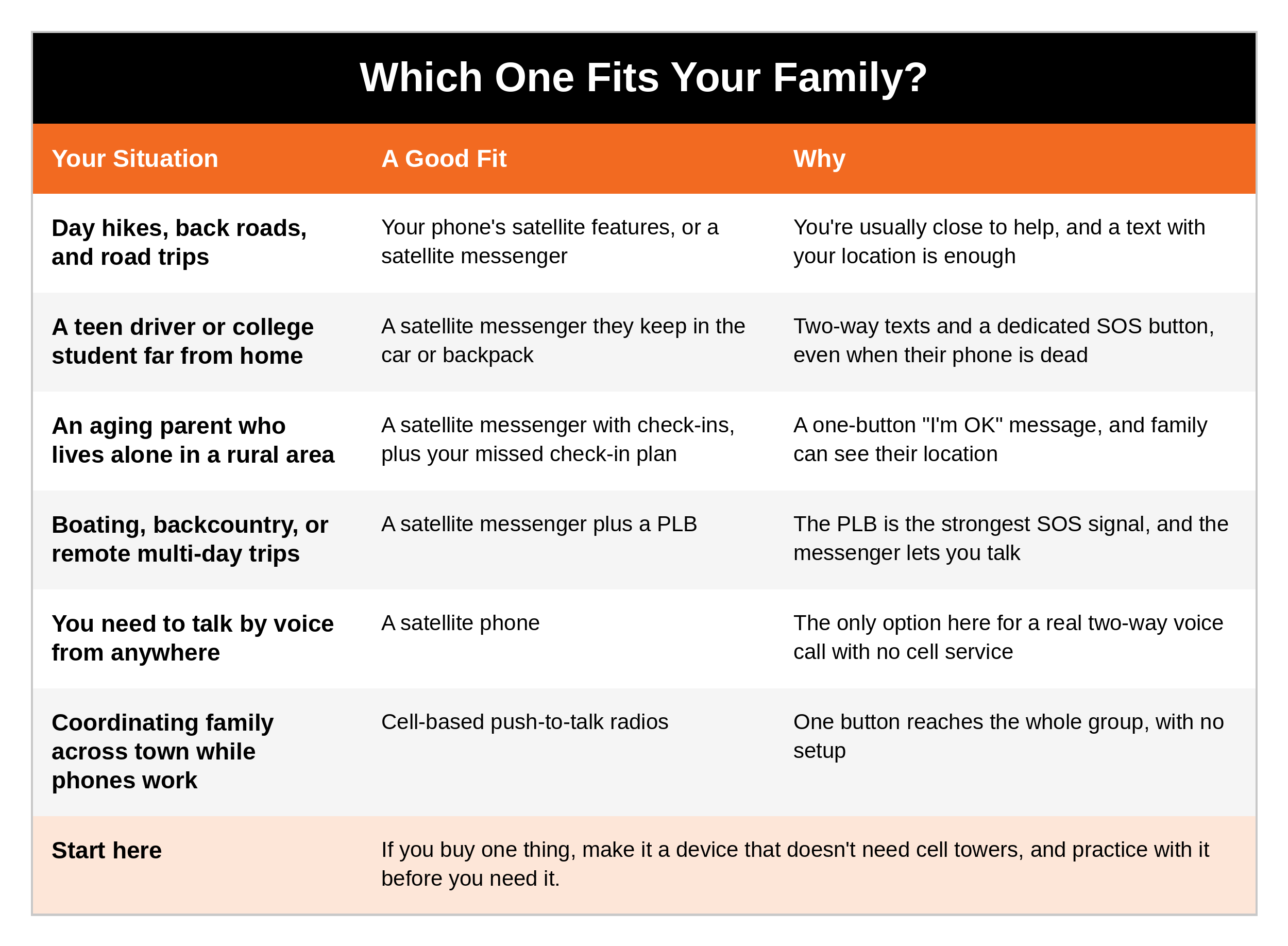
Checking on an aging parent? A satellite messenger with a preset "I'm OK" check-in can give you peace of mind, especially if they live somewhere with spotty cell service. Pair it with a plan for what happens when a check-in doesn't come. My free Missed Check-In Protocol walks you through every step. [LINK]
Set It Up and Practice
A device you've never used is a device you won't trust when it counts. When you get yours:
Activate it and set up your plan before your trip, not at the trailhead
Set up your preset messages, like "I'm OK," "Running late, all good," and "Need a ride, not an emergency," and choose who receives them
Send a test message from your backyard and make sure family receives it
Learn the SOS button and how to cancel a false alarm
Register your PLB with NOAA, and update it if your phone number or emergency contacts change
Add your device to your family plan. Write down which layer it is, who carries it, and when you'll check in.
Keep it charged and stored where you'll grab it: your go bag, glove box, or backpack
Coming Up Next
In Part 4, we'll look at walkie-talkies: FRS, GMRS, and CB radios, what the licenses mean, and how to set up a simple radio plan for your family that works with no towers, no satellites, and no internet.
Ask Yourself
If the cell towers went down right now, which device in our house could still call for help?
Does my teen driver, college student, or aging parent have a way to reach help when their phone is dead?
Have I actually tested our satellite device, or is it still in the box?
Remember
If it needs cell towers, it fails when the towers fail. A satellite messenger, a PLB, or a satellite phone gives your family a way to reach help when everything else goes quiet. Pick the one that fits how you live, set it up, and practice with it, because the prepared protector doesn't wait for the emergency to learn how the tools work.
Get Started Today
FREE GUIDE: Lights Out, The Prepared Not Paranoid Blackout Plan. What to do in the first 30 minutes, the first 24 hours, and beyond when the power goes out, including how to keep your family connected when the phones and Wi-Fi go down. [CTA: Comment or DM "KEYWORD" / or download it here: LINK]
Go Deeper
The Family Safety Toolkit. This post helps you choose your backup communication tools. The Toolkit gives you 20 checklists covering every area of family safety and preparedness, from your go bag and your vehicle to first aid and home safety, all for $19.99. [Get it here: https://www.preparednotparanoid.com/family-safety-toolkit]
The Family Emergency Preparedness Manual is coming soon.
Tools I recommend: The satellite messengers, personal locator beacons, walkie-talkies, and power banks I recommend are in my Backup Communications Amazon store. https://link.amazon/B09z0lfEb
Related reading:
Emergency Communications, Part 2: Your Smartphone in an Emergency https://www.preparednotparanoid.com/pnp-library/emergency-communications-lesson1
Emergency Communications, Part 4: Walkie-Talkies: FRS, GMRS, and CB https://www.preparednotparanoid.com/pnp-library/emergency-communications-lesson3
Emergency Communications, Part 1: Your Family Communication Plan https://www.preparednotparanoid.com/pnp-library/emergency-communications-family-plan
Mobile Command Center, Part 5: Navigation and Communications https://www.preparednotparanoid.com/pnp-library/mobile-command-navigation-communications
References
FieldMag. "New Garmin inReach Mini 3 Plus Introduces Voice, Photo and Text Messages" (December 2025).
HikingGuy. Garmin inReach Subscription Cost Breakdown (reviewed October 2026), and ACR ResQLink PLB review.
GearJunkie. The Best Satellite Phones and satellite messengers (2025 to 2026).
Trail and Kale. Rapid Radios Walkie-Talkie Review (updated February 2026).
NOAA SARSAT. 406 MHz beacon registration.
Garmin. inReach plans and Garmin Response.
Disclaimer
These suggestions are intended to help you and your family build awareness, confidence, and safer decision-making habits. No safety plan, checklist, or device can guarantee 100% protection. Device models, plans, and prices change often, so check with the manufacturer for current details. Some countries restrict satellite devices; check local laws before you travel. This article is for general informational purposes only. Follow the instructions of local officials during an emergency. Affiliate disclosure: I've linked to products from my Amazon store that I personally recommend. As an Amazon Associate, I earn from qualifying purchases, at no extra cost to you. Thank you for supporting my work.
In an emergency, call 911. If a call won't go through, try texting 911 where it's available, and include your location in the first message.
Awareness gives you time. Time gives you options.
The prepared protector is someone who's decided that loving someone means being ready for them, not just hoping things go fine.
Prepared Not Paranoid. Protecting the Most Vulnerable Among Us.