Public Wi-Fi, USB Charging, and Faraday Bags: Protecting Your Data, Identity, and Safety on the Road
By Larry Betz | Prepared Not Paranoid https://www.preparednotparanoid.com/
Travel cyber safety comes down to three habits: your own power, your own network, and a screen only you can see. Airports and hotels are full of free charging ports and free Wi-Fi, and not all of it is what it looks like.
Traveling can be stressful! Proper planning makes it smoother. Giving yourself enough time to get to the airport, through security, and to your gate without rushing takes a little foresight.
Most of us end up waiting at the airport, scrolling on our phones or working on our laptops. That's exactly why it's important to remember that cyber threats can happen anywhere. Here are the key strategies to protect yourself, plus the travel gear that makes it easier. Whether you're in a busy airport or facing an emergency, these steps can help keep you safer and your identity secure.
Alcohol, Altitude, and Situational Awareness
A drink while traveling might seem like a harmless way to relax. But alcohol dulls your senses and slows your reaction time, two things you can't afford to lose in an unfamiliar place. Even one or two drinks can lower your awareness. You're less likely to notice the person standing behind you, casually reading your phone screen.
That matters most in airports, rideshares, and public transit, where bad actors look for easy targets. They may quietly gather personal information from your unlocked screen, like your flight details, your hotel, or clues that you're traveling alone. This is especially concerning for women traveling solo.
The effects can be stronger in the air. Airliner cabins are pressurized to the equivalent of about 8,000 feet, so there's less oxygen in every breath. FAA research has found that people feel alcohol more on a plane at the same blood alcohol level. A 2024 study found that just two drinks, plus sleeping at cabin pressure, dropped people's blood oxygen well below normal. That one drink mid-flight can hit harder than it would on the ground.
Now think about the moment the plane lands. Almost everyone grabs their phone to text loved ones or plan the next step. It's one of the easiest times for someone to look over your shoulder, or even snap a photo of your screen. With everyone's eyes on their own devices, it goes unnoticed. If you've had a few drinks on the flight, your guard is down and you're not scanning. Situational awareness is one of your best defenses while traveling, and alcohol, especially at altitude, can quietly strip it away.
Want to know more about alcohol? Nutrition Basics, Part 12: Alcohol covers what it does to your body, your readiness, and your family. [Read it here: LINK]
Use a Privacy Screen
To keep wandering eyes off your screen, consider a 360-degree privacy screen protector for your phone, tablet, or laptop. It narrows the viewing angle, so only someone looking straight at the screen can see it clearly. Anyone glancing from the side sees a dark or blurred image. As a bonus, it also helps protect your screen from scratches and smudges.
USB Security: The Hidden Risk of Public Charging Stations
USB charging stations are everywhere: airports, hotels, cafes, and transit hubs. They're convenient, but they come with a risk most people never think about. A USB port doesn't just carry power. It can carry data, too.
Juice jacking: a tampered USB port could install malware on your phone or tablet. That malware could steal passwords and banking details, or even lock you out of your device.
Data theft: because USB ports are built for both charging and data, a compromised station could pull contacts, emails, messages, and stored passwords from your device without your knowledge.
How real is it? The FBI, the FCC, and the TSA all warn travelers not to plug into public USB ports. To be honest with you, there are no publicly confirmed cases of it happening to everyday travelers, and the FCC says so. But in 2025, researchers showed a new way around the protections built into phones, and Apple patched part of it. The risk is real but rare, and the fix is easy, so it's worth the habit.
Hardware Protection
Always use your own charger and cable instead of public charging stations.
Skip public USB ports, especially for your phone and tablet. If you must use one, save it for something less sensitive, like an e-reader.
Carry a power bank so you never need a public station at all.
Be careful borrowing or sharing chargers and cables. An untrusted cable is a risk, and some scammers hand out "free" cables as gifts.
Use a USB data blocker (sometimes called a "USB condom") or a charge-only cable. Both let power through but block data.
Software Protection
Choose "charge only." On most Android phones, plugging in defaults to charging only. Keep it that way, and don't tap "allow" or "trust" on a public charger.
iPhone: USB Restricted Mode is on by default. It blocks USB accessories after your phone has been locked for a while. Leave it on.
Keep your phone locked with a passcode or face or fingerprint ID.
Keep your phone and apps updated. Updates patch the holes hackers use.
Public Wi-Fi: Why Your Own Network Is Safer
Like charging stations, public Wi-Fi networks are everywhere, and they come with their own risks:
Man-in-the-middle attacks: a criminal sits between your device and the network and quietly captures what you send, like passwords and card numbers.
Evil twin hotspots: a fake network with a familiar name, like "Hotel Guest Wi-Fi," tricks you into connecting. Then the criminal can watch your activity and send you to fake websites.
Packet sniffing: even on a real public network, special software can capture data that isn't encrypted.
Malware: some compromised networks try to push malicious code onto your device.
Most websites now encrypt your connection, which helps a lot. But the safest move is still to use a network you control. Here's the short version for charging and connecting.
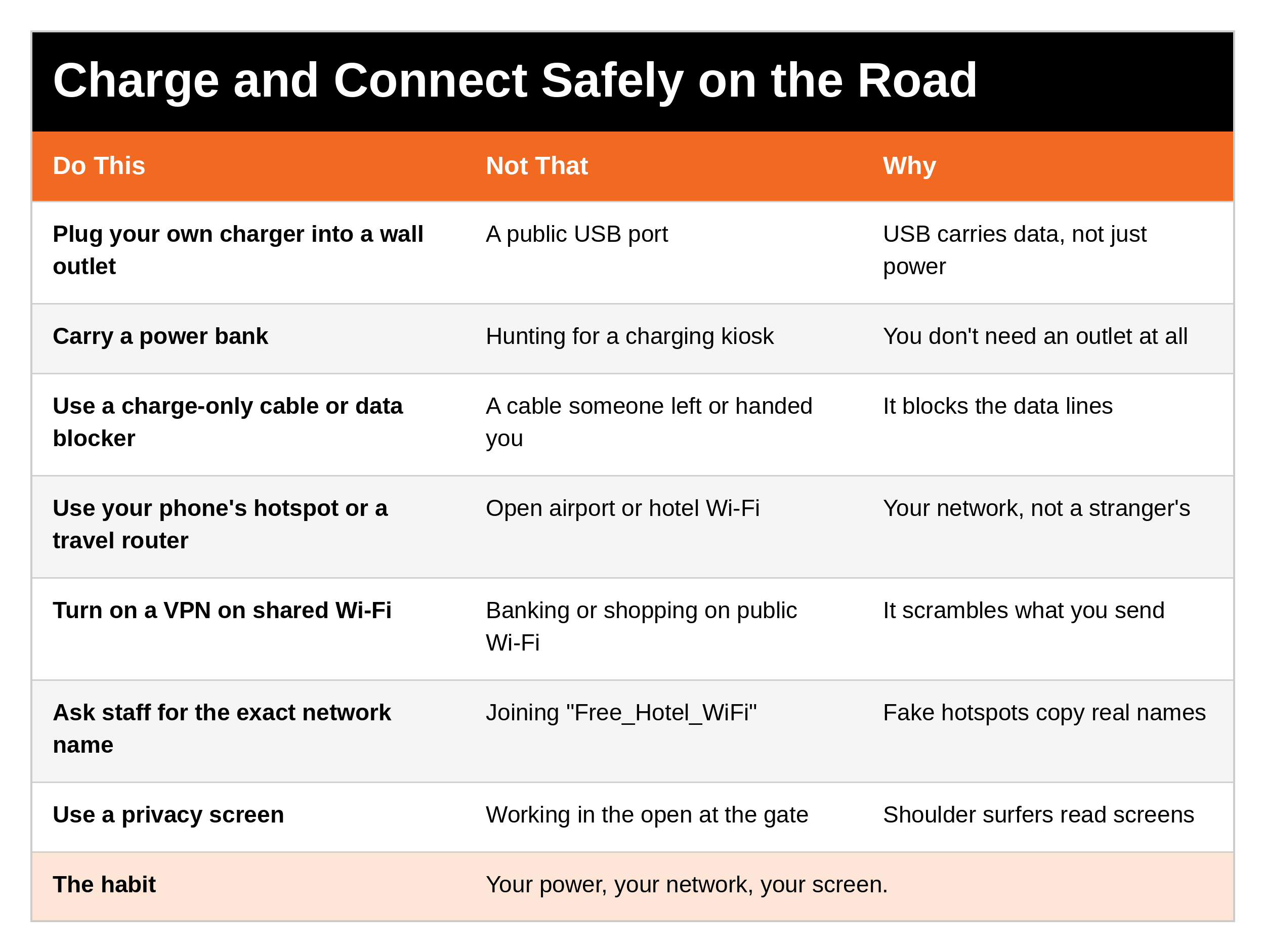
Use a Travel Router
A portable travel router is one of the best security moves you can make. It creates your own private Wi-Fi network that only your devices can join. You connect the router to the hotel's Wi-Fi once, and everything else connects to the router instead of the open network. Many travel routers also have a VPN built in, which encrypts all your internet traffic so no one can spy on it. And a travel router blocks unauthorized access attempts, which lowers the risk of malware and data theft.
There are two main types:
A compact router that plugs in. It's small and secure, and it supports VPNs. It needs a wall outlet or a power bank. Best if you mainly need Wi-Fi security and have power nearby.
A battery-powered router with built-in cellular (LTE). It doubles as a mobile hotspot with a SIM card, so you can get online even with no Wi-Fi. Best if you want internet that doesn't depend on anyone else's network.
The current models I recommend are in my Travel Safety Amazon store.
Use a Personal Mobile Hotspot
A mobile hotspot is another great tool. Instead of relying on public Wi-Fi, it creates a private, password-protected connection using cellular data. That greatly lowers the risk of man-in-the-middle attacks, packet sniffing, and fake networks. Hotspots are also usually faster and more reliable than airport or hotel Wi-Fi, and many handle several devices at once, which is great for families.
Your phone can do this, too. Most phones have a built-in personal hotspot. If you're traveling overseas, check your plan's international data before you rely on it. (Emergency Communications, Part 8 covers staying connected overseas.)
A hotspot also helps at home. Most home internet routers need electricity, so a power outage means no Wi-Fi. A hotspot keeps you connected to news, emergency alerts, and the people you love.
Set Up a VPN
Choose a reputable, paid VPN service that fits your needs (privacy, speed, and server locations). Install it before you leave, and turn it on whenever you're on any network you don't control. With a hotspot plus a VPN, you have much more control over your connection, and much less risk from public USB ports and open Wi-Fi.
Faraday Bags: Block the Signal
A Faraday bag is a pouch lined with signal-blocking material. It stops wireless signals like RFID, Wi-Fi, Bluetooth, and cellular from getting in or out. That keeps devices, contactless cards, and key fobs from being reached or tracked remotely.
Key fobs are the big one. Most keyless-entry fobs answer when they "hear" a signal from your car. Thieves use relay devices to pass that signal between your car and your fob, even when the fob is inside your house or hotel room, so the car thinks you're standing next to it. They can unlock it and drive away. Keep your fob in a Faraday pouch when you're not using it, and test it: with the fob inside, walk up to your car. The doors shouldn't unlock.
When you travel, a Faraday bag also helps against RFID skimming of contactless cards and unwanted tracking of your phone. (U.S. passports already have anti-skimming material in the cover, so passports are a lower risk.)
Hotel and Airbnb Security
Your phone and data are only part of the trip. Where you sleep matters just as much. This series covers it step by step:
Part 7: Choosing Safe Lodging: chains vs. off-brand vs. Airbnb, and the questions to ask before you book
Part 8: Hotel Security: check-in, getting into your room safely, layering your door, fire exits, and elevator safety
Part 9: Hidden Cameras: where they hide and how to sweep your room
Your Travel Digital Defense Checklist
These tips give you a solid foundation for protecting your personal information and your family while you travel.
Here are the essentials and what each one protects.
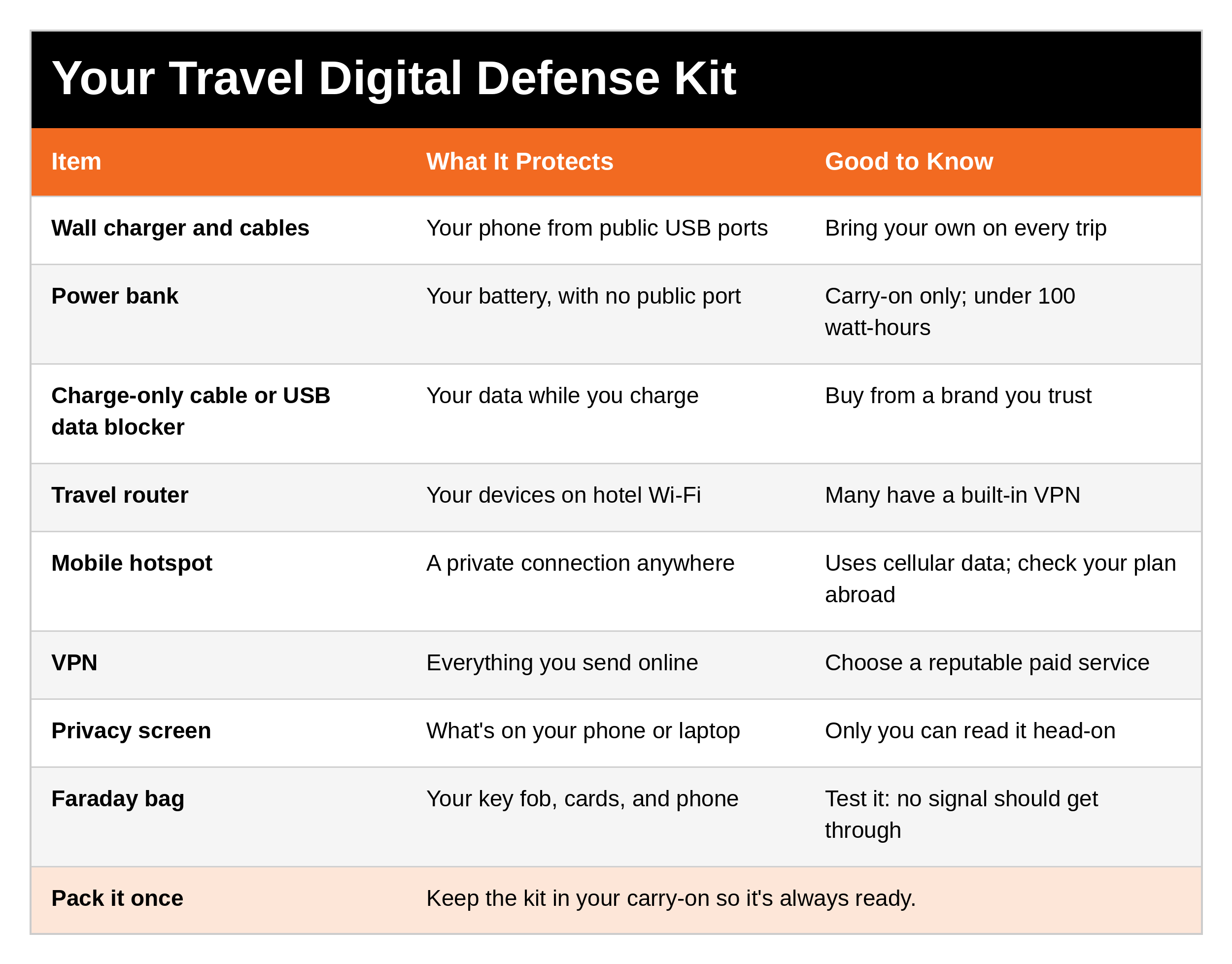
Want the full packing list? My free travel checklist covers everything, from your charging block and Faraday bag to door wedges, a portable carbon monoxide (CO) alarm, a first aid kit, and bed bug spray. [Get it here: LINK]
Every product I recommend is in my Travel Safety Amazon store: https://link.amazon/B023guhPk
What to Say
At check-in
"What's the exact name of your guest Wi-Fi network?"
At the gate
If someone's reading over your shoulder: "Excuse me, could you give me a little room?" Then turn your screen away.
If someone offers to help
A stranger offers you a charging cable or a "free" charger: "No thanks, I've got my own."
SCAN It
S, See your environment: Notice who's behind you when your phone is out, especially right after you land.
C, Create space: Turn your screen away, and use a privacy screen.
A, Act deliberately: Your own charger, your own network, your VPN on.
N, Never doubt your gut feelings: If a network name, a charging kiosk, or a "helpful" stranger feels off, skip it.
5 Quick Wins You Can Start Today
Pack your own wall charger, cable, and power bank.
Install a reputable VPN on your phone and laptop before your next trip.
Put a privacy screen on your phone.
Turn on your phone's personal hotspot once so you know how it works.
Put your key fob in a Faraday pouch at night, and test it at your car.
Ask Yourself
Do I plug into whatever port is closest at the airport?
Could the person behind me at the gate read my screen right now?
Where's my car key tonight, and could someone reach its signal?
Remember
You don't need to be a tech expert to protect your family's data on the road. Your own power, your own network, and a screen only you can see. Pack the kit once, keep it in your carry-on, and it's ready every trip.
Get Started Today
Get the free Travel Safety checklists. Simple, practical checklists for safer family trips. DM the word [KEYWORD] on Instagram or Facebook and I'll send them to you. [Get them here: LINK]
Go Deeper
Situational Awareness and Safe Family Travel Strategies. This post covers your phone and your data. The book covers the whole trip: airport and travel safety, hotel and Airbnb security, hidden cameras, the elevator safety section, traveling overseas, and protective strategies for your family. [Get it here: https://store.bookbaby.com/book/situational-awareness-and-safe-family-travel-strategies]
Want to protect your kids online, too? My Cyber Safety series [LINK] and Cyber Safety Manual [LINK] cover passwords, social media, and keeping children safe online.
Tools I recommend: The privacy screens, power banks, charge-only cables, data blockers, travel routers, hotspots, and Faraday bags I recommend are in my Travel Safety Amazon store. https://link.amazon/B023guhPk
Related reading:
Safe Family Travel, Part 9: Hidden Cameras [LINK]
Safe Family Travel, Part 8: Hotel Security [LINK]
Safe Family Travel, Part 7: Choosing Safe Lodging [LINK]
Emergency Communications, Part 8: Staying Connected Overseas [LINK]
Safe Family Travel, Part 11: Airport and Travel Day Safety [LINK when posted]
References
Federal Communications Commission. 'Juice Jacking': The Dangers of Public USB Charging Stations. https://www.fcc.gov/juice-jacking-tips-to-avoid-it
FBI Denver, public warning on public USB charging (April 2023).
Transportation Security Administration, travel warning on public USB ports and Wi-Fi (2025).
Draschbacher, F., and others. ChoiceJacking: Compromising Mobile Devices through Malicious Chargers like a Decade ago. USENIX Security 2025.
Elmenhorst, E.-M., and others. Alcohol and sleep under hypobaric conditions. Thorax (2024).
Federal Aviation Administration. 14 CFR 25.841, cabin pressurization; Lithium batteries in carry-on baggage.
Betz, L. Situational Awareness and Safe Family Travel Strategies (Travel Safety and Digital Defense).
Betz, L. Navigating the Red Zone and Beyond (SCAN framework).
Disclaimer
This article is for general informational and educational purposes only. It is not a substitute for professional cybersecurity advice. Technology, products, carrier plans, and airline rules change often, so check current guidance before you travel. No tool or habit can guarantee your data or devices are safe. Prepared Not Paranoid and Larry Betz are not affiliated with any technology company, carrier, or VPN provider mentioned here and are not responsible for the content of third-party websites or resources linked here. Affiliate disclosure: I've linked to products from my Amazon store that I personally recommend. As an Amazon Associate, I earn from qualifying purchases, at no extra cost to you. Thank you for supporting my work.
If you're in danger, get to a safe place and call 911 (or the local emergency number when you're overseas).
Awareness gives you time. Time gives you options.
The Prepared Protector is someone who's decided that loving someone means being ready for them, not just hoping things go fine.
Prepared Not Paranoid. Protecting the Most Vulnerable Among Us.