Five Fixes So Your Cameras Don't Become a Way In
By Larry Betz | Prepared Not Paranoid https://www.preparednotparanoid.com/
The camera you bought to protect your family can also be used to watch them. In 2023, the Federal Trade Commission charged that Ring didn't put basic protections in place against password attacks, and that hackers used that gap to take over customers' accounts and cameras. Years earlier, a flaw in TRENDnet home cameras let anyone with the web address watch live feeds with no password at all, and hackers posted hundreds of them online. Learning how to secure your home Wi-Fi is how you keep your security system working for you.
Your Wi-Fi Is Part of Your Security System
Your router doesn't just connect phones and laptops anymore. Your cameras, video doorbell, smart locks, alarm hub, and garage controls may all run through it. A weak router or a reused password can expose your video, interrupt your security equipment, or give someone a path to everything else on your network.
You don't need to be a network engineer to fix the most common weak spots. You need about one evening.
Five Fixes for One Evening
These five take care of the problems criminals count on most.
Here they are.
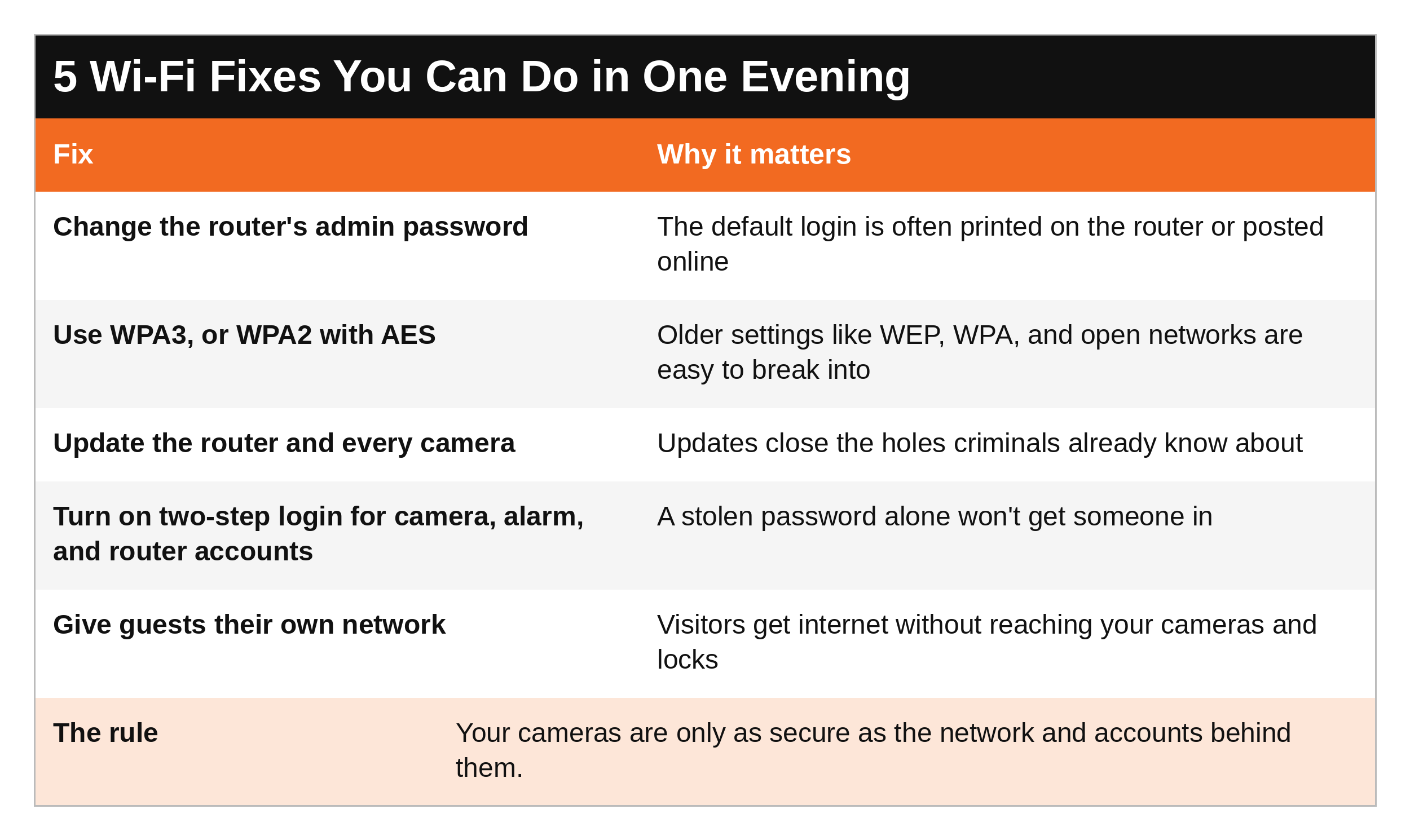
Change the router's admin password, and keep it different from the Wi-Fi password your family uses.
Use WPA3, or WPA2 with AES if some of your devices can't handle WPA3. If your router only offers older settings, it's time for a new router.
Update everything: the router, the cameras, the doorbell, and the apps. If a device no longer gets security updates, plan to replace it.
Turn on two-step login (multi-factor authentication) for your camera, alarm, router, and email accounts, with a long, unique password for each.
Give guests their own network instead of handing out your main password.
One more: don't put your family name, address, or router brand in your network name. It tells anyone nearby exactly whose network it is.
Get the free Lock Down Your Home Wi-Fi checklist. It puts all five fixes on one page with checkboxes and where to find each setting, plus a network map to fill in and a list of who should and shouldn't have access. Keep it by your router. DM the word WIFI on Instagram or Facebook and I'll send it to you. [Get it here: LINK]
Give Your Smart Devices Their Own Space
Many routers let you split your home into separate networks, so a weak smart plug or TV can't become a path to your family's phones and computers.
Here's how it breaks down.
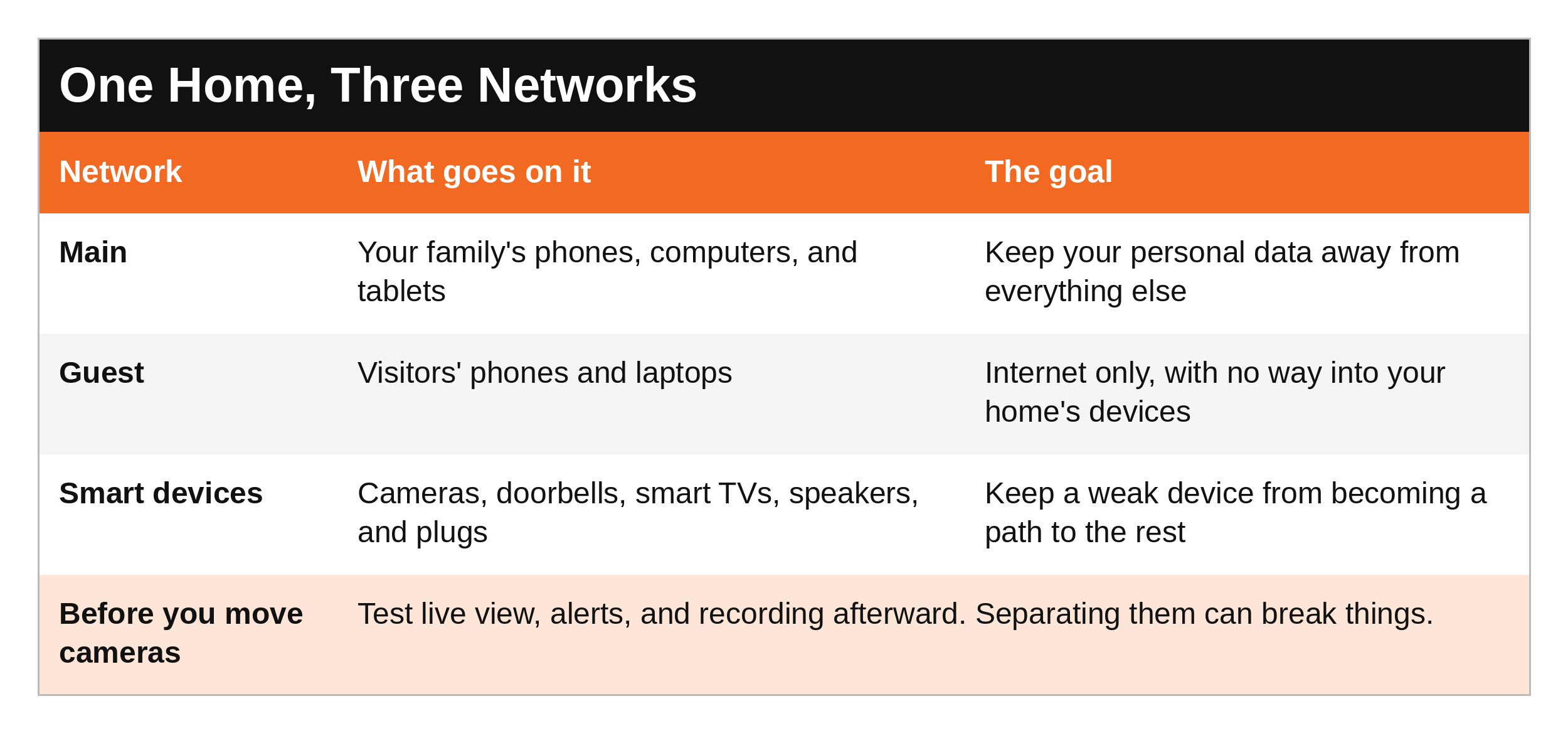
Test before you trust it. Moving cameras to their own network can break live view, alerts, or recording. After any change, walk past your cameras and make sure everything still works. The Safest House on the Block walks through how to set this up without breaking your system.
Signs Something's Wrong
Most people never look at their router until something stops working.
Here's what to watch for.
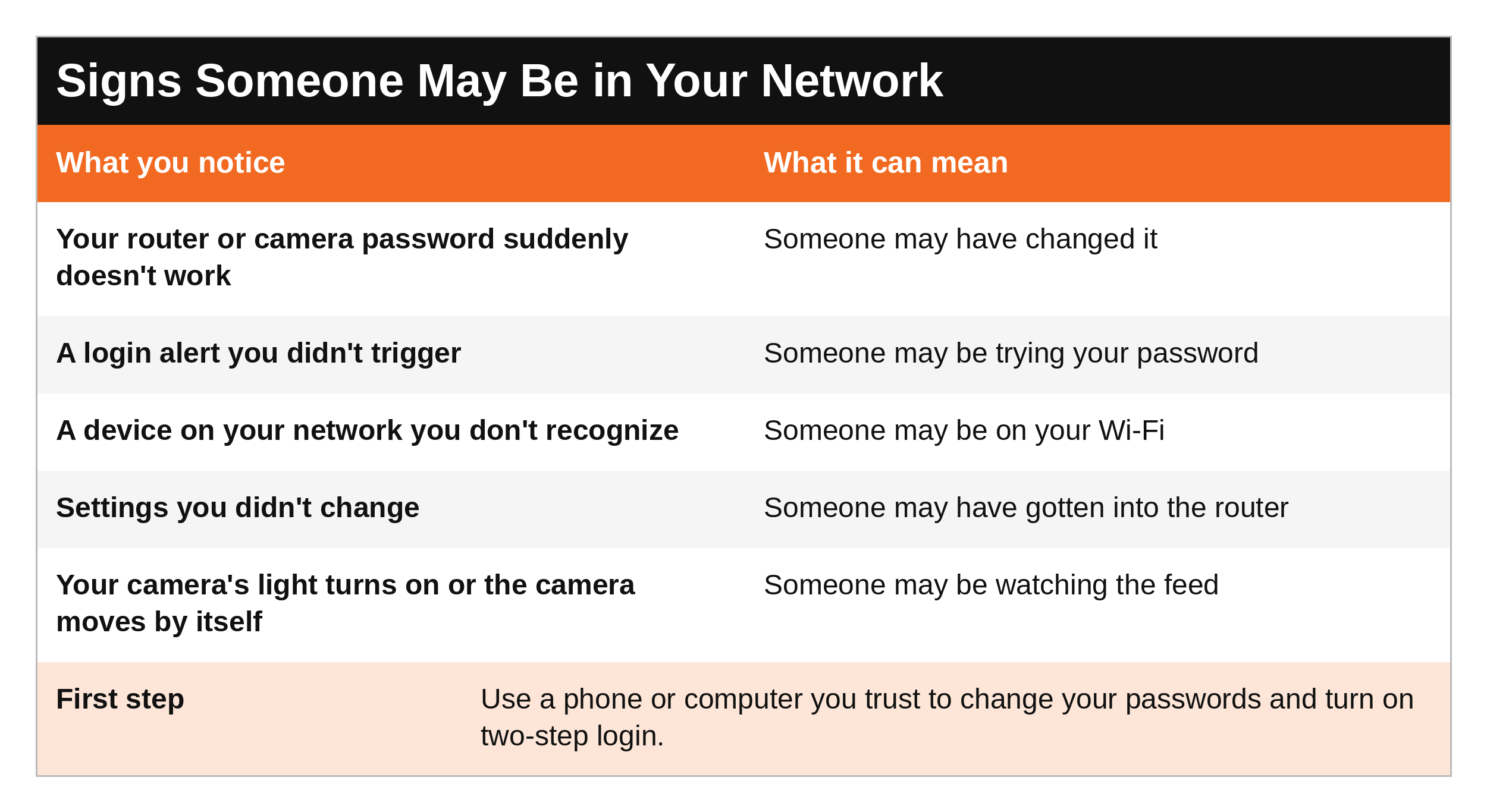
If you think someone's in your network, don't start randomly changing settings on every device. From a phone or computer you trust, change your most important passwords and turn on two-step login first. The book has the full step-by-step recovery plan.
If you think someone you know is using your cameras or accounts to watch or follow you, your safety comes first. Changing settings can tip them off, so reach out to law enforcement or a domestic violence advocate before you make changes.
What to Say
To your family:
"Never approve a login request you didn't start, even if it looks real. Come get me."
"Guests use the guest Wi-Fi. That's the one on the fridge."
To a visitor or contractor:
"Here's our guest network. Feel free to use it."
To the installer or the person who set up your cameras:
"Please walk me through how to change every password. I want to be the only one with the admin login."
The Prepared Protector is someone who's decided that loving someone means being ready for them, not just hoping things go fine. Sometimes that's an evening on the couch, changing passwords nobody's touched since the router came out of the box.
SCAN Your Network
S - See your environment. Open your router's app or settings page and look at what's connected. Do you recognize everything?
C - Create space. Put guests and smart devices on their own networks, away from your family's phones and computers.
A - Act deliberately. Do the five fixes in order, then test your cameras and alerts.
N - Never doubt your gut feelings. If a login alert or a camera acting strange doesn't feel right, treat it as real until you know it isn't.
Ask Yourself
Is my router still using the password it came with?
Do my camera and alarm accounts have two-step login turned on?
Would I recognize every device on my network right now?
Remember
Your cameras, doorbell, and locks are only as secure as the network and accounts behind them. Change the default passwords, update everything, turn on two-step login, and give guests and smart devices their own space.
This post covers the five fixes that matter most. The Safest House on the Block has the complete Wi-Fi chapter, plus every other layer of your home. Next, Part 11: Making a Home Security Plan.
Get Started Today
Check your system with the free Home Security Audit. Its camera backup and Wi-Fi section walks you through the settings that keep your cameras working and protected. DM the word AUDIT on Instagram or Facebook and I'll send it to you. [Get it here: LINK]
Go Deeper
The Safest House on the Block. This post gives you the five fixes. The book gives you what you won't find on the blog: the complete Wi-Fi chapter, with your router and modem explained in plain English, every router setting to turn off, how to set up separate networks without breaking your cameras, protecting the router and recorder from being unplugged or stolen, what a VPN does and doesn't do, a step-by-step plan if you've been hacked, family and kids' device settings, and a plain-English glossary of every term. Plus the full 15-page Home Security Audit and a step-by-step family security plan with a SWOT analysis for your own home. [Get it here: https://www.preparednotparanoid.com/shop/p/safest-house-on-the-block]
For the rest of your family's online life, my Cyber Safety guide covers passwords, scams, social media, and keeping kids safe online. [LINK]
Tools I recommend: The routers, cameras, and home security gear I recommend are in my Safest House on the Block Amazon store. https://link.amazon/B0dSfoUkh
Related reading:
The Safest House on the Block, Part 9: Choosing a Home Security Camera https://www.preparednotparanoid.com/pnp-library/home-security-camera
The Safest House on the Block, Part 5: Your Home Online https://www.preparednotparanoid.com/pnp-library/home-security-remove
The Safest House on the Block, Part 11: Making a Home Security Plan https://www.preparednotparanoid.com/pnp-library/homeinvasion-homesafetyplan
References
Federal Trade Commission. (2023). FTC says Ring employees illegally surveilled customers, failed to stop hackers from taking control of users' cameras. https://www.ftc.gov
Federal Trade Commission. (2013). Marketer of internet-connected home security video cameras settles FTC charges it failed to protect consumers' privacy. https://www.ftc.gov/news-events/news/press-releases/2013/09/marketer-internet-connected-home-security-video-cameras-settles-ftc-charges-it-failed-protect
Cybersecurity and Infrastructure Security Agency (CISA). Home Network Security. https://www.cisa.gov
Federal Trade Commission. How to Secure Your Home Wi-Fi Network. https://consumer.ftc.gov
Betz, L. The Safest House on the Block. Prepared Not Paranoid. Chapter 15: Secure Your Home Wi-Fi.
Disclaimer
This article is for general informational and educational purposes only. It is not a substitute for professional cybersecurity, legal, or law enforcement advice. Before changing network settings, make sure the change won't interrupt an alarm, medical device, or accessibility tool someone in your home depends on. Affiliate disclosure: I've linked to products from my Amazon store that I personally recommend. As an Amazon Associate, I earn from qualifying purchases, at no extra cost to you. Thank you for supporting my work.
If someone is using your cameras, locks, or accounts to threaten or follow you, and you're in danger right now, call 911.
Awareness gives you time. Time gives you options.
The Prepared Protector is someone who's decided that loving someone means being ready for them, not just hoping things go fine.
Prepared Not Paranoid. Protecting the Most Vulnerable Among Us.