Start With Purpose, Not Products
By Larry Betz | Prepared Not Paranoid https://www.preparednotparanoid.com/
A lot of people find out their camera doesn't work on the worst possible day. Something happens, they pull up the video, and all they have is the top of a hat, a blur crossing the driveway, or a dark shape on a bright porch. The camera was recording. It just wasn't set up to capture anything useful. Learning how to choose a home security camera starts long before you shop.
Start With Purpose, Not Products
Cameras help you deter (a visible camera makes someone think twice), detect (an alert tells you someone's there), document (the video preserves what happened), and diagnose (reviewing it shows you what to fix). But a camera doesn't physically stop anyone. It works alongside your lights, locks, neighbors, and family plan.
So don't start by asking which camera has the most features.
Ask what this camera needs to help you see, know, or prove.
Observation Is Not Identification
This is the idea that changes how most people set up their cameras. Seeing that someone was on your porch isn't the same as being able to tell police who it was.
Here's the difference.
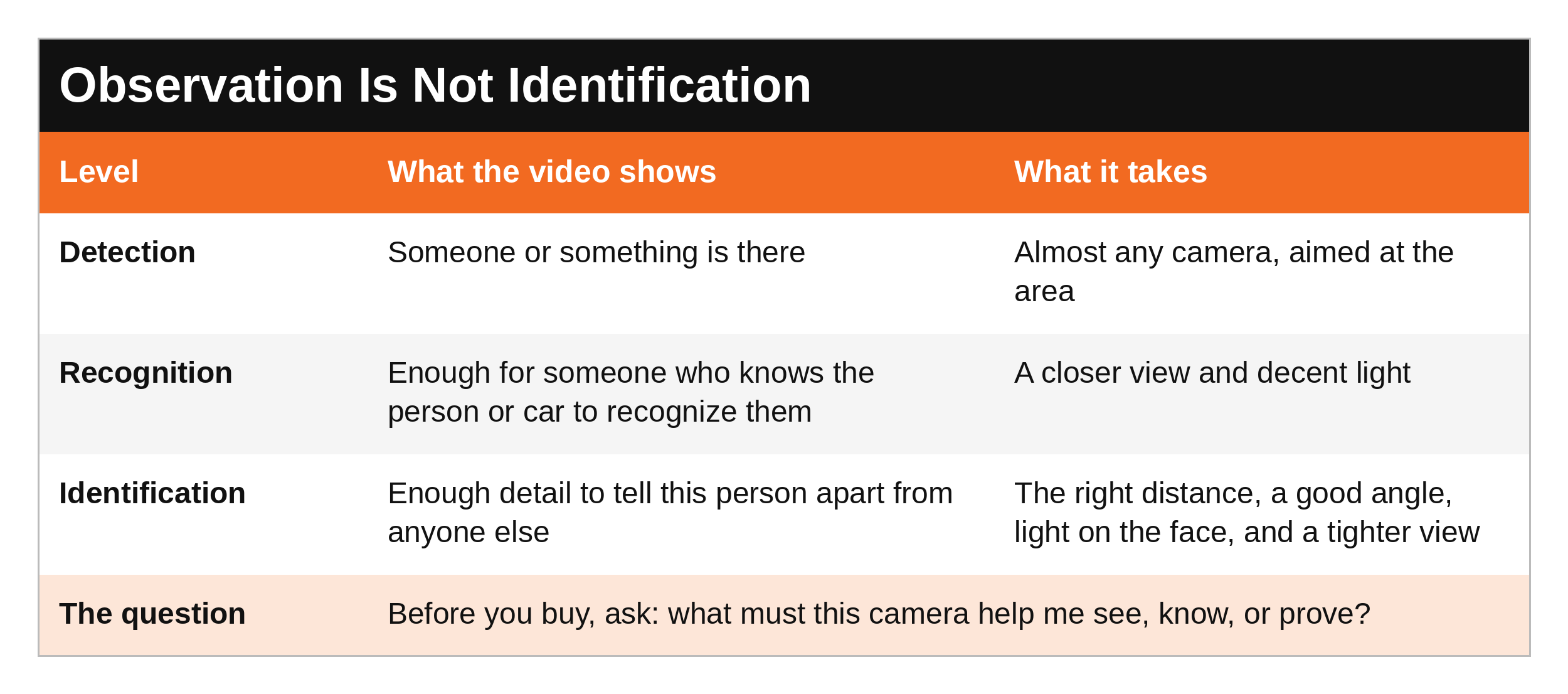
Many disappointing recordings aren't caused by a cheap camera. They're caused by distance, a bad angle, light behind the person, or a face that only fills a tiny corner of the picture.
Wired or Wi-Fi: The First Decision
Wired systems run power and video through a cable to a recorder. They don't depend on your Wi-Fi signal or batteries, and they're the better fit for covering your whole perimeter. Wi-Fi cameras are easier to install and place, and they work well for a few cameras or spots where running a cable isn't practical, but they depend on your network, and many depend on a battery. Many homes end up with a mix. The book walks through power, storage, and what happens to each type when the power or internet goes out.
Where to Put Your First Cameras
Walk your property before you shop, in daylight and after dark, and give every camera a job.
Here's where to start.
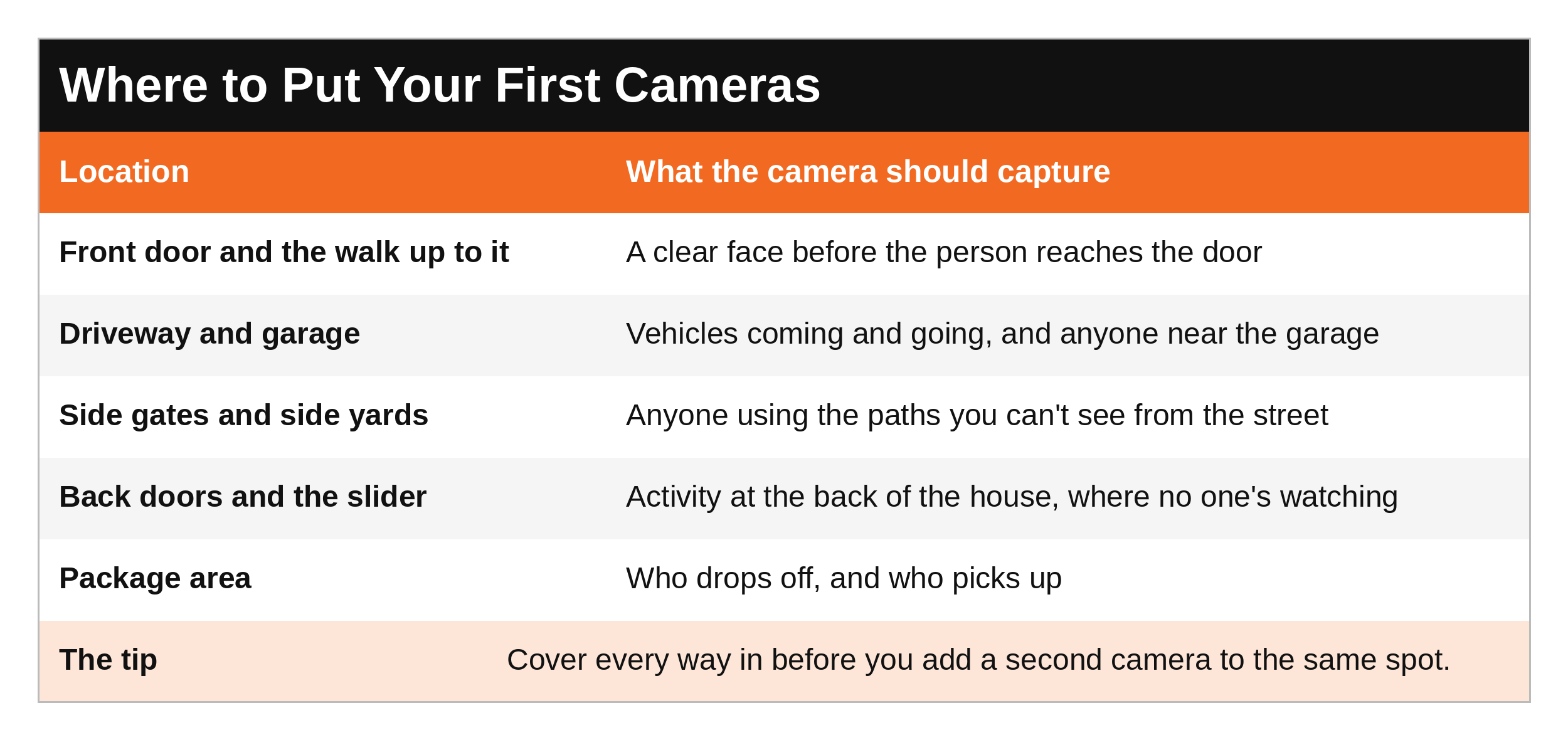
Cover every way in before you double up on one spot. Two cameras watching the front yard while no one's watching the side gate leaves a gap someone can use.
Placement Beats Specs
A well-placed 2K camera can give you more useful video than a badly placed 4K camera. Resolution can't bring back a face that was never captured clearly.
Here are the five mistakes I see most, and the fix for each.
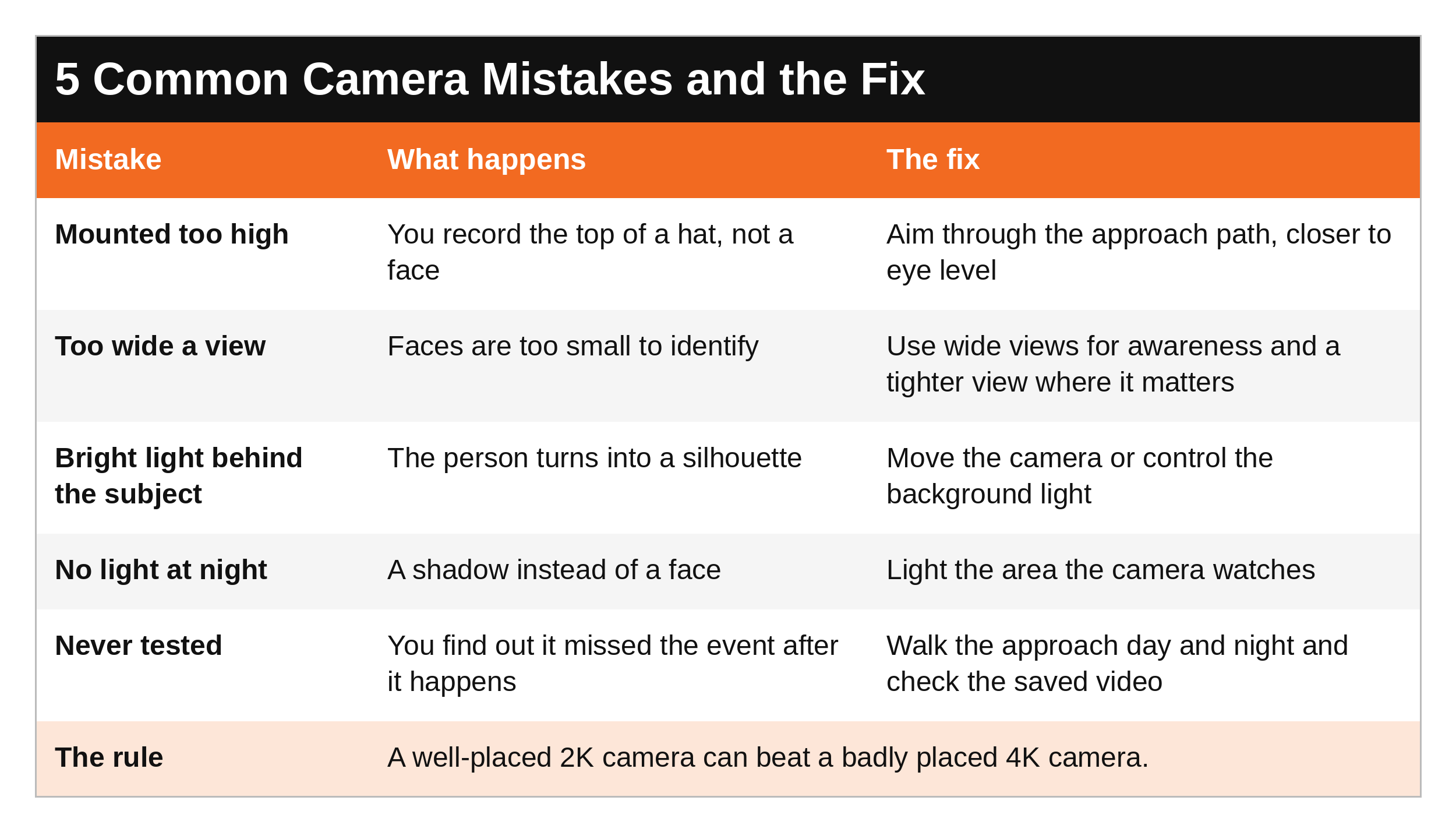
Quick wins:
Aim through the approach path, not just at the door. The best shot of a face is often a few steps before the person reaches it.
Don't mount it so high that all you get is the top of someone's head.
Light what the camera watches. We covered lighting in Part 6.
Test the saved video, not just the live view. Walk up to your door at normal speed, in daylight and after dark, then watch the recording and see what you actually got.
The Safest House on the Block goes much deeper on choosing the camera itself: field of view, camera types, resolution, night vision, how fast it starts recording, where the video is stored, and what happens when the power or internet goes out.
Privacy and the Law
Audio recording and consent laws vary by state, so check yours before you turn on a camera's microphone. Don't aim cameras into a neighbor's windows or yard, and think carefully about indoor cameras where guests, caregivers, or kids expect privacy. And because your cameras are connected to the internet, protecting them matters too. We'll cover that in Part 10.
What to Say
Through a video doorbell, to someone you don't know:
Safe and non-engaging: "Can I help you?" Then let them answer.
Setting boundaries: "We're not opening the door. You can leave it on the porch."
If they persist: "You're on camera, and I'm calling the police." Then do it.
To your family:
"If the camera alerts, we look from inside. Nobody goes out to check."
To an installer:
"I want to see a face at the front door from a few steps out, day and night. Show me the recording before we drill."
The Prepared Protector is someone who's decided that loving someone means being ready for them, not just hoping things go fine. Sometimes that's walking up your own driveway at night and checking what your camera really sees.
SCAN Your Cameras
S - See your environment. Walk every approach to your home and ask what a camera would need to capture there.
C - Create space. Let the camera give you early warning so you have time and distance before anyone reaches the door.
A - Act deliberately. Give each camera one clear job, then test it.
N - Never doubt your gut feelings. If the view on your phone looks useless at night, it is. Fix it before you need it.
Ask Yourself
If something happened tonight, would my camera show a face, or just a shape?
Is there a way into my home that no camera covers?
When was the last time I watched a saved recording, not just the live view?
Remember
The best camera system isn't the one that records the most video. It's the one that gives you useful information when your family needs it. Start with purpose, aim through the approach, light the area, and test what you actually saved.
This post covers how to plan your cameras. The Safest House on the Block has the complete camera chapter, plus every other layer of your home. Next, Part 10: Securing Your Wi-Fi and Smart Home.
Get Started Today
Check your cameras with the free Home Security Audit. Its camera and lighting sections walk you through every view around your home. DM the word AUDIT on Instagram or Facebook and I'll send it to you. [Get it here: LINK]
Go Deeper
The Safest House on the Block. This post shows you how to plan your cameras. The book gives you what you won't find on the blog: the complete camera chapter, with field of view by degrees, every camera type and when to use it, resolution and night vision, how fast a camera starts recording, local vs. cloud storage, planning for power and internet outages, protecting your cameras from being hacked, the questions to ask before you buy, and a full installation checklist. Plus the full 15-page Home Security Audit and a step-by-step family security plan with a SWOT analysis for your own home. [Get it here: https://www.preparednotparanoid.com/shop/p/safest-house-on-the-block]
Tools I recommend: The cameras, video doorbells, motion lights, and backup power I recommend are in my Safest House on the Block Amazon store. https://link.amazon/B0dSfoUkh
Related reading:
The Safest House on the Block, Part 6: The Outer Ring (lighting) https://www.preparednotparanoid.com/pnp-library/the-outer-ring
The Safest House on the Block, Part 8: Windows, Sliding Doors, and Security Film https://www.preparednotparanoid.com/pnp-library/windows-and-sliding-doors
The Safest House on the Block, Part 10: Securing Your Wi-Fi and Smart Home [LINK when posted]
The Safest House on the Block, Part 3: The Knock at the Door https://www.preparednotparanoid.com/pnp-library/the-knock-at-the-door
References
Betz, L. The Safest House on the Block. Prepared Not Paranoid. Chapter 13: Choosing a Home Security Camera System.
Federal Trade Commission. How to Secure Your Home Security Cameras. https://consumer.ftc.gov
Disclaimer
This article is for general informational and educational purposes only. It is not a substitute for a professional security assessment or legal advice. Audio-recording, consent, and privacy laws vary, so check your state and county laws before recording audio or placing cameras that could capture neighbors, guests, or private areas. Affiliate disclosure: I've linked to products from my Amazon store that I personally recommend. As an Amazon Associate, I earn from qualifying purchases, at no extra cost to you. Thank you for supporting my work.
If your camera shows someone trying to get in, don't go outside to confront them. Stay inside, lock the doors, and call 911.
Awareness gives you time. Time gives you options.
The Prepared Protector is someone who's decided that loving someone means being ready for them, not just hoping things go fine.
Prepared Not Paranoid. Protecting the Most Vulnerable Among Us.