How to Call for Help, Reach Your Family, and Stay Out of Trouble Abroad
By Larry Betz | Prepared Not Paranoid https://www.preparednotparanoid.com/
At home, you never think about how to call for help. You just dial 911. Overseas, that habit can cost you precious minutes. The number may be different, your phone may not have service, your favorite app may be blocked, and the satellite messenger in your bag might even be illegal. Staying connected overseas takes a little planning before you leave, and it's one of the most important things you can do for your family's safety on a trip.
Everything in this series still applies abroad: a PACE plan, an out-of-area contact, and more than one way to communicate. This post shows you what changes when you cross a border.
The Five Things Most Travelers Don't Know
911 doesn't work everywhere. Europe uses 112, the UK uses 999, Australia uses 000, and some countries have separate numbers for police, fire, and ambulance.
Your phone plan may not work, or may cost a fortune. Without the right plan, roaming charges add up fast.
Some satellite devices are illegal in some countries. Travelers have been arrested in India for carrying a Garmin inReach.
Your favorite apps may be blocked. WhatsApp is fully blocked in China and Russia, and some Gulf countries block WhatsApp calls but allow texts.
The power is different. Different plugs, different voltage, and airlines have strict rules on power banks.
911 Doesn't Work Everywhere
Save the local emergency number in your phone before you land. In Europe and many other countries, 112 often connects from a mobile phone, but don't count on it. Know the number for where you are.
Here are some of the most common destinations.
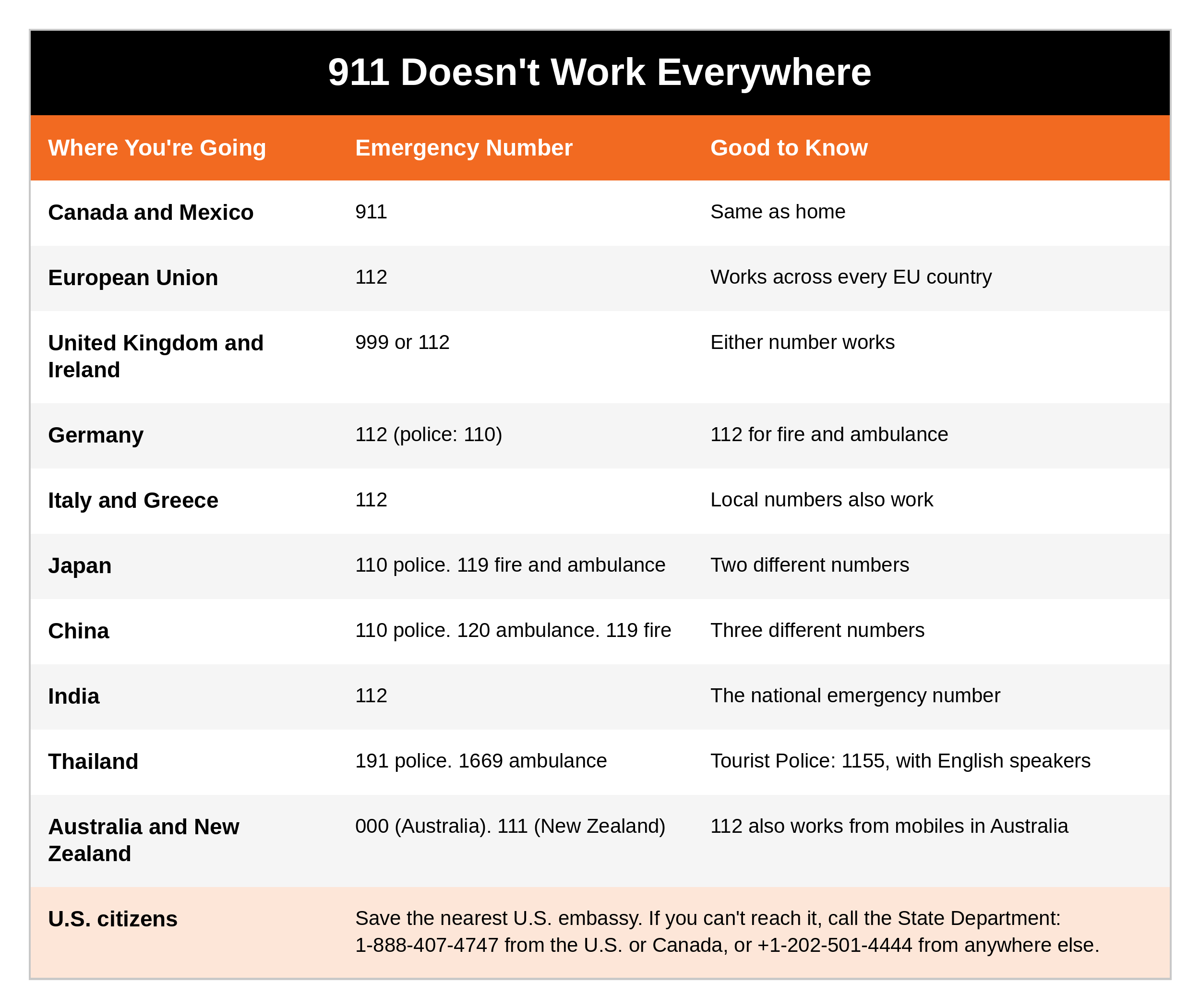
Going somewhere else? Look up the local emergency numbers on the State Department's country page at travel.state.gov, or on the U.S. embassy website for that country.
If You're a U.S. Citizen in Trouble Abroad
Save the nearest U.S. embassy or consulate (phone number and address) before you go
If you can't reach the embassy, call the State Department's Overseas Citizens Services: 1-888-407-4747 from the U.S. or Canada, or +1-202-501-4444 from anywhere else
The embassy can help with: crises and natural disasters, lost or stolen passports, crime victims, finding a missing U.S. citizen, arrests and detention, and emergency money
The embassy can't: act as your lawyer, get you out of jail, or pay your bills
Before You Go: Your Communications Checklist
Enroll in STEP (the Smart Traveler Enrollment Program) at step.state.gov, so the embassy can reach you in a crisis
Read the State Department country page and travel advisory for every country you'll visit
Save in your phone and on paper: the local emergency number, the U.S. embassy, your hotel, your travel insurance assistance line, and your contact back home
Decide on your phone plan and test it before you leave
Download offline maps for every city you'll visit
Download an offline translation pack in Google Translate or Apple Translate
Check whether your satellite device is legal where you're going
Check which apps work there, and agree on a backup app with your family
Pack plug adapters, and check your chargers' voltage
Set up a check-in schedule with someone at home
Carry a printed contact card in your wallet, in case your phone is lost, stolen, or dead
Your Phone Abroad
You have five main options.
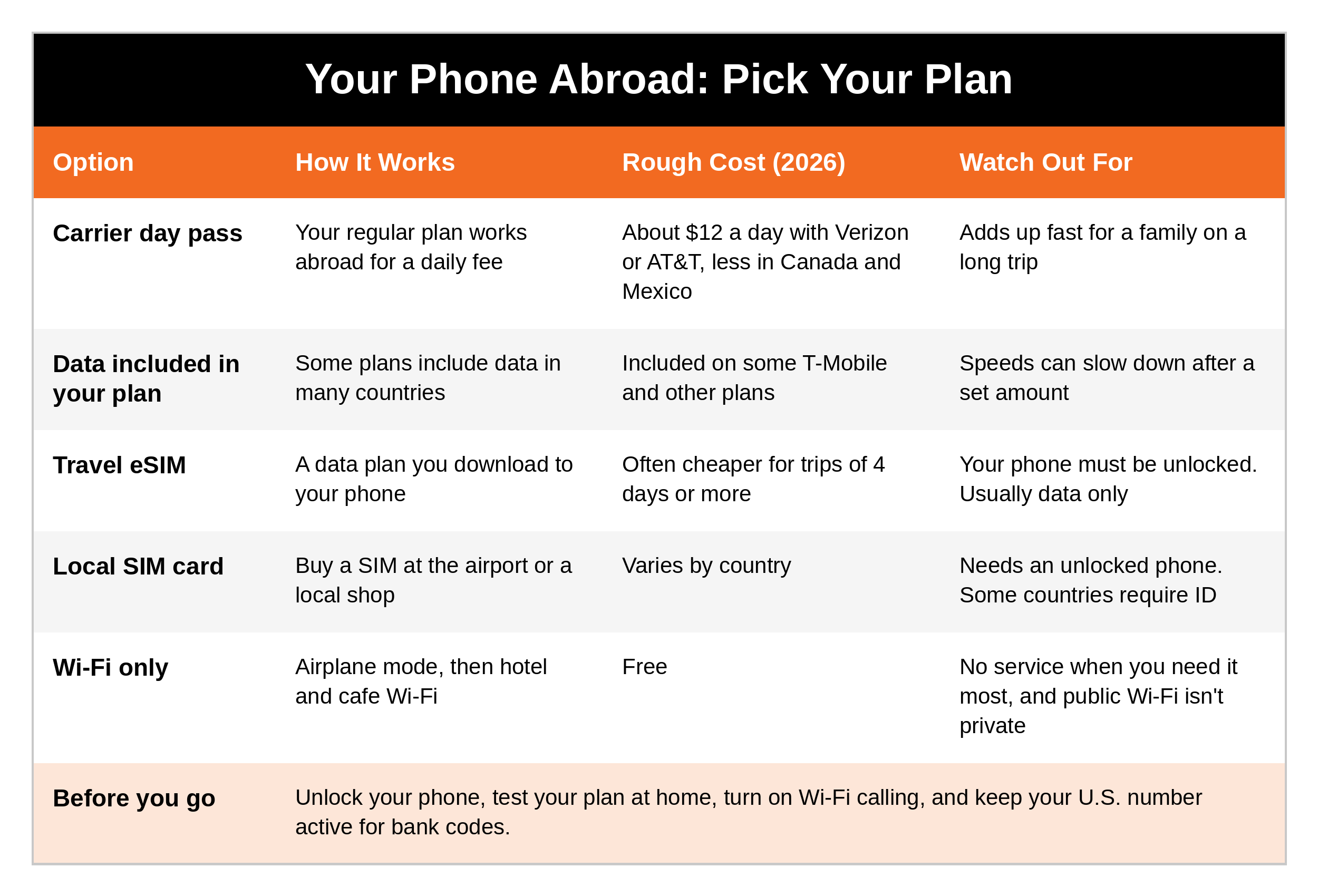
Tips that save money and headaches:
Unlock your phone before you go. Phones bought from a carrier usually have to be paid off before they can be unlocked.
Check for eSIM. iPhones from the XR and XS (2018) on support it. On any phone, dial *#06#. If you see an "EID" number, your phone supports eSIM.
Keep your U.S. line active for texts and login codes from your bank, and use the eSIM for data.
Turn on Wi-Fi calling before you leave. Many U.S. carriers let you call U.S. numbers over Wi-Fi at no extra charge, but check your carrier's rules.
Install and test your eSIM on good Wi-Fi at home before the trip, and switch back when you get home.
Satellite SOS on Your Phone Abroad
iPhone 14 and newer: Emergency SOS via satellite works in about 21 countries, including the U.S., Canada, Mexico, the U.K., Ireland, much of Western Europe, Australia, New Zealand, and Japan. Visitors can use it in those countries.
Android phones offer satellite SOS in fewer countries. Check your phone maker's list before you travel.
Phone satellite SOS reaches emergency services only in most countries. It's not a way to text your family from abroad.
Satellite Devices: Check Before You Pack
A satellite messenger like a Garmin inReach works almost anywhere on Earth, and it can be a lifesaver on remote trips, as we covered in Part 3. But in some countries, carrying one can get you arrested. In late 2024 and early 2025, foreign travelers were arrested at airports in India for carrying inReach devices. Regular smartphones are fine.
Here's where they're banned or restricted.
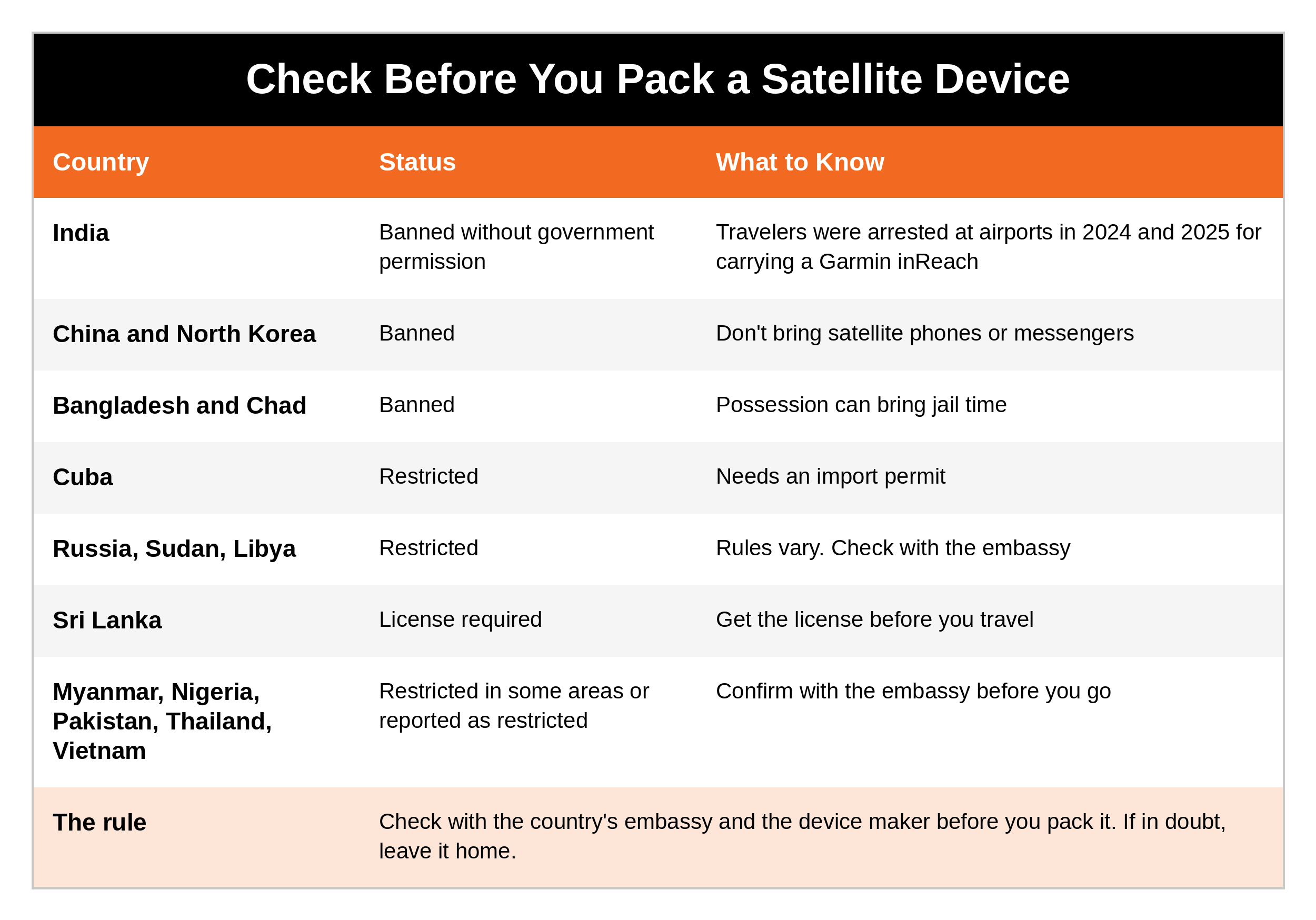
The rule: before you pack a satellite messenger or satellite phone, check with the destination country's embassy and the device maker. If in doubt, leave it home.
Apps That Work, and Where They're Blocked
WhatsApp and Signal are the most common way people text and call overseas. Many hotels, tour guides, and drivers use WhatsApp. But some countries block them:
China: WhatsApp, Google (including Gmail and Maps), Facebook, Instagram, and most Western apps are blocked. People use WeChat. Only government-approved VPNs are legal, so set up your plan before you arrive.
Russia: WhatsApp has been fully blocked since February 2026.
Iran: WhatsApp is blocked, and internet access has been severely cut. Check the travel advisory.
United Arab Emirates: WhatsApp and FaceTime calls are blocked, but texting works.
Qatar, Oman, and Egypt: WhatsApp calls are restricted at times, while texting usually works.
About VPNs: VPNs are banned or tightly restricted in some countries, including China, Iran, North Korea, and Turkmenistan, and in the UAE, using a VPN to get around local law can bring heavy fines.
Never use a VPN to break the law of the country you're visiting.
What to do:
Know what's blocked before you go, and agree on a backup app with your family
Remember that regular text messages and phone calls still work when apps are blocked, as long as you have a phone plan
Download apps and offline maps before you leave, since app stores may be restricted where you're going
Check the Communications and Infrastructure Before You Go
Before any trip, I like to look at four things about a destination's communications and infrastructure:
Cell coverage: which carriers work well, where the dead zones are, and whether service works at your hotel, the places you'll visit, and along your routes
Internet: how good the hotel Wi-Fi is, how risky public Wi-Fi is, and whether you need a backup hotspot
Blackouts and outages: whether the area has rolling blackouts or storm outages, whether your hotel has backup power, and where you can charge your devices
Censorship and monitoring: which apps or websites are blocked, whether devices are searched, what the VPN laws are, and whether you should keep sensitive conversations off your phone
Where to find it: the State Department country page, the Global Rescue Travel Intelligence Center, your hotel, and recent traveler reports.
Privacy and Device Security
Public Wi-Fi can be watched, in airports, cafes, and hotels. Use your own hotspot, a phone plan, or a travel router when you can.
Your devices can be searched. Border officers in many countries, including the U.S. when you come home, can inspect phones and laptops. Travel with only what you need on your devices.
Use an encrypted group chat like Signal or WhatsApp for the family, where it's legal.
Don't post your location in real time. Share photos after you've left a place.
Turn off auto-join Wi-Fi and Bluetooth when you aren't using them.
Power and Charging
Check the voltage. The U.S. uses 120 volts. Most of the world uses 220 to 240. If a charger's label says 100-240V, you only need a plug adapter. If it doesn't (some hair dryers and older devices), you need a voltage converter, or leave it home.
Pack a universal plug adapter. A small power strip lets you charge several devices from one outlet.
Power banks on planes: carry-on only, never in checked bags. The FAA allows power banks up to 100 watt-hours without approval. Between 100 and 160 watt-hours needs airline approval, with no more than two. Over 160 watt-hours isn't allowed. Most phone power banks are well under 100 watt-hours.
Some airlines are stricter, including some international carriers, so check your airline's rules before you fly.
Keep a power bank charged and a cable in your day bag. A dead phone is one of the most common communication failures on a trip.
Your Contact Back Home and the Missed Check-In Plan
The most important part of staying connected overseas isn't a gadget. It's someone at home who knows your plan and knows what to do if they don't hear from you.
Before the trip, give your contact back home:
Your full itinerary: flights, hotels with addresses and phone numbers, tour operators, and drivers
Copies of your passports, kept securely
Your travel insurance policy number and assistance phone line
The U.S. embassy contact for each country
Your phone plan and backup app ("If you can't reach me on iMessage, try WhatsApp")
Your check-in schedule, written in their time zone
Your family's safe word and duress word from Part 1
Set the check-in schedule:
Agree on set times, like when you land, once a day, and after every travel day
Write the times in both time zones, and allow for long flights and time changes
Agree on a grace period before anyone worries. Make it longer than at home, because service abroad is less reliable.
If a check-in is missed, here's the order:
Try the traveler again on every method: call, text, backup app, and email
Try their travel companions, if any
Call the hotel front desk and ask them to check the room or confirm when they were last seen
Call the tour operator or driver on the itinerary
Call the travel insurance assistance line. Many can help find a traveler and work with local services.
Contact the U.S. embassy in that country, or Overseas Citizens Services, and ask for help locating a U.S. citizen
Have ready: their full name, passport number, a photo, the itinerary, the last contact (time, place, and method), medical conditions, and who they're with
Your PACE Plan Abroad
P - Primary: your phone plan, with texts and calls on a day pass or eSIM
A - Alternate: a messaging app like WhatsApp or Signal over hotel Wi-Fi
C - Contingency: a third party, like the hotel front desk, your tour operator, or your travel insurance line
E - Emergency: satellite SOS (only where it's legal), or the U.S. embassy and Overseas Citizens Services
Your Overseas Comms Kit
An unlocked phone with a working travel plan or eSIM
A charged power bank (under 100 watt-hours) and charging cables
A universal plug adapter, and a voltage converter if you need one
Offline maps and offline translation downloaded
Your messaging app and backup app, installed and tested
The local emergency number, embassy, hotel, and insurance line saved in your phone
A printed contact card in your wallet
Copies of passports, on paper and stored securely online
A satellite messenger or satellite phone, only where it's legal
A travel router or personal hotspot (optional)
Your check-in schedule, shared with your contact back home
Coming Up Next
In Part 9, we'll put the whole series into practice: monthly radio checks, a simple family drill, a battery and charging plan, and how to keep your communication plan current.
Ask Yourself
Do I know the emergency number for the next place we're traveling?
Will our phones actually work there, and what will it cost?
Does someone at home have our itinerary, our check-in times, and a plan if they don't hear from us?
Remember
Overseas, the habits that keep you safe at home don't always work. Learn the local emergency number, set up your phone before you leave, check the laws on satellite devices and apps, and give someone at home a check-in plan. The prepared protector plans the trip and the way home, so if something goes wrong, someone already knows where to start looking.
Get Started Today
FREE GUIDE: Travel Missed Check-In Protocol. A step-by-step plan for your contact back home: your itinerary, your check-in schedule across time zones, and exactly what to do, and who to call, if they don't hear from you. [CTA: Comment or DM "KEYWORD" / or download it here: LINK]
Go Deeper
Situational Awareness and Safe Family Travel Strategies. This post helps your family stay connected and reachable abroad. My book shows you how to read your environment, avoid predictable risks, and travel with confidence instead of anxiety, at home and overseas. [Get it here: LINK]
The Family Safety Toolkit gives you 20 checklists covering every area of family safety and preparedness, including travel safety, all for $19.99. [Get it here: https://www.preparednotparanoid.com/family-safety-toolkit]
The Family Emergency Preparedness Manual is coming soon.
Tools I recommend: The power banks, travel adapters, satellite messengers, and radios I recommend are in my Backup Communications Amazon store. https://link.amazon/B09z0lfEb
Related reading:
Emergency Communications, Part 7: Weather Alerts https://www.preparednotparanoid.com/pnp-library/emergency-weather
Emergency Communications, Part 3: Satellite Messengers, Satellite Phones, and Cell-Based Radios https://www.preparednotparanoid.com/pnp-library/emergency-communications-lesson2
Emergency Communications, Part 1: Your Family Communication Plan https://www.preparednotparanoid.com/pnp-library/emergency-communications-family-plan
References
U.S. Department of State. Americans Abroad: help in an emergency (travel.state.gov). Smart Traveler Enrollment Program (step.state.gov).
Apple Support. Emergency SOS via satellite availability (verified October 24, 2026).
Explorersweb. "Do NOT Bring an InReach or Other Satellite Device to India" (January 2025).
Global Rescue. "Where Is Your Satellite Phone Illegal?" and the Travel Intelligence Center.
Reuters. Russia fully blocks WhatsApp (February 12, 2026).
ShopBack. Verizon vs AT&T vs T-Mobile international roaming (August 2026).
AARP. Using eSIMs for international travel.
FAA. PackSafe: lithium batteries and power banks.
Ooma. Emergency telephone numbers around the world.
Disclaimer
These suggestions are intended to help you and your family build awareness, confidence, and safer decision-making habits. No safety plan, checklist, or device can guarantee 100% protection. Emergency numbers, phone plans, app restrictions, and satellite device laws change often, so check the State Department and the destination country's embassy before every trip. This article is for general informational purposes only and is not legal advice. Follow the instructions of local officials during an emergency. Affiliate disclosure: I've linked to products from my Amazon store that I personally recommend. As an Amazon Associate, I earn from qualifying purchases, at no extra cost to you. Thank you for supporting my work.
In an emergency abroad, call the local emergency number. U.S. citizens can also call the State Department at 1-888-407-4747 (from the U.S. or Canada) or +1-202-501-4444 (from anywhere else).
Awareness gives you time. Time gives you options.
The prepared protector is someone who's decided that loving someone means being ready for them, not just hoping things go fine.
Prepared Not Paranoid. Protecting the Most Vulnerable Among Us.