Rideshare, Rides Without a Smartphone, and When Driving Gets Harder
By Larry Betz | Prepared Not Paranoid https://www.preparednotparanoid.com
Rideshare safety for seniors comes down to a few habits: book in the app, check the driver before getting in, and let someone you trust follow the ride. Teach those well, and a rideshare app can give your parent back a lot of freedom.
So far in this series, we've covered the home: cameras, the front door, the technology inside, and daily check-ins. But staying independent also means getting out: to the doctor, the store, church, and lunch with friends. For many older adults, that increasingly means a rideshare instead of their own car.
How to Teach Rideshare the Right Way
Start With Empathy, Not Alarm
Frame safety as a way to stay in control and keep their freedom, not as a list of dangers.
"This isn't about being scared. It's about staying one step ahead and keeping your freedom."
Teach in Person
Walk through the app together. Don't just explain it. Show it. Practice while you're with them:
How to check the driver's information
How to share the ride with family
How to cancel a ride if something doesn't feel right
Make a Simple Cheat Sheet
Print a large-text guide with labeled screenshots and simple color coding, like green for "OK" and red for "stop." Cover how to open the app, how to check the driver, what to say at pickup, and what to do if something feels off.
Practice, Then Practice Again
Do a pretend ride at home. Order a ride together, talk through each safety step, then cancel it. Repetition builds memory, and memory builds confidence.
Bring in a Trusted Person
Pick someone to receive shared trip alerts, so someone always knows where the ride is.
Save the regular places, like the doctor, pharmacy, and grocery store, so your parent doesn't have to type addresses.
Teach the Related Habits Too
Rideshare safety connects to everything else in this series: door safety, phone scam awareness, staying aware in public, and keeping emergency contacts up to date.
Celebrate the wins. After the first solo ride goes well, say so: "See? You did that perfectly. You're in control."
The Prepared Protector doesn't just download the app for their parent. They practice it together until the safety steps become habit.
Rideshare Safety for Seniors: Before They Get In
Most rideshare problems can be stopped at the curb.
Teach your parent to run this check every single time.
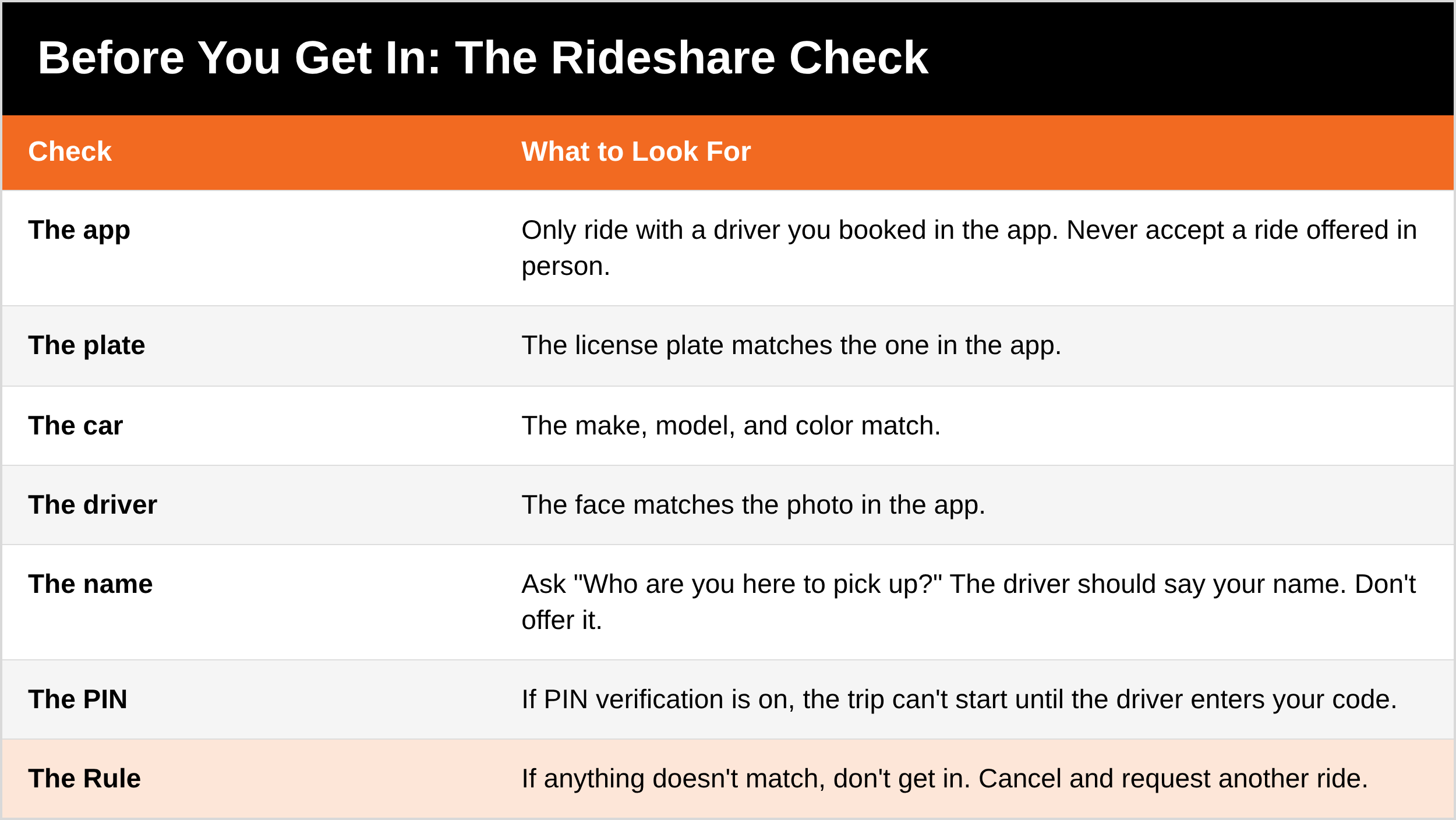
Use the official app only. Uber or Lyft. Never accept a ride from someone offering one in person, even if they say they're a rideshare driver.
Match the plate, the car, and the driver to what the app shows.
Ask, "Who are you here to pick up?" The driver should say your name. Don't offer it first.
Turn on PIN verification. In the Uber app, this means the trip can't start until the driver enters your 4-digit code. It's a simple way to make sure your parent is in the right car.
Wait somewhere well lit, ideally inside until the car arrives, and avoid standing alone outside when possible.
During the Ride
Share the trip. Use the "Share my trip" feature so a family member can follow the ride in real time and see when it ends.
Sit in the back seat. It gives space from the driver and an easier exit on either side.
Trust your gut. If something feels off before getting in, cancel. If the driver goes off route without a reason or makes your parent uncomfortable, they can ask to be let out in a safe, public place.
Know the emergency button. Both apps have an in-app safety button that can call 911 and share the location and trip details.
Keep it friendly, not personal. Light conversation is fine. There's no need to share that they live alone, when they'll be home, or anything about money.
Pick the Right Ride Option
Not every parent wants the same thing. Some are comfortable with a smartphone. Some will never touch an app. The good news: there's an option for both.
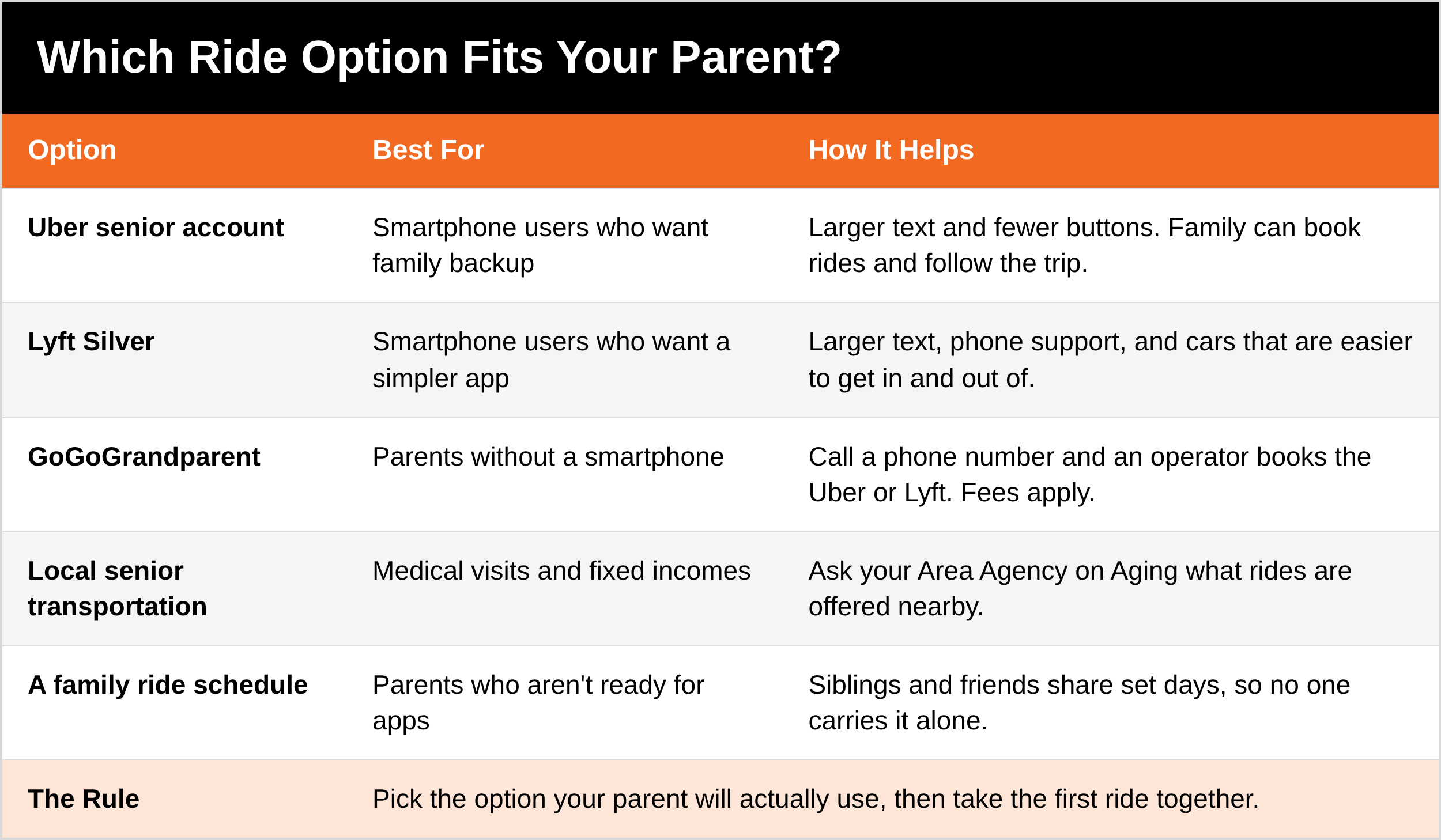
Uber senior accounts: a simpler version of the Uber app with larger text and fewer buttons. Through a Family profile, you can book rides for your parent, follow the trip, and contact the driver. Your parent stays in control of their settings. Parents who'd rather ride on their own can turn on Simple mode instead.
Lyft Silver: a simpler Lyft experience with larger text, live phone support during set hours, and matching with cars that are easier to get in and out of. Trusted contacts can see ride details.
GoGoGrandparent: for parents without a smartphone. They call a phone number, and a live operator books an Uber or Lyft for them. Family can get updates on the ride. There's an added fee on top of the ride cost.
Local senior transportation: many communities offer rides to medical appointments and errands for older adults, sometimes free or low cost. Your local Area Agency on Aging can tell you what's nearby. Find yours through the Eldercare Locator.
When Driving Gets Harder
For many families, the rideshare conversation starts because driving is getting harder. You don't have to start with taking the keys.
Try a CarFit check. CarFit is a free program developed by AAA, AARP, and the American Occupational Therapy Association. Trained technicians check 12 points, like seat position, mirrors, and pedal reach, and suggest adjustments. It isn't a driving test.
Watch for patterns, not one bad day: new dents and scrapes, getting lost on familiar routes, close calls, or friends who won't ride with them anymore.
Talk early and often. A plan made together, like "no highway driving at night," keeps your parent in the conversation, not on the receiving end of it.
Set up the rideshare app before it's needed. It's much easier to learn when it's an option, not a loss.
Ask Yourself
Could my parent get to the doctor tomorrow if they couldn't drive?
Do they know to check the plate and ask, "Who are you here to pick up?"
If my parent took a ride today, would anyone know where they were?
What to Say
"Mom, I'm not trying to take anything away. I want you to have more options, not fewer. Can we set up the app together and take the first ride as a team?"
5 Quick Wins You Can Start Today
Set up the app, or call GoGoGrandparent together if they don't use a smartphone.
Turn on PIN verification and trip sharing, and add yourself as a trusted contact.
Save the regular places in the app.
Do a practice ride together, start to finish.
Tape the "Before You Get In" check inside their wallet or by the front door.
Remember: Getting around safely isn't about being afraid of strangers. It's about a few simple checks, done every time, that keep your parent independent and in control.
That's the Series
Safe at Home covered the five areas that help a parent live independently: cameras that actually record, a safer front door, technology they'll really use, a daily check-in plan, and getting around safely. You don't have to do it all this week. Pick one part, start there, and keep going.
Get Started Today
My free Immediate Emergency Summary puts your parent's medications, allergies, doctors, and emergency contacts on one page. Fold a copy into their wallet or purse, so it goes everywhere they go.
DM the word [KEYWORD] on Instagram or Facebook and I'll send it to you. [Get it here: LINK]
Go Deeper
The Family Safety Toolkit includes a Senior Safety section with checklists you can work through together. This series gives you the plan. The Toolkit helps you put it in place. [Get it here: LINK]
Situational Awareness and Safe Family Travel Strategies covers staying aware in public, in transit, and on the road, for every age in the family. [Get it here: LINK]
Coming soon: the Senior Safety Guide. Step-by-step app setup guides, a printable rideshare cheat sheet, how to plan for the day driving stops, and transportation for parents with memory loss.
Tools I recommend: medical alert devices with GPS, phone cases with a wallet for the emergency summary, and other gear for getting around in my Senior Safety store. [SENIOR SAFETY STORE LINK]
The Full Series
Part 1: What the Nancy Guthrie Case Teaches Families [LINK]
Part 2: The Front Door [LINK]
Part 3: Tech That Keeps Them Independent [LINK]
Part 4: Check-Ins, Medications, and the Missed-Call Plan [LINK]
Part 5: Getting Around Safely (you are here)
Related Reading
Scam-Proofing the People You Love, Part 1: How Scams Work [LINK]
Situational Awareness series [LINK]
Safe Family Travel: rideshare safety for the whole family [LINK]
References
Uber, Senior accounts and Simple mode launch (June 2025): https://www.businesswire.com/news/home/20250604439977/en
ConnectSafely, Guide to Uber Senior Accounts (May 2026): https://connectsafely.org/guide-to-uber-senior-accounts/
Lyft, How Lyft Silver is making it easier for older adults to get around: https://www.lyft.com/blog/posts/under-the-hood-lyft-silver
GoGoGrandparent: https://www.gogograndparent.com
CarFit: https://www.car-fit.org
Eldercare Locator (find your Area Agency on Aging): https://eldercare.acl.gov
Disclaimer: App features, names, and prices change often, so check the app or company before you rely on a feature. These suggestions are intended to help you and your family build awareness, confidence, and safer decision-making habits. No safety plan, checklist, or training can guarantee 100% protection. There will always be people who try to exploit vulnerability, opportunity, trust, or positions of power. The goal is not to create fear, but to help guide families toward more informed, prepared, and practical safety decisions in everyday life. Driving rules and senior transportation services vary, so check your state and county for what applies where you live. As an Amazon Associate, I earn from qualifying purchases.
If your parent ever feels unsafe during a ride, they should ask to be let out in a busy, public place and call 911 if they're in danger.
Awareness gives you time. Time gives you options.
The Prepared Protector is someone who's decided that loving someone means being ready for them, not just hoping things go fine.
Prepared Not Paranoid. Protecting the Most Vulnerable Among Us.