Voice Assistants, Wearables, Phones, and Smart Alarms
By Larry Betz | Prepared Not Paranoid https://www.preparednotparanoid.com/
The right safety technology for seniors can mean the difference between waiting hours for help and getting it in minutes. The trick isn't buying the most gadgets. It's picking the few your parent will actually wear, charge, and use.
In Part 2, we covered the front door. Now let's look at the tools that help your parent stay independent inside the home: voice assistants, wearable emergency devices, easier phones, and smarter alarms.
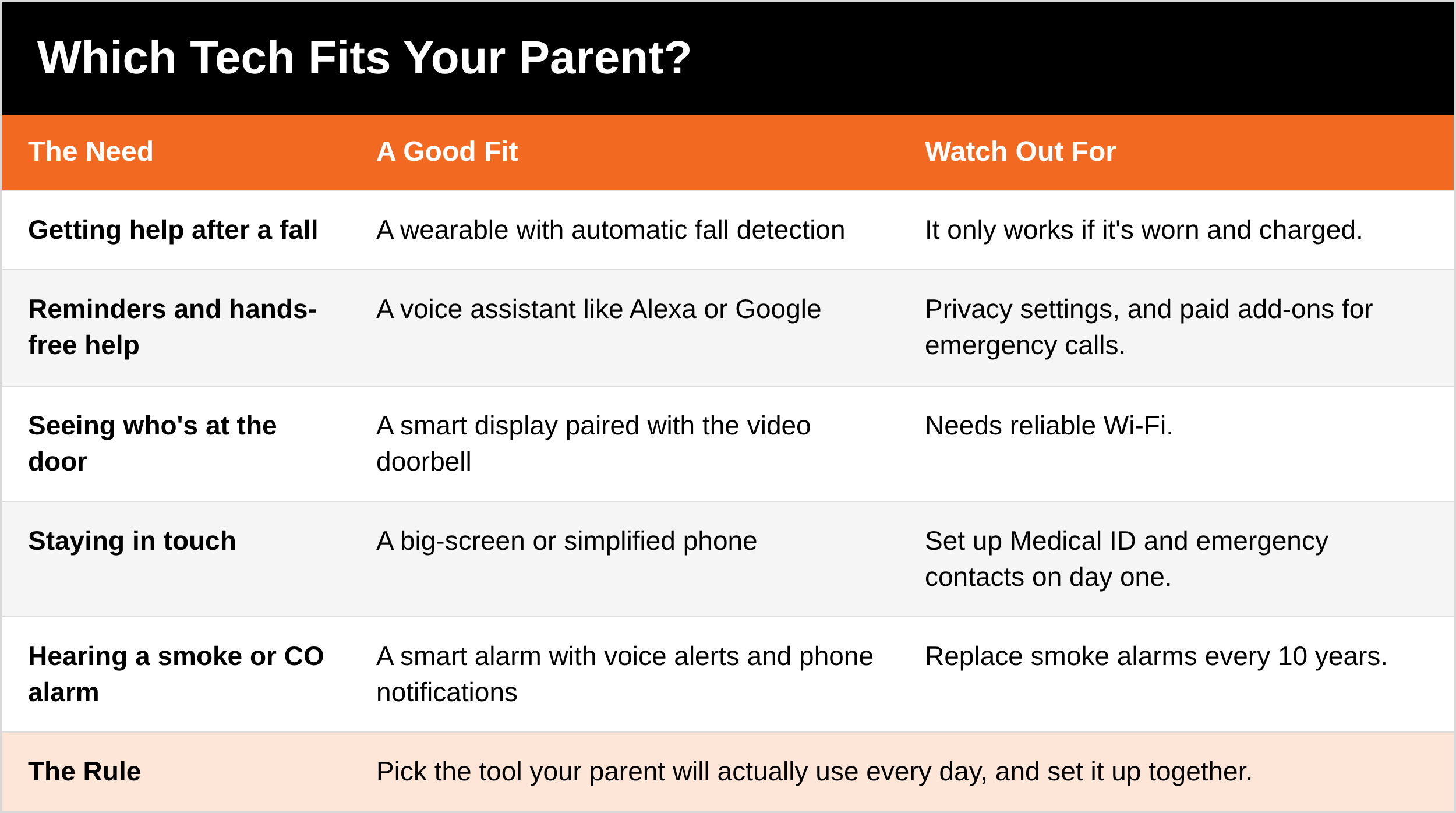
Before you buy anything, start with your parent's biggest risk. Do they live alone? Have they fallen before? Do they have trouble hearing? Then match the tool to the need, and pick the one they'll actually use.
Safety Technology for Seniors: Wearable Emergency Devices
For seniors living alone or managing a health condition, a wearable emergency device is one of the most important safety tools there is. It puts help one button press away, or no press at all.
Why they matter:
Falls are the leading cause of injury for older adults, and a long wait for help makes everything worse
Many seniors can't reach a phone after a fall
Fast response can save a life during a heart attack, stroke, or a moment of confusion
GPS lets family find a loved one who gets lost or disoriented
Key Features to Look For
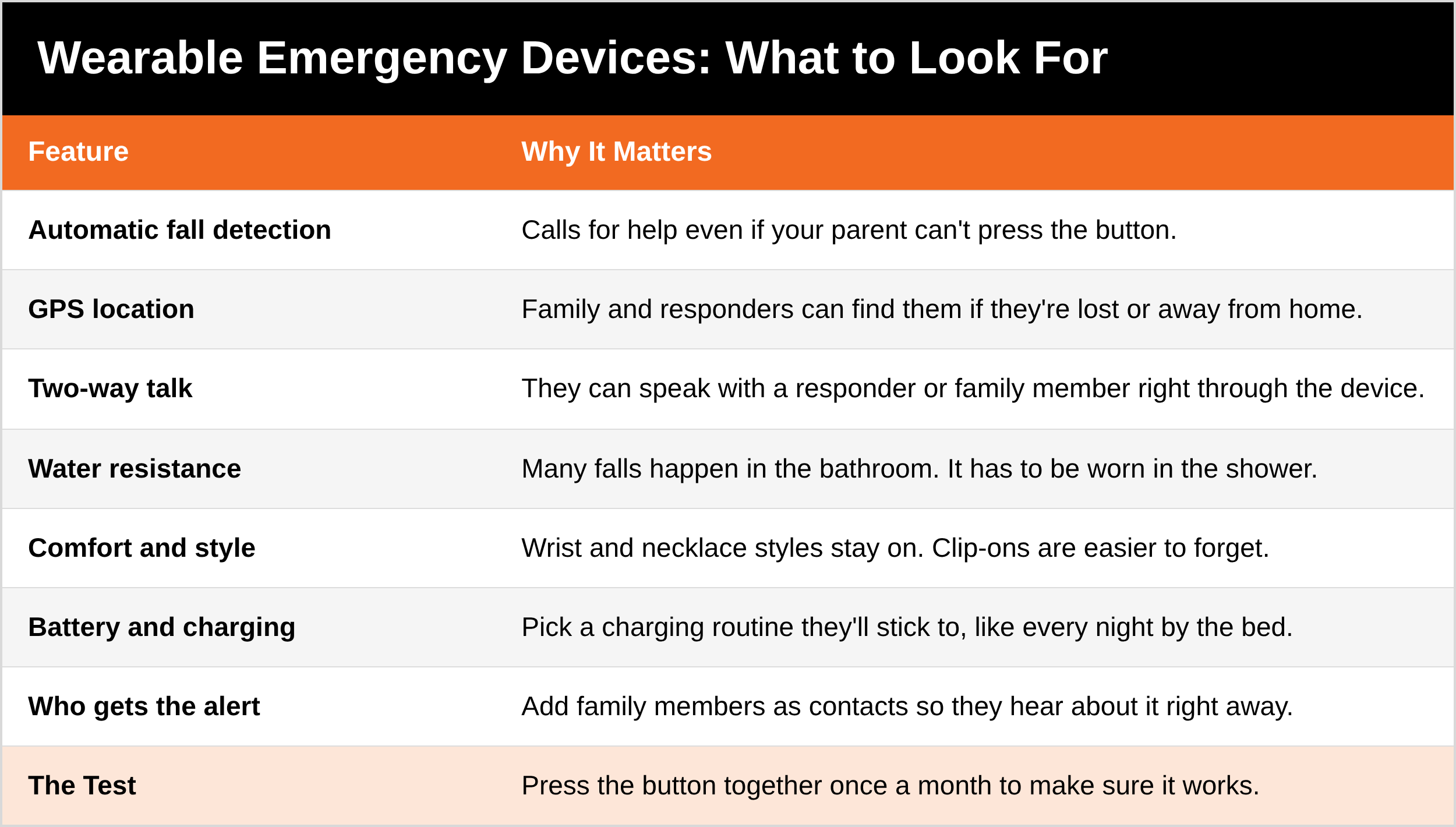
Automatic fall detection: sends an alert even if your parent is unconscious or can't press the button. This is crucial for serious falls.
GPS tracking: lets family or caregivers find your parent in real time, especially important for anyone with memory issues or who lives alone.
Two-way communication: lets your parent speak directly with a responder or family member through the device, like a speakerphone.
Water resistance: many falls happen in the bathroom, so the device needs to be worn in the shower.
Comfort: it should be light and easy to wear. Clip-on styles seem more discreet, but they're easier to forget or take off. Wrist and necklace styles tend to stay on when it counts.
Devices to Consider
Medical Guardian: a range of medical alert systems, including all-in-one wearables with fall detection, GPS, and 24/7 monitoring.
Apple Watch (Series 4 and later): fall detection, Emergency SOS, heart monitoring, and your iPhone contacts. A good fit for parents who already use Apple products.
Lively (Best Buy Health): the Lively Mobile2 medical alert and the Jitterbug phones, sold in Best Buy stores, so you can buy and set up the same day.
Life Alert: a long-standing name known for simplicity.
Bonus tip: add family members or caregivers as emergency contacts in the device's system, so they get alerts the moment something happens.
The Prepared Protector doesn't just buy the device. They make sure it's worn, charged, and tested, and that the alert goes to someone who will answer.
Voice Assistants: Hands-Free Help
Voice assistants like Amazon Alexa (on Echo devices) and Google Assistant (on Google Nest devices) can offer real safety and convenience for older adults, especially when paired with other smart home devices.
How they help:
Calling for help: by default, a voice assistant won't dial 911. With Amazon's paid Alexa Emergency Assist service, your parent can say "Alexa, call for help" to reach a trained response agent, who can send emergency services and notify family. (Amazon's free Alexa Guard feature was discontinued, and its emergency features moved to Emergency Assist.)
Medication and appointment reminders: "Alexa, remind me to take my pills at 9 a.m."
Who's at the door: paired with a compatible video doorbell, a smart display like an Echo Show or Google Nest Hub can show who's there, so your parent doesn't have to walk to the door.
Weather and traffic: "Hey Google, what's the weather today?" helps them plan safely before heading out.
Lights, locks, and thermostat by voice: helpful for anyone with limited mobility, or at night.
Protect Their Privacy
These devices listen for their wake word and collect data. A few steps keep that under control:
Review the privacy settings in the Alexa app or the Google Home app
Use the physical mic-off button when the device isn't needed
Delete old recordings, and stop saving new ones. In the Alexa app, go to Alexa Privacy, then choose not to save recordings or set them to delete automatically. Since March 2025, Alexa requests are always sent to Amazon's cloud, so this setting matters.
Don't link sensitive accounts, like banking, unless it's truly needed
Big-Screen and Simplified Phones
A phone your parent can actually see and use is one of the best safety tools in the house.
Big screens and large text: turn up the text size and use a simple, uncluttered home screen
Simplified modes: iPhones have Assistive Access, and many Android phones have an easy mode, both built for simpler use
Senior-focused phones: Lively's Jitterbug flip and smart phones have big buttons and a built-in urgent response button
Medical ID and emergency contacts: set them up so responders can see them even when the phone is locked. Save contacts in plain words, like "Emergency - Mom."
Keep it charged: pick one charging spot, like the nightstand, and make it a habit
Basic cyber safety: keep automatic updates on, use a passcode, and teach the "hang up and call back" rule from Scam-Proofing the People You Love [LINK]. Never call a number from a pop-up that says the device is infected.
Smart Smoke and Carbon Monoxide Alarms
Traditional smoke and CO alarms are essential. Smart alarms take protection a step further, especially for seniors living alone or with hearing loss.
Phone alerts: smart alarms, like the First Alert Smart Smoke and CO Alarm or X-Sense smart alarms, can send an alert to family members' phones the moment an alarm sounds
Voice alerts and lights: some models announce the danger and location, like "Smoke in the kitchen," and add visual cues
Self-testing and low-battery warnings: fewer chirps at 3 a.m., and fewer dead alarms
Pick Wi-Fi models that allow more than one emergency contact
Note: Google stopped selling the Nest Protect in 2025. Existing units keep working, and Google now recommends the First Alert model as the replacement. Replace any smoke alarm every 10 years.
For the full guide to alarms, see Home Fire Safety Essentials, Part 1 [LINK].
Ask Yourself
If my parent fell today, how would they call for help, and who would hear it?
Is my parent's emergency device worn every day, or sitting in a drawer?
Would I get an alert if my parent's smoke alarm went off?
What to Say
"Mom, I'd sleep better knowing you could call for help even if you couldn't get to the phone. Can we pick out a device together, one you'd actually like wearing?"
5 Quick Wins You Can Start Today
Set up Medical ID and emergency contacts on your parent's phone.
Turn up the text size and clean up the home screen.
Open the Alexa or Google app and delete old voice recordings.
Test the wearable together, and pick a nightly charging spot.
Check the date on the smoke alarms. If they're 10 years old, replace them.
Remember: The best safety technology is the kind your parent wears, charges, and trusts. Set it up together, test it together, and keep it simple.
Coming Up in Part 4
Check-Ins, Medications, and the Missed-Call Plan. Daily check-ins, reassurance call programs, a simple neighbor signal, and medication systems that prevent mistakes.
Get Started Today
My free Phone Emergency Setup Checklist walks you through Medical ID, emergency contacts, and the settings that help responders and family when it matters most.
DM the word [KEYWORD] on Instagram or Facebook and I'll send it to you. [Get it here: LINK]
Go Deeper
The Family Safety Toolkit includes a Senior Safety section with checklists you can work through together. This post helps you pick the tools. The Toolkit helps you put the whole plan in place. [Get it here: LINK]
Cyber Safety: A Beginner's Guide to Protecting Your Digital Footprint covers passwords, updates, privacy settings, and keeping devices secure. [Get it here: LINK]
Coming soon: the Senior Safety Guide. Device-by-device comparisons, step-by-step setup, GPS tools for parents with memory loss, and what happens to each device when the power or cell service goes out.
Tools I recommend: medical alert devices, smart displays, smart smoke alarms, and senior-friendly phones in my Senior Safety store. [SENIOR SAFETY STORE LINK]
The Full Series
Part 1: What the Nancy Guthrie Case Teaches Families [LINK]
Part 2: The Front Door [LINK]
Part 3: Tech That Keeps Them Independent (you are here)
Part 4: Check-Ins, Medications, and the Missed-Call Plan [LINK]
Part 5: Getting Around Safely [LINK]
Related Reading
Staying Steady, Part 3: A Safer Home, Room by Room (plan for a fall) [LINK]
Home Fire Safety Essentials, Part 1: Smoke and CO Alarms [LINK]
Scam-Proofing the People You Love, Part 2: "This Is Your Bank Calling" (tech support scams) [LINK]
References
SafeWise, Alexa Guard No Longer Supported: What You Need to Know: https://www.safewise.com/news/alexa-guard-no-longer-supported-what-you-need-to-know
Android Authority, Nest Protect retired, First Alert replacement (March 2025): https://androidauthority.com/nest-protect-retired-3539328
Associated Press via AJC, Amazon ends privacy feature for Echo voice recordings (March 2025): https://www.ajc.com/news/nation-world/amazon-ends-little-used-privacy-feature-that-let-echo-users-opt-out-of-sending-recordings-to-company/UZXBJWJXKRCUVICOKPRC3323EM
NCOA, Lively Medical Alert Review 2026: https://www.ncoa.org/product-resources/medical-alert-systems/lively-review/
National Fire Protection Association, Smoke alarms: https://www.nfpa.org
Disclaimer: Product features, names, and prices change often, so check with the manufacturer before you buy. These suggestions are intended to help you and your family build awareness, confidence, and safer decision-making habits. No safety plan, checklist, or training can guarantee 100% protection. There will always be people who try to exploit vulnerability, opportunity, trust, or positions of power. The goal is not to create fear, but to help guide families toward more informed, prepared, and practical safety decisions in everyday life. Rules and services vary, so check your state and county for what's available where you live. As an Amazon Associate, I earn from qualifying purchases.
If someone has fallen and is badly hurt, has hit their head, or can't get up safely, call 911.
Awareness gives you time. Time gives you options.
The Prepared Protector is someone who's decided that loving someone means being ready for them, not just hoping things go fine.
Prepared Not Paranoid. Protecting the Most Vulnerable Among Us.