What Your Photos Share, Why Names Stay Inside, and the Family Password
By Larry Betz | Prepared Not Paranoid https://www.preparednotparanoid.com/
The best back to school safety tips start before your child ever walks into class. A first-day photo, a name on a backpack, or a predictable routine can tell a stranger more than you'd ever say out loud.
In Part 1, I told you about a car covered in bumper stickers, a roadmap of a family's life. Today, most of that roadmap lives on our phones. The excitement of a new school year comes with new backpacks, lunch boxes, and those first-day photos parents love to share. These moments are precious. They can also put your child at risk without you realizing it.
1. Think Twice Before Posting Back-to-School Photos
The risk: One picture can hold more information than you think. Parents often post photos with signs or captions showing their child's name, grade, teacher, and school. A photo in front of the school sign or at the bus stop can reveal exactly where your child will be.
What to do instead:
If you share a photo, keep the background neutral, like inside your home or the backyard.
Leave out school logos, uniforms, and landmarks.
Share with trusted family and friends through private messages or albums, not public feeds.
Rule of thumb: Before posting, ask yourself, "Would I hand this exact information to a stranger on the street?"
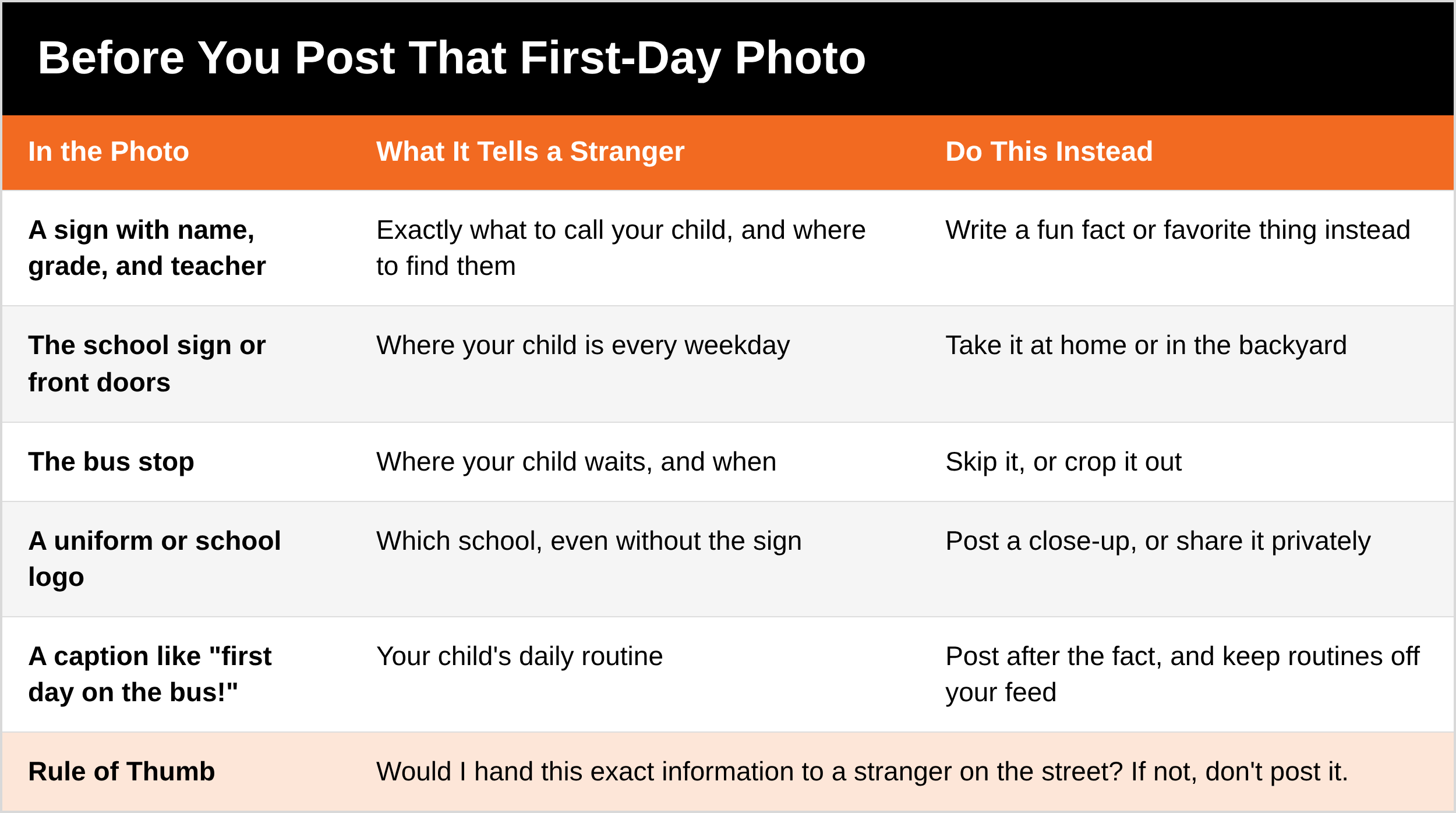
The Prepared Protector Shares Less
You can still celebrate the first day. Take the photo, love the photo, send it to Grandma. A Prepared Protector just thinks for five seconds before it goes public: the sign, the school, the bus stop, the caption. Sharing less isn't hiding your family. It's choosing who gets the roadmap.
2. Keep Names Off Backpacks, Lunch Boxes, and Clothing
The risk: Using a child's name breaks down barriers instantly. If someone calls your child by name, your child may believe that person knows them, and be more likely to trust or follow them.
What to do instead:
Personalize with initials, fun patches, or keychains.
If the school needs a name on it, write it inside the bag or on a hidden label, not on the outside where strangers can see it.
3. Know the Tricks, and Set Up a Family Password
The risk: You may have taught your child about strangers, but a friendly voice using their name can override that lesson. Here are the kinds of lines people use:
"Your mom asked me to pick you up, Emily."
"Your dad is hurt. Come with me, Sarah."
"Your parents told me to pick you up, but I can't remember the password..."
What to do instead: Set up a family password. If anyone other than Mom or Dad picks your child up, that person must know the password. No exceptions. Then practice it in short What If games (Part 1) so your child gets comfortable saying no and walking away.
Here's how to set one up.
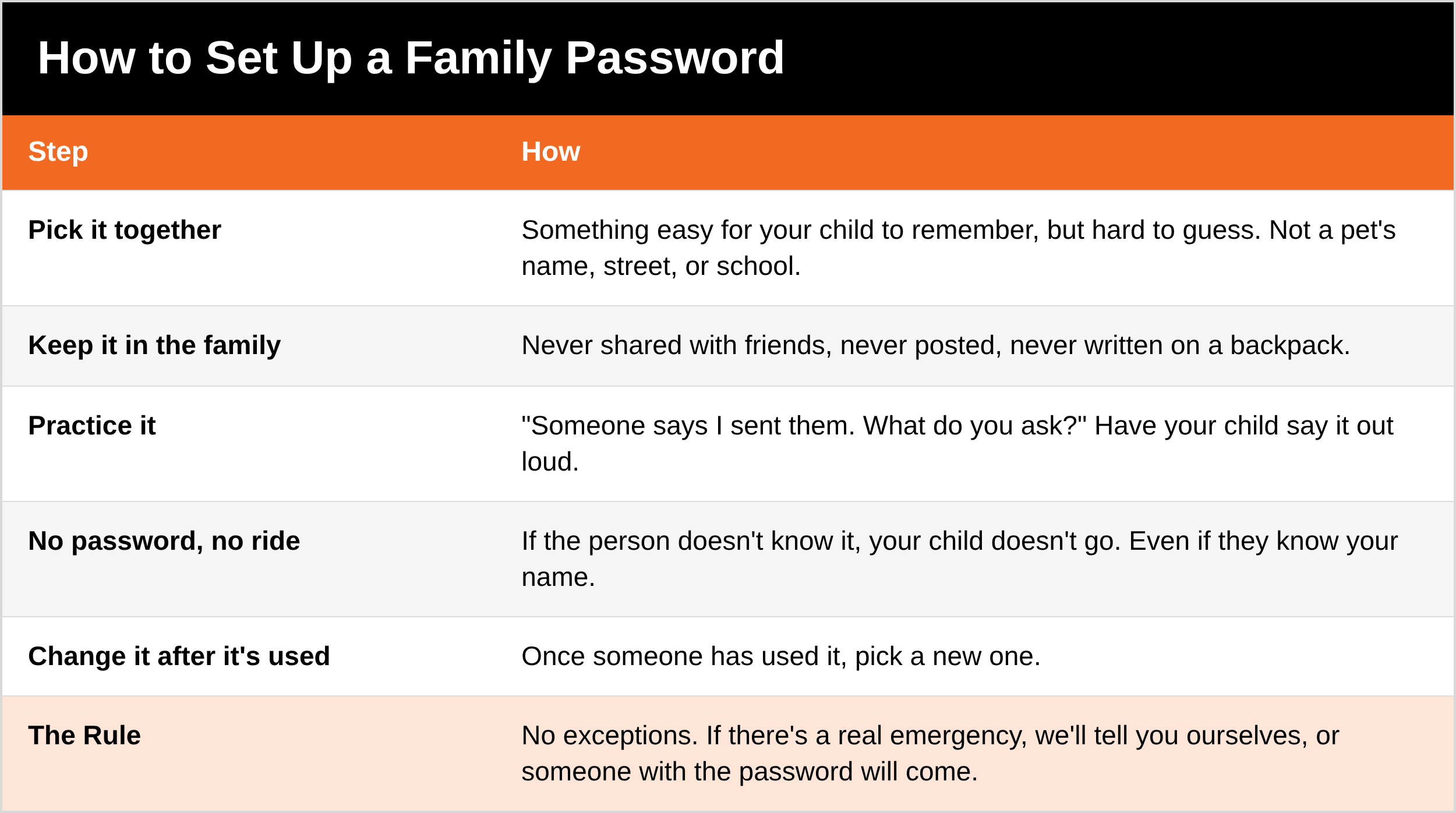
4. Protect Your School Routines
The risk: Posting your child's daily schedule, like "first day on the bus" or "after-school soccer," creates a predictable pattern someone could use.
What to do instead:
Keep routines off social media.
Share schedule changes only with trusted family and friends.
Remind your child to always check in with you before leaving school with anyone, even if it seems normal.
5. Practice Check-In Habits Early
From kindergarten on, teach your children to:
Check in with a parent or guardian before leaving school grounds with anyone.
Call or text when they arrive at an after-school activity or a friend's house.
Know exactly who is allowed to pick them up.
Children thrive on routine. Like brushing their teeth, these habits become second nature when you start early.
6. Hidden Trackers: Check Their Pockets
After a birthday trip to the Tennessee Aquarium in Chattanooga, a family made a startling discovery: one of the grandkids pulled an Apple AirTag out of his pocket. They took it to security, a police report was filed, and police took the AirTag to investigate. The aquarium later said its security footage and the city's police cameras showed no one had contact with the child.
So we don't know how it got there. That's the honest answer. But the lesson is the same either way: a tracker can end up in a bag, a jacket, or a pocket, and a young child won't know what it is.
Here's the part most parents don't realize. Phones now warn people when an unknown tracker is moving with them. iPhones do it, and since 2024 Android phones do it too, built in. But the alert goes to the phone of the person carrying the tracker. A young child without a phone won't get one. That's why the check is on you.
What to do:
Check pockets, jackets, bags, and toys after outings to crowded places. Make it part of the routine, like a 10-second habit on the way to the car.
Turn on tracker alerts on your phone. On Android, go to Settings, then Safety & emergency, then Unknown tracker alerts, where you can also tap Scan now. iPhones alert you automatically.
If you find one, report it. Take it to security or police. Note or photograph the serial number before you disable it, so police can trace the owner.
To stop it from tracking, twist off the back and remove the battery.
Stay calm. Finding a tracker doesn't always mean someone is after your child. It does always mean you check, report it, and let the professionals figure it out.
What to Say
To your child: "If someone you don't know says I sent them, what do you ask?" (The password.) "And if they don't know it?" (I don't go.)
To a grandparent or sitter: "We have a family password for pickups. Here it is. Please don't share it."
To a friend posting group photos: "Could you leave the school sign out of the pictures you post? We keep that off social media."
Ask Yourself
Could a stranger find my child's school from my social media?
Is my child's name on the outside of their backpack?
Does my child know our family password, and what to do if someone doesn't know it?
5 Quick Wins You Can Start Today
Scroll your last 10 posts. Any school signs, uniforms, or bus stops? Archive them.
Move the name on your child's backpack to the inside.
Pick a family password tonight, together.
Turn on unknown tracker alerts on your phone.
Check pockets after your next outing.
Remember
Share less, keep names inside, and set the password. Then check pockets after a busy day out. Small habits like these keep your family's roadmap in your hands.
Coming Up in Part 3
In Part 3, we'll take on one of the biggest questions parents ask: is Roblox safe? We'll cover what the lawsuits say, how predators use gaming platforms, and the settings that matter most.
Get Started Today
Get my free Child Safety bundle. It includes Family Tech Rules, When Trusted Adults Cross the Line, the Summer Camp Safety Checklist, and more. DM the word [KEYWORD] on Instagram or Facebook and I'll send it to you. [Get it here: LINK]
Go Deeper
Hooked: The Dangers of Social Media (written by Justin Nichols). What your family shares online, who's watching, and how to protect your kids on social media. $7.99. [Get it here: LINK]
The Family Safety Toolkit. 20 ready-to-use checklists for kids, travel, home, and emergencies. That's 244 pages, for $19.99. [Get it here: LINK]
Coming soon: the Child Safety Manual. The full family guide, with a step-by-step privacy settings walkthrough for the big social apps, a ready-to-use Authorized Pickup and Password Card, and a full after-outing tracker check routine.
Tools I recommend: The child safety gear and books I actually recommend are in my Children's Safety Amazon store. https://amzn.to/4hcldVo
The full series:
Toddler to Teen, Part 1: The What If Game https://www.preparednotparanoid.com/pnp-library/keeping-kids-safe
Toddler to Teen, Part 3: Is Roblox Safe? [LINK]
Toddler to Teen, Part 4: Cracking the Code: Teen Slang, Emoji, and Drug Codes [LINK]
Toddler to Teen, Part 5: Apps Parents Should Know (2026 Edition) [LINK]
Related reading:
Parent Pro Tips: Staying Together in Crowded Places https://www.preparednotparanoid.com/pnp-library/parent-pro-tips-for-crowded-places
Summer Camp Safety, Part 2: Who Has Access to Your Child? (pickup and custody) https://www.preparednotparanoid.com/pnp-library/camp-staff-screening
Who's Talking to Your Kids? (online grooming) [LINK]
Child Safety Resource Center [LINK]
References
WTVC NewsChannel 9 (Sinclair). Family fishes out unexpected AirTag in child's pocket at Tennessee Aquarium. https://katv.com/news/nation-world/family-fishes-out-unexpected-airtag-in-childs-pocket-at-tennesse-aquarium
Google Security Blog. Google and Apple deliver support for unwanted tracking alerts in Android and iOS (May 13, 2024). https://security.googleblog.com/2024/05/google-and-apple-deliver-support-for.html
Apple Support. What to do if you get an alert that an AirTag is with you (search "AirTag alert" at https://support.apple.com/).
National Center for Missing & Exploited Children. Safety Tips. https://www.missingkids.org/education
Disclaimer
These suggestions are intended to help you and your family build awareness, confidence, and safer decision-making habits. They are not a substitute for professional advice, including legal, technical, or law enforcement guidance. No safety plan, checklist, or training can guarantee 100% protection. There will always be people who try to exploit vulnerability, opportunity, trust, or positions of power. The goal is not to create fear, but to help guide families toward more informed, prepared, and practical safety decisions in everyday life. Phone settings change with updates, and laws vary, so check your device and your state and county for the exact rules where you live. Affiliate disclosure: I've linked to products from my Amazon store that I personally recommend. As an Amazon Associate, I earn from qualifying purchases, at no extra cost to you. Thank you for supporting my work.
If you find an unknown tracker or believe your child is being followed, contact local law enforcement. If a child is in immediate danger, call 911.
Awareness gives you time. Time gives you options.
The Prepared Protector is someone who's decided that loving someone means being ready for them, not just hoping things go fine.
Prepared Not Paranoid. Protecting the Most Vulnerable Among Us.