8 App Types, the Red Flags, and a Simple Monthly Phone Check
By Larry Betz | Prepared Not Paranoid https://www.preparednotparanoid.com/
The apps parents should know about change every year. The risks behind them don't. Learn the 8 types, and you'll spot a risky app even when you've never heard its name.
Every year, someone publishes a list of "dangerous apps." By the time you read it, half the apps have new names, new owners, or new copycats. That's why this post is built around types of apps, not brand names.
If you know what a random video chat app or an anonymous question app does, you'll recognize the next one the moment you see it on your child's phone.
Why Types, Not Names
Here's a good example. Omegle, a site that paired strangers for live video chat, shut down in November 2023 after 14 years and a string of lawsuits over children being exploited. Did random video chat go away? No. Dozens of copycats took its place.
The name changed. The risk didn't.
Here are the eight.

The Prepared Protector Downloads It First
When your child asks for a new app, or you find one you don't know, don't guess. Download it yourself. Spend ten minutes clicking around. Who can message you? Can strangers find you? Is there a map? A Prepared Protector doesn't need to be a tech expert. You just need to look before you say yes.
1. Random Video Chat Apps
These apps connect your child, live on camera, with a total stranger, often in seconds. Many say "18+" but only ask users to click a button. Children can be exposed to explicit content almost immediately, and recorded without knowing it.
The rule: No random video chat apps. Period.
2. "Make New Friends" Swipe Apps
These work like dating apps for teens: swipe on profiles, match, and chat. They're marketed as a way to make friends, but they connect kids with strangers, sometimes across wide age ranges and far from home.
Red flag: New "friends" your child has never met, from other cities or states.
3. Anonymous Question Apps
These let people send messages with no name attached, often through a link in a teen's social media bio. Anonymity brings out bullying.
In July 2024, the FTC and the Los Angeles District Attorney banned one of these apps, NGL, from serving anyone under 18. It was the first time the FTC had banned an app from serving minors. Regulators said the app sent fake anonymous messages to teens to push them into a paid subscription that promised to reveal who sent them.
Red flag: A link in your child's bio inviting anonymous messages.
4. Vault and Hidden Apps
Vault apps hide photos, videos, and chats behind something that looks harmless, like a calculator. Newer phones can also hide or lock apps behind Face ID, or in a private space.
Red flag: Two calculators, an app that asks for a password to open, or apps you can't find on the home screen.
5. Gaming Chat and Servers
Many games have built-in text and voice chat, and many kids join group servers on apps like Discord. Some are great communities. Some are where strangers pull kids into private chats. (Part 3 covers how predators use gaming platforms.)
Red flag: Late-night voice chats with people your child has never met.
6. Disappearing Messages and Location Sharing
Snapchat, Instagram, WhatsApp, and others offer messages that vanish after they're read. That means no record if something goes wrong. Many of the same apps include maps that show where your child is.
Red flag: Location shared with "friends of friends," or with people your child doesn't know in real life.
Your move: Turn location sharing off, or limit it to family, in each app and in the phone's settings.
7. AI Companions
This is the newest category, and it's growing fast. AI companions are chatbots built to feel like a friend, a confidant, or even a boyfriend or girlfriend. A 2025 Common Sense Media survey found 72% of teens have used an AI companion, and about a third have used them for social interaction and relationships.
The concern: these bots can give harmful advice, steer conversations in sexual directions, and pull kids away from real people. After lawsuits from families, Character.AI ended open-ended chats for users under 18 in November 2025. Kids can still find similar features in other apps and general chatbots.
Red flag: Hours of private chatting, or your child calling an AI their "friend" or more.
Your move: Ask about it with curiosity, not judgment. "What do you talk to it about?" If your child seems emotionally dependent on a chatbot, talk to their doctor or a school counselor.
8. Adult Dating Apps
Dating apps are for adults only, but teens can lie about their age to get in. Adults lie too. Any dating app on a phone under 18 is a conversation for today.
Your Monthly Phone Check
Once a month, sit down together and look through your child's phone. Tell them ahead of time. It works best as a routine, not a surprise.
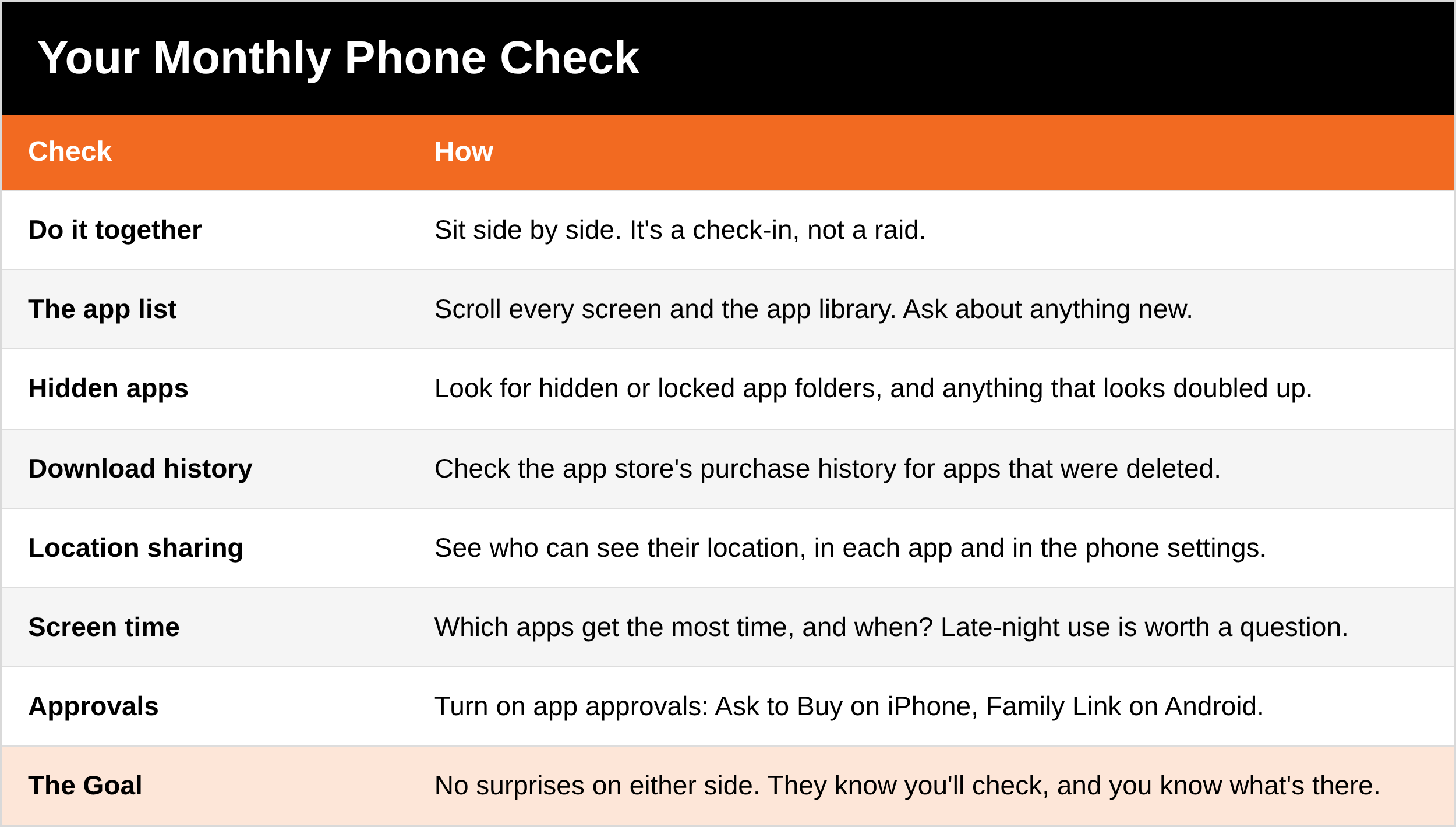
Use the free controls built into the phone. On iPhone, Screen Time and Ask to Buy let you approve new apps. On Android, Google Family Link does the same. Neither one is perfect, but both make a new app a conversation instead of a surprise.
The Whole Series in One Place
This is the last part of the Toddler to Teen series. Here's everything:
The What If Game: calm practice for real-life situations, starting at any age
Back to School and Out in Public: what photos share, names on backpacks, and the family password
Is Roblox Safe?: the lawsuits, what changed in 2026, and the 10-minute setup
Cracking the Code: teen slang, emoji, and drug codes
Apps Parents Should Know: you're here
What to Say
"Can you show me your favorite app? How does it work?"
"If you want a new app, ask me first. If it's okay, I'll say yes. If it's not, I'll tell you why."
"We'll look through your phone together once a month. It's not because I don't trust you. It's because I care."
Ask Yourself
Do I know what every app on my child's phone does?
Who can see my child's location right now?
Does my child use an AI chatbot, and what do they talk about?
5 Quick Wins You Can Start Today
Turn on Ask to Buy or Family Link so new apps need your OK.
Check location sharing in your child's apps and phone settings.
Look for hidden or doubled-up apps on your child's phone.
Download one app your child uses and click around for ten minutes.
Put the monthly phone check on the family calendar.
Remember
App names change. The risks don't. Learn the 8 types, look before you say yes, check the phone together once a month, and keep the conversation open.
Get Started Today
Get my free Child Safety bundle. It includes Family Tech Rules, a practical set of rules for phones, games, and screens. DM the word [KEYWORD] on Instagram or Facebook and I'll send it to you. [Get it here: LINK]
Go Deeper
Hooked: The Dangers of Social Media (written by Justin Nichols). How platforms and predators hook kids, and how to protect them. $7.99. [Get it here: LINK]
Cyber Safety. A practical guide to protecting your family online. $7.99. [Get it here: LINK]
The Family Safety Toolkit. 20 ready-to-use checklists, including Family Tech Rules. That's 244 pages, for $19.99. [Get it here: LINK]
Coming soon: the Child Safety Manual. The full family guide, with a named watchlist of current apps in each category, updated each year, app-by-app privacy settings, and a first-phone family agreement.
Tools I recommend: The child safety gear and books I actually recommend are in my Children's Safety Amazon store. https://amzn.to/4hcldVo
The full series:
Toddler to Teen, Part 1: The What If Game https://www.preparednotparanoid.com/pnp-library/keeping-kids-safe
Toddler to Teen, Part 2: Back to School and Out in Public https://www.preparednotparanoid.com/pnp-library/back-to-school-safety-tips
Toddler to Teen, Part 3: Is Roblox Safe? https://www.preparednotparanoid.com/pnp-library/is-roblox-safe
Toddler to Teen, Part 4: Cracking the Code https://www.preparednotparanoid.com/pnp-library/teen-slang-emoji-codes
Related reading:
Who's Talking to Your Kids?, Part 1 (online grooming) [LINK]
Who's Talking to Your Kids?, Part 2: Sextortion and AI-Generated Images [LINK]
Child Safety Resource Center [LINK]
Cyber Safety Resource Center [LINK]
References
NPR. Omegle shuts down after 14 years (November 2023).
Federal Trade Commission. FTC Order Will Ban NGL Labs and Its Founders from Offering Anonymous Messaging Apps to Kids Under 18 (July 9, 2024). https://www.ftc.gov/
NBC News. FTC bans anonymous messaging app NGL from allowing users under 18 (July 2024). https://www.nbcnews.com/tech/tech-news/ftc-bans-anonymous-messaging-app-ngl-for-minors-rcna160897
TechCrunch. Character.AI is ending its chatbot experience for kids (October 29, 2025). https://techcrunch.com/2025/10/29/character-ai-is-killing-the-chatbot-experience-for-minors/
Common Sense Media. Talk, Trust, and Trade-Offs: How and Why Teens Use AI Companions (2025). https://www.commonsensemedia.org/
Apple. Use Ask to Buy and Screen Time. https://support.apple.com/
Google. Family Link. https://families.google/familylink/
Disclaimer
This article is for general informational and educational purposes only. It is not a substitute for professional advice, including legal, technical, mental health, or law enforcement guidance. Apps, features, and age rules change often, so check the current settings on your child's devices. No safety plan, checklist, or training can guarantee 100% protection. There will always be people who try to exploit vulnerability, opportunity, trust, or positions of power. The goal is not to create fear, but to help guide families toward more informed, prepared, and practical safety decisions in everyday life. Laws vary, so check your state and county for the exact rules where you live. Prepared Not Paranoid and Larry Betz are not affiliated with any app or platform named here. Affiliate disclosure: I've linked to products from my Amazon store that I personally recommend. As an Amazon Associate, I earn from qualifying purchases, at no extra cost to you. Thank you for supporting my work.
If a child is being exploited online, report it to the NCMEC CyberTipline at report.cybertip.org or 1-800-843-5678. If your child is in crisis, call or text 988. If a child is in immediate danger, call 911.
Awareness gives you time. Time gives you options.
The Prepared Protector is someone who's decided that loving someone means being ready for them, not just hoping things go fine.
Prepared Not Paranoid. Protecting the Most Vulnerable Among Us.