The Fake Party Invitation Scam
Why a Real Invitation Never Asks You to "Download & Install"
We're heading into the busiest invitation season of the year. Halloween parties, Thanksgiving get-togethers, Christmas, New Year's Eve, all exciting times to celebrate with the people you love. And that means a lot of invitations are about to start showing up in your inbox.
Take a look at what we just received.
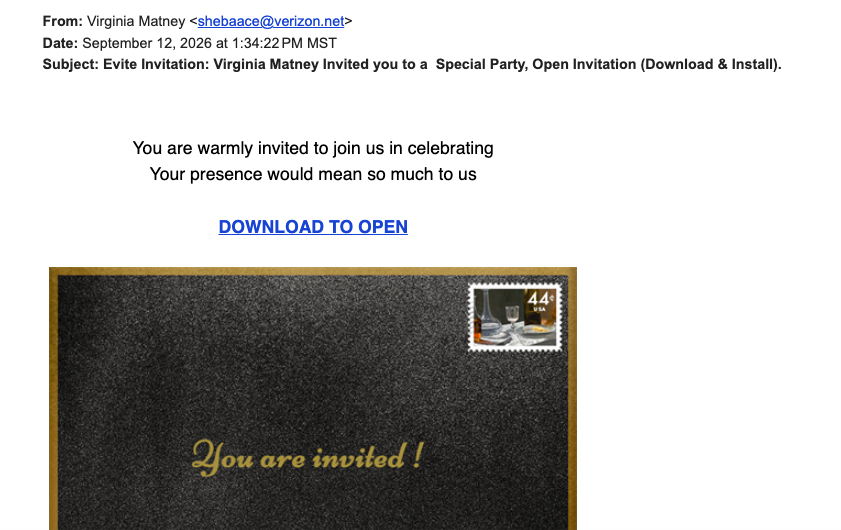
The fake invitation we received. Sender's name blurred for privacy.
No name of an event. No date. No location. Just a warm little opening line about celebrating something, and a subject line that read: "Open Invitation (Download & Install)."
That last part is what stopped me.
The Tactic: "Download & Install"
Real invitations, whether they come from Evite, Paperless Post, or a friend forwarding you a link, never ask you to download or install anything. You click, you see the party details, you RSVP. That's it.
The moment an "invitation" asks you to install something, it's not an invitation anymore. It's an attempt to get software onto your device. And once that happens, the scammer isn't after your RSVP. They're after your accounts, your passwords, or control of your device itself.
That's not a guess. Versions of this scam have been caught installing remote access software that lets a stranger see your screen, open your files, and grab your saved passwords. Other versions send you to a fake login page to steal your email password. Earlier this year, the FTC warned that once scammers get into your email, they use it to send the same fake invitation to everyone you know.
Why It Works
This one is clever because it borrows trust from something ordinary. Nobody thinks twice about a party invite. It doesn't trigger the same alarm bells a fake bank alert or a tax scam might.
That's exactly why scammers use it. The less threatening something looks, the less scrutiny it gets, and the more likely you are to click without thinking. And with the holidays coming, everyone's inbox is about to be full of real invitations too, which makes a fake one even easier to slip past you.
Here's the part that catches even careful people: these often come from someone you actually know. When a friend's email gets hacked, the scam goes out to their whole contact list under their name. So a familiar name on the invitation is not proof it's real.
The Red Flags in This One
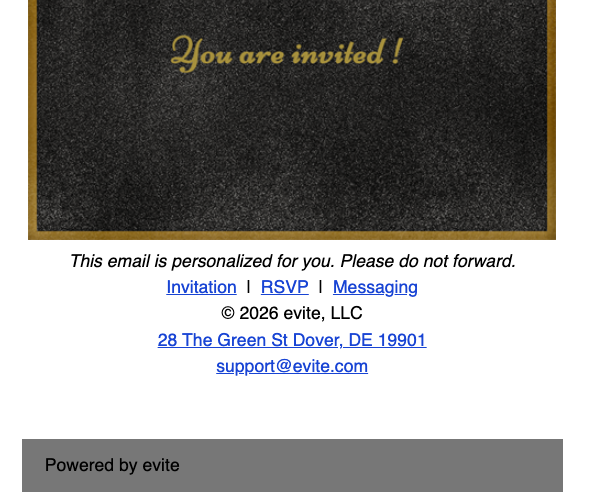
The footer copies Evite's branding, address, and support email to look legitimate.
A subject line asking you to "download and install"
No actual event details anywhere in the body: no host, no date, no location
A generic, fill-in-the-blank feel to the message itself
"Please do not forward" language. Scammers copy footer text like this from real emails to look legitimate, and it also discourages you from showing it to someone else before you act.
A sender email address that doesn't match the company it claims to be from.
That last one matters more than people realize. This "Evite" came from a personal @verizon.net address. Evite says its real emails only come from evite.com, and real Evite links go to evite.com or evite.me. A personal email address standing in for a big brand name is one of the fastest ways to spot a fake.
Ask Yourself
Was I expecting an invitation from this person, and would they really send it this way?
Does this email include real details, or does it just ask me to click and trust it?
Why would a legitimate invitation ever need me to download or install something?
What to Do Instead
Don't click the link. Don't download anything.
If you recognize the name and want to know if it's real, reach out to that person directly with a text or a phone call, using contact information you already have for them, not anything inside the email.
If you don't recognize the name, report it as phishing in your email app and delete it. You haven't missed a party. You've dodged one.
If You Already Clicked
It happens. Don't panic, just act quickly:
If you downloaded or installed anything, disconnect that device from the internet right away.
Change your email password first, then your banking and other important passwords. Do it from a different device you know is clean.
Turn on two-step verification for your email and bank accounts.
Run a security scan on the device, or have someone you trust check it.
Watch your bank and credit card accounts for anything you don't recognize.
Give your contacts a heads-up that a fake invitation may have gone out under your name.
Report it to the FTC at ReportFraud.ftc.gov.
Remember
An invitation should never ask for your trust before it gives you any details. If a message wants you to install something before it will tell you what you're even being invited to, that's not an invitation. That's the con.
With Halloween, Thanksgiving, Christmas, and New Year's all coming up fast, this scam is only going to show up more often. Share this with the people you love, especially the ones who'd click first and ask questions later.
Sources
How To Tell The Difference Between A Real Evite And A Phishing Email, Evite
FTC warns about email scam masking as party invitations, ABC News
Hackers Are Using Fake Invitations to Take Over Your PC, Techlicious
Prepared, Not Paranoid. Protecting the Most Vulnerable Among Us.