How Oversharing Hands Scammers the Keys, and How to Take Them Back
By Larry Betz | Prepared Not Paranoid https://www.preparednotparanoid.com/
Social media quiz scams don't feel like scams. They feel like fun. But the questions they ask are often the same questions your bank asks when you forget your password. Here's what to watch for, and how to clean up what your family has already shared.
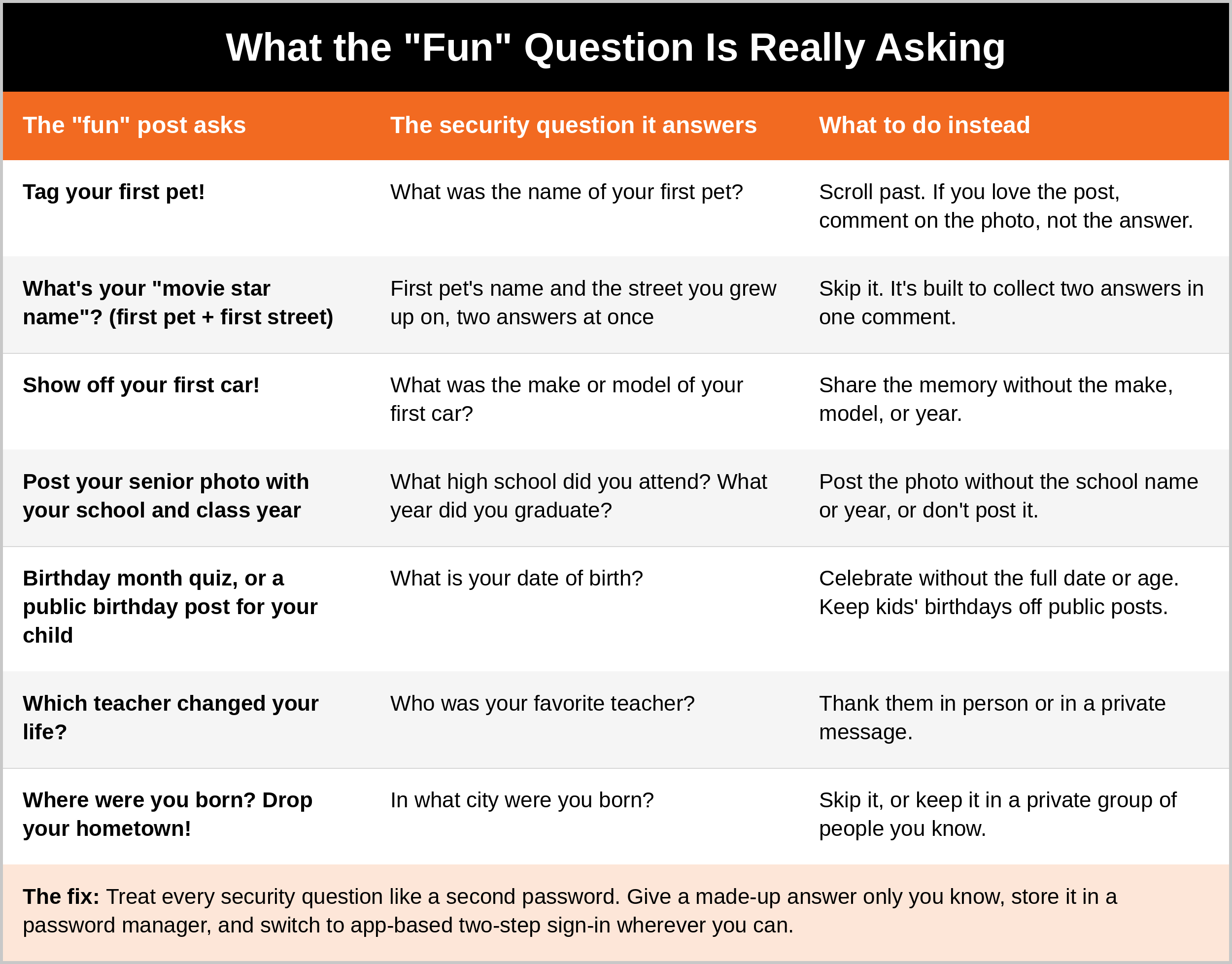
"What was your first pet's name? Tag a friend!"
"Your movie star name is your first pet plus the street you grew up on. Drop yours below!"
You've seen them. Maybe you've answered a few. They're harmless, right?
Now think about the last time you reset a password. What did the bank ask you? What was the name of your first pet? What street did you grow up on?
That's not a coincidence. That's the point.
In Part 1, we looked at how the apps keep your family scrolling. Part 2 is about what your family gives away while they're scrolling. This series is built on Hooked: The Hidden Dangers of Social Media, written by Justin Nichols.
The Quiz Is the Bait
The Federal Trade Commission has warned that questions about your first car, your favorite hobby, and the high school you attended are common to both online quizzes and account security questions. The Better Business Bureau has warned about the same thing for years, adding your mother's maiden name, your first pet, and the street you grew up on to the list.
Not every quiz is a scam. Plenty are just fun. The problem is you can't tell which is which, and once you post your answer in the comments, it's public. Anyone can read it. Anyone can save it.
A quiz doesn't have to be a scam to hurt you. It just has to collect the answers.
What Scammers Do With Your Answers
Here's what a stranger can do with a handful of "fun" answers:
Guess your security questions. Your first pet, your first car, and your high school can be enough to reset an account that still uses those questions.
Pretend to be you. The BBB warns that quiz answers can help a scammer impersonate you to your friends and family. The more they know about your life, the more believable the message.
Build a scam made just for you. Your hometown, your kids' names, and your dog's name make a fake message sound like it came from someone who knows you.
Spread the trap. The FTC says some scammers hack a social media account, then send the account owner's friends a malware link dressed up as a quiz.
Social media is where a lot of this starts. In 2025, nearly 30% of people who reported losing money to a scam said it started on social media, according to the FTC. Reported losses hit $2.1 billion, about eight times the 2020 figure.
Get the free Take Your Family Off the Map checklist. Remove your family from people-search sites, take your home's photos off real estate sites, blur your house on map apps, lock down your accounts, and keep a follow-up list so the listings don't sneak back. Get it free here
The Security Question Problem
Here's something most people don't know. NIST, the federal agency that writes the digital identity guidelines, no longer accepts security questions as a safe way to prove who you are. The answers are too easy to find or guess.
Many banks, utilities, and phone carriers still use them anyway. So until they catch up, you have to protect yourself.
The fix is simple: stop telling the truth.
The FTC says to treat security questions like extra passwords and use random answers. Their own example: if a site asks for your mother's maiden name, enter something like "Parmesan."
Give a made-up answer to every security question. It only has to make sense to you.
Save it in your password manager next to that account's password, so you never have to remember it.
Use a different answer on every account. If one site leaks, the rest stay safe.
Turn on app-based two-step sign-in or a passkey wherever you can. For the full walkthrough, see Cyber Safety- Part 4: Passwords and Two-Factor Sign-In.
Once your real answers are gone, the quiz can ask all it wants.
Oversharing Goes Beyond Quizzes
Quizzes are the easy example. Everyday posts give away just as much:
Birthday posts with your child's full date of birth and age
First-day-of-school photos with the school name, the teacher, and the grade on the sign
Vacation posts while you're still gone. "Leaving for a week!" on Friday tells people your house is empty.
The background. A house number, a street sign, a school logo, or a license plate can say more than the caption.
Location tags and live posts that show exactly where your family is right now
Memory posts about your first car, your childhood home, or the dog you grew up with
None of these feel dangerous on their own. Put them together, and a stranger has your family's birthdays, your kids' school, your routine, and the answers to half your security questions.
For the questions to teach your kids before they post, see Rule 12 in Who's Talking to Your Kids? Part 4: Family Tech Rules That Actually Work.
Ask Yourself
Have I ever answered a "fun" quiz in the comments? What did I give away?
Do any of my accounts still use my real first pet, first car, or high school as a security answer?
Could a stranger find my child's school, birthday, or after-school routine from my public posts?
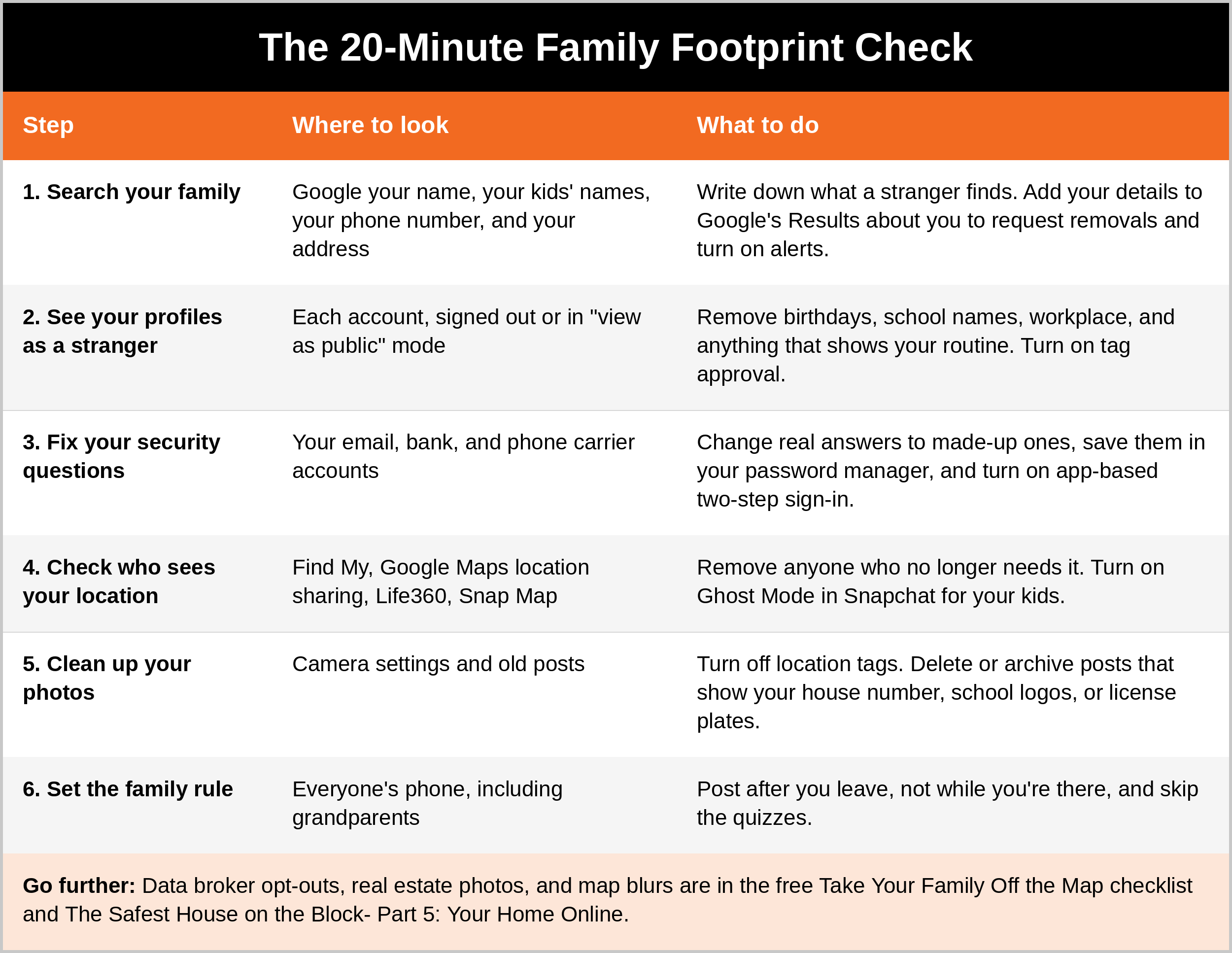
The 20-Minute Family Footprint Check
You can't erase everything. You can make your family a lot harder to find than the next family. Sit down with your spouse and your older kids and do this together.
1. Search your family. Google your name, your kids' names, your phone number, and your address. Write down what a stranger would find. Then add your details to Google's "Results about you" (search for it, or tap your profile picture in the Google app) to request removals and turn on alerts.
2. See your profiles the way a stranger does. Open each account while signed out, or use the "view as public" option. Remove birthdays, school names, your workplace, and anything that shows your routine. Turn on tag approval. Do the same with your spouse and kids. A family is only as private as its most public member.
3. Fix your security questions. Start with your email, your bank, and your phone carrier. Swap real answers for made-up ones and save them in your password manager.
4. Check who sees your location. Find My, Google Maps location sharing, Life360, and Snap Map all show your location to other people. Remove anyone who no longer needs it. Turn on Ghost Mode in Snapchat for your kids.
5. Clean up your photos. Turn off location tags in your camera settings. Scroll back through your public posts and delete or archive the ones that show your house number, a school logo, or a license plate.
6. Set the family rule. Post after you leave, not while you're there, and skip the quizzes. That goes for everyone, grandparents included.
For data broker opt-outs, real estate photos, and map blurs, see The Safest House on the Block- Part 5: Your Home Online and the free Take Your Family Off the Map checklist.
The Prepared Protector checks the whole family.
Your accounts can be locked down tight, but if your spouse posts the kids' school, or Grandma answers every quiz in her feed, the family is still exposed. Have the talk once, kindly, and help each other fix the settings. The Prepared Protector is someone who's decided that loving someone means being ready for them, not just hoping things go fine.
What to Say
To a friend who tags you in a quiz: "I love the trip down memory lane, but I don't answer those. A lot of them line up with bank security questions."
To your teen: "You can post. Just don't post the stuff that answers security questions or shows where you are right now. Post the beach after you leave the beach."
To your parents or grandparents: "Those quizzes in your feed are fishing for the same answers your bank asks for. Let's skip them, and let's change your security answers together this weekend."
To your spouse: "Before we post the kids' birthday or first day of school, let's leave off the full date and the school name."
5 Quick Wins You Can Start Today
Stop answering quizzes and "tag a friend" memory posts.
Change the security answers on your email and bank to made-up ones, saved in your password manager.
Google your family's names and your address, and add them to Google's Results about you.
Review who can see your location on every phone in the house.
Make "post after you leave" a family rule.
Remember
The quiz isn't asking about your first pet because it cares. It's asking because your bank does. Keep the memories. Keep the answers to yourself.
Coming Up in Part 3
Cyberbullying: When It Follows Your Child Home. Bullying used to stop at the school door. Now it lives in your child's pocket. How to spot it, what to say, and what to do when it happens.
Quick Answers
Are social media quizzes a scam?
Not all of them, but many ask the same things banks use as security questions, like your first pet, first car, or high school. The FTC and the Better Business Bureau warn that scammers use quiz answers to get into accounts and to impersonate people to their friends and family.
What should I put for my security questions?
Treat them like extra passwords. The FTC recommends random answers, for example "Parmesan" for your mother's maiden name. Use a different made-up answer on every account and save them in a password manager.
Are security questions still safe to use?
Not on their own. NIST no longer recognizes security questions as an acceptable way to prove who you are, because the answers can be found or guessed. Turn on app-based two-step sign-in or a passkey wherever you can.
How do I reduce my family's digital footprint?
Search your family's names and address, add your details to Google's Results about you, review your profiles while signed out, limit who sees your location, turn off photo location tags, and opt out of people-search sites. The free Take Your Family Off the Map checklist walks you through it.
Get Started Today
Get the free Take Your Family Off the Map checklist. Remove your family from people-search sites, take your home off real estate sites and map apps, lock down your accounts, and keep a follow-up list. [Get it here: https://www.preparednotparanoid.com/downloads-cyber-safety]
Go Deeper
Hooked: The Hidden Dangers of Social Media (Written by Justin Nichols). This post shows how a "fun" quiz turns into a security risk. Hooked goes further: how fraud spreads through your feed, how romance and job scams work, how AI and deepfakes are being used against families, and how to take your family's time and privacy back. Get it here
Cyber Safety: A Beginner's Guide to Securing Your Digital Footprint and Avoiding Online Scams. Passwords, privacy settings, and protecting your kids online, step by step and without the jargon. Get it here
The Family Safety Toolkit. 20 complete safety checklists, including the full Family Tech Rules checklist with privacy and location rules for every age. Get it here
Tools I recommend: Security keys, privacy screens, data blockers, and other digital safety tools are in my Cyber Safety Amazon store.
The Full Series
Part 2: The "Fun" Quiz That Answers Your Security Questions (you are here)
Related Reading
References
Federal Trade Commission, Don't answer another online quiz question until you read this (Jan 2023): https://consumer.ftc.gov/consumer-alerts/2023/01/dont-answer-another-online-quiz-question-until-you-read
Federal Trade Commission, Data Spotlight: Reported losses to scams on social media eight times higher than in 2020 (April 2026): https://www.ftc.gov/news-events/data-visualizations/data-spotlight/2026/04/reported-losses-scams-social-media-eight-times-higher-2020
Better Business Bureau, warnings on social media quiz scams (via WTHR, Fox43, and the BBB Louisville office): https://www.army.mil/article/217096/bbb_warning_be_careful_of_facebook_quizzes
AARP, Why You Should Think Twice Before Taking an Online Quiz (2023): https://www.aarp.org/money/scams-fraud/info-2023/online-quiz.html
NIST, SP 800-63 Digital Identity Guidelines FAQ (knowledge-based authentication): https://pages.nist.gov/800-63-FAQ/
NIST, SP 800-63B-4 Authentication and Authenticator Management (2025): https://pages.nist.gov/800-63-4/sp800-63b/authenticators
Google, Results about you now covers government ID numbers (Feb 2026): https://blog.google/products-and-platforms/products/search/results-about-you-government-id-numbers/
Hooked: The Hidden Dangers of Social Media, Justin Nichols (2025)
These suggestions are intended to help you and your family build awareness, confidence, and safer decision-making habits. No safety plan, checklist, or training can guarantee 100% protection. There will always be people who try to exploit vulnerability, opportunity, trust, or positions of power. The goal is not to create fear, but to help guide families toward more informed, prepared, and practical safety decisions in everyday life. Privacy laws and data removal options vary by state, so check your state and county for the rules where you live. App settings and website steps change often, so check the current menus on your family's devices. As an Amazon Associate, I earn from qualifying purchases.
If you are in immediate danger, call 911. If you think someone has gotten into your accounts or stolen your identity, report it at IdentityTheft.gov, and report quiz scams at ReportFraud.ftc.gov.
Awareness gives you time. Time gives you options.
The Prepared Protector is someone who's decided that loving someone means being ready for them, not just hoping things go fine.
Prepared Not Paranoid. Protecting the Most Vulnerable Among Us.