Why Your Kids Can't Put the Phone Down, and the Settings That Help
By Larry Betz | Prepared Not Paranoid https://www.preparednotparanoid.com/
Social media addiction isn't a character flaw. The apps are built to be hard to put down, and kids feel it first. Once you know how the hook works, you can turn it down.
You tell your kid to put the phone away. Five minutes later, it's back in their hand. You think, "Where's their self-control?"
Here's the truth: the app is working exactly the way it was built to work.
About 1 in 5 teens say they're on TikTok or YouTube "almost constantly," and nearly half say they're online almost constantly, according to the Pew Research Center's 2025 survey of U.S. teens.
That's not an accident. It's a business model. The longer your child scrolls, the more ads they see.
This series is built on Hooked: The Hidden Dangers of Social Media, written by Justin Nichols. Part 1 shows you how the hook works and what you can change tonight.
The States Said It Out Loud
In August 2026, Meta agreed to pay up to $17.1 billion to settle claims from dozens of states that Instagram and Facebook were designed to hook young people. The settlement cut a trial short in Oakland, California.
Look at what Meta agreed to change for teens:
A 2-hour daily limit across Instagram and Facebook, on by default. Only a parent can lift it.
Most of the apps shut down from midnight to 6 a.m.
Notifications muted from 8 a.m. to 3 p.m. on school days.
Like counts hidden by default.
Read that list again. Every fix points to a feature that keeps kids scrolling.
Here's the catch. Those rules cover Instagram and Facebook, in the U.S. only. TikTok, YouTube, and Snapchat aren't part of the deal. Neither is the next new app your kid finds.
A court can set rules for an app. You set the rules for your house.
How the Addiction Machine Works
Former Google design ethicist Tristan Harris compared checking your phone to playing a slot machine. You pull, and you don't know what you'll get. Maybe a like. Maybe a message. Maybe nothing. That not-knowing is what keeps you pulling.
Here are the five hooks to know:
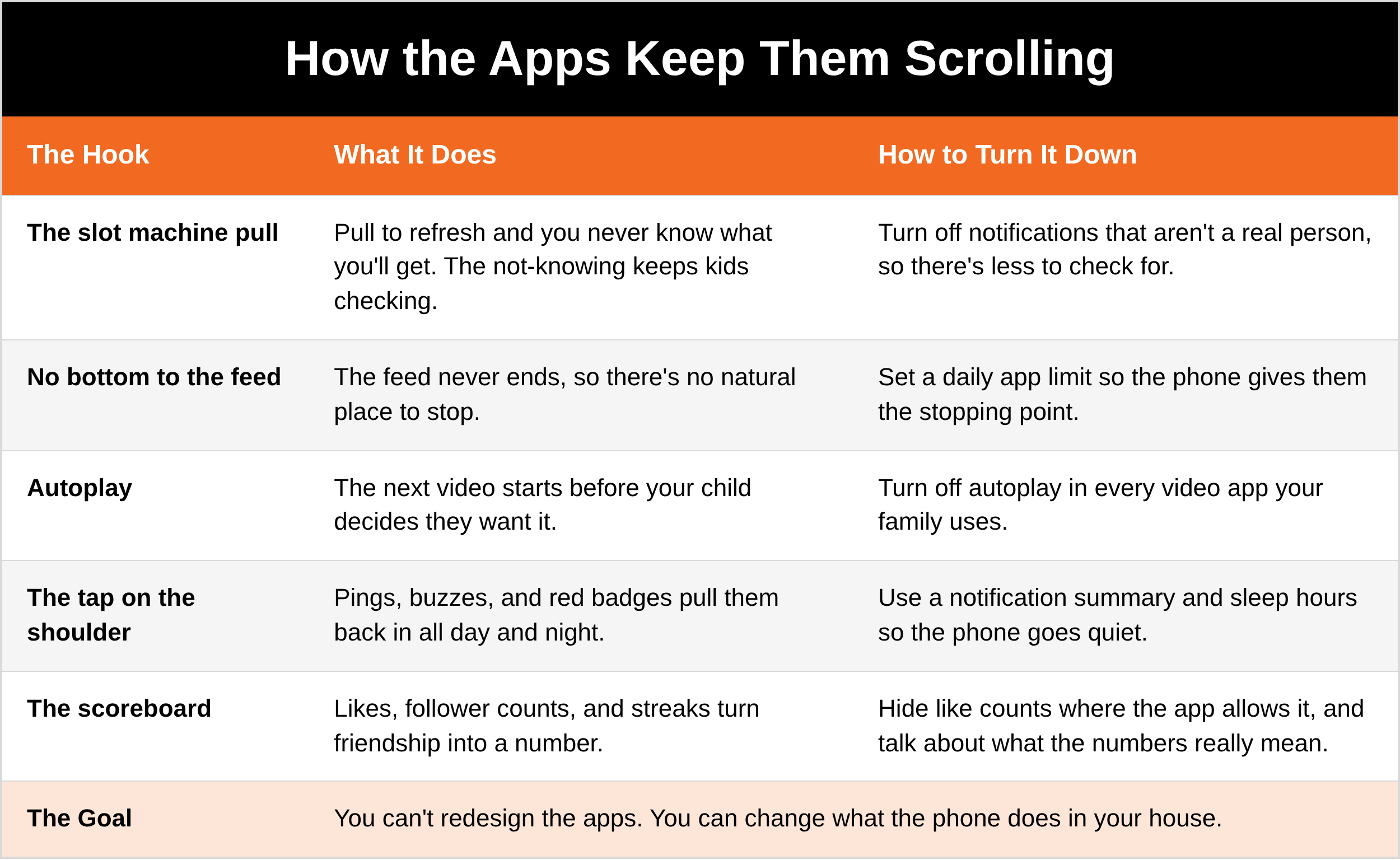
1. The slot machine pull. Pull down to refresh, and the feed spins. Sometimes there's something good. Usually there isn't. The "sometimes" is the hook.
2. No bottom. A book has a last page. The feed doesn't. There's no natural place to stop, so kids don't.
3. The next one starts on its own. Autoplay rolls the next video before your child decides whether they want it.
4. The tap on the shoulder. Every ping, buzz, and red badge pulls them back in. Even a phone face-down on the desk is calling.
5. The scoreboard. Likes, follower counts, and streaks turn friendship into a number. Miss a day and the streak dies, so kids log in to protect it.
Get the free Family Social Media Reset. Notifications, phone-free zones, a charging spot outside the bedroom, sleep settings, what to do about cyberbullying, and a sleepover card, with separate pages for ages 8 to 12 and 13 to 17. Get it free here
Why Kids Get Hooked Faster
The U.S. Surgeon General's 2023 advisory on social media calls the years from 10 to 19 a highly sensitive period of brain development. The part of the brain that says "that's enough, put it down" is still being built.
The advisory also found:
Teens who spend more than 3 hours a day on social media face double the risk of depression and anxiety symptoms.
Teens average 3.5 hours a day.
One-third or more of girls ages 11 to 15 say they feel "addicted" to certain platforms.
The hardest hit is sleep. A phone in the bedroom keeps buzzing, keeps glowing, and keeps offering "one more." If your kid is tired every morning, start there.
Signs Your Child Is Hooked
Watch for these patterns, not just one bad night:
Reaching for the phone with no notification, out of habit
Anger or panic when the phone is taken away or the Wi-Fi goes out
Losing track of time, again and again
Feeling worse after scrolling, not better
Homework, sleep, or friends slipping because of "just five more minutes"
If you see yourself on that list too, you're not alone. Adults are built the same way.
Ask Yourself
Does my child pick up the phone because they want something, or because it's there?
How many notifications does my child's phone send in a day? Have I ever looked?
What does my own phone use teach my kids?
Turn the Machine Down: The 10-Minute Phone Reset
You can't redesign the apps. You can change what the phone does in your house. Sit down with your child and do this together. It takes about 10 minutes per phone.
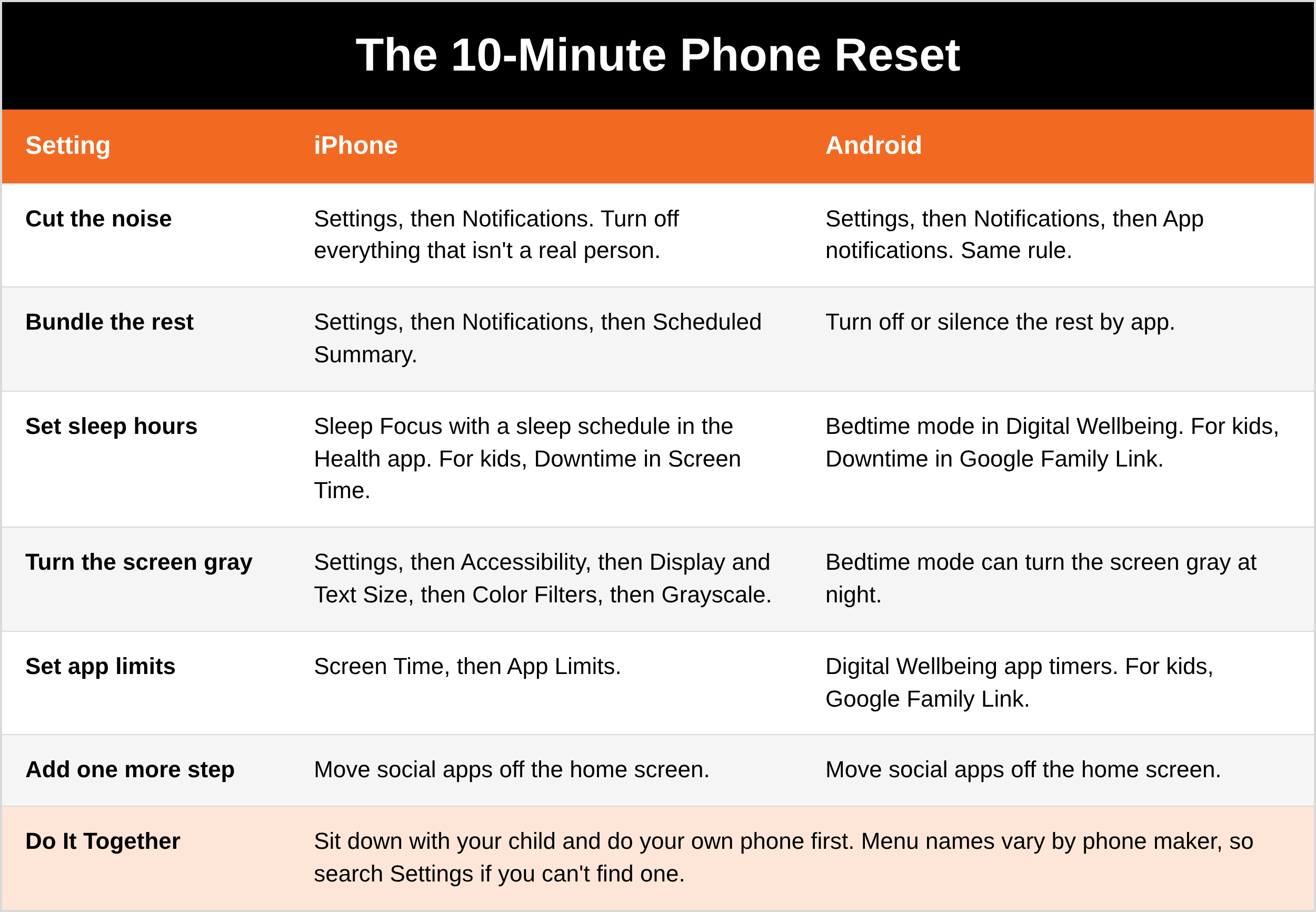
Turn off every notification that isn't a real person. Calls and texts from family stay on. Likes, "suggested for you," and game alerts go off. On iPhone: Settings, then Notifications. On Android: Settings, then Notifications, then App notifications.
Bundle the rest. On iPhone, Scheduled Summary holds the non-urgent alerts and delivers them once or twice a day instead of all day.
Set sleep hours. On iPhone, Sleep Focus follows the sleep schedule in the Health app and silences the phone overnight. On Android, Bedtime mode in Digital Wellbeing does the same. For a child's phone, use Downtime in Screen Time (iPhone) or Google Family Link (Android) so the limits can't be turned off.
Turn the screen gray. Color is part of the pull. Grayscale makes the feed boring. On iPhone: Settings, then Accessibility, then Display and Text Size, then Color Filters. On Android, Bedtime mode can turn the screen gray at night.
Set app limits. Screen Time on iPhone and Digital Wellbeing on Android let you put a daily timer on the apps that eat the most time.
Turn off autoplay inside the video apps your family uses, so the next video waits for a decision.
Move the apps off the home screen. One extra swipe gives your child a second to ask, "Do I actually want this?"
Menu names change by phone maker and software update. If you can't find a setting, search for it in the Settings app.
For the house rules that go with these settings, like a family media plan and charging phones outside the bedroom, see Who's Talking to Your Kids? Part 4: Family Tech Rules That Actually Work.
The Prepared Protector goes first. Before you reset your child's phone, open Screen Time or Digital Wellbeing on your own. Look at the number. Then turn off your own notifications, set your own sleep hours, and put your phone away at dinner. Kids learn more from what you do than from what you say. The Prepared Protector is someone who's decided that loving someone means being ready for them, not just hoping things go fine.
What to Say
To your younger child: "These apps are built to be hard to stop. That's not your fault. Let's set up your phone so it helps you stop."
To your teen: "I'm not taking your phone. I'm taking away the stuff that's designed to keep you on it. You pick which notifications stay on, and we'll check in after a week."
To yourself or your partner: "Let's do our phones first. If we expect them to put it down at dinner, we put ours down too."
5 Quick Wins You Can Start Today
Check your child's Screen Time or Digital Wellbeing report, and your own.
Turn off every notification that isn't a real person.
Set sleep hours so the phone goes quiet at bedtime.
Turn off autoplay in the video apps your family uses.
Move the most-used social apps off the home screen.
Remember
Your child isn't weak. The app is strong. Once you know how the hook works, you can turn the machine down and give your kid their time, their sleep, and their attention back.
Coming Up in Part 2
The "Fun" Quiz That Answers Your Security Questions. Your first pet, your first car, the street you grew up on. Why those harmless quizzes are a gift to scammers, and how to clean up what your family has already shared.
Quick Answers
Is social media addictive by design?
Many features are built to keep people scrolling: endless feeds, autoplay, notifications, and likes that come at random, like a slot machine. In 2026, Meta agreed to pay up to $17.1 billion to settle claims from dozens of states that Instagram and Facebook were designed to hook young people.
How much social media is too much for a teen?
The U.S. Surgeon General's 2023 advisory found that teens who spend more than 3 hours a day on social media face double the risk of depression and anxiety symptoms. Teens average about 3.5 hours a day.
What are the signs my child is addicted to their phone?
Reaching for the phone with no notification, anger or panic when it's taken away, losing track of time, feeling worse after scrolling, and sleep, homework, or friendships slipping.
How do I limit my child's screen time on iPhone or Android?
On iPhone, use Screen Time for Downtime, App Limits, and Communication Limits. On Android, use Google Family Link for daily limits, Downtime, and app approvals. Turning off notifications and setting sleep hours helps too.
Get Started Today
Get the free Family Social Media Reset. Notifications, phone-free zones, a charging spot outside the bedroom, sleep settings, what to do about cyberbullying, and a sleepover card, with pages for ages 8 to 12 and 13 to 17. [Get it here: https://www.preparednotparanoid.com/downloads-cyber-safety]
Go Deeper
Hooked: The Hidden Dangers of Social Media (Written by Justin Nichols). This post shows how the hook works and how to turn it down. Hooked goes further: what social media does to mental health and body image, how the algorithm learns what keeps your child scrolling, why adults get hooked too, and a 5-step plan to take your family's time back. Get it here
The Family Safety Toolkit. 20 complete safety checklists, including the full Family Tech Rules checklist for every age. Get it here
Tools I recommend: A family charging station outside the bedroom, a simple alarm clock so the phone doesn't have to be one, and other tools for kids and families are in my Children's Safety Amazon store.
The Full Series
Part 1: The Addiction Machine (you are here)
Related Reading
Who's Talking to Your Kids? Part 4: Family Tech Rules That Actually Work
Who's Talking to Your Kids? Part 1: How Online Grooming Works
References
Pew Research Center, Teens, Social Media and AI Chatbots 2025 (Dec 2025): https://www.pewresearch.org/internet/2025/12/09/teens-social-media-and-ai-chatbots-2025/
U.S. Surgeon General, Social Media and Youth Mental Health Advisory (2023): https://www.hhs.gov/sites/default/files/sg-youth-mental-health-social-media-advisory.pdf
CBS News, Meta settles social media addiction suit with states for up to $17.1 billion (Aug 2026): https://www.cbsnews.com/news/meta-settles-social-media-addiction-lawsuit/
PBS NewsHour / Associated Press, With time limits and stronger age checks, Meta's new rules for kids go further (Aug 2026): https://www.pbs.org/newshour/nation/with-time-limits-and-stronger-age-checks-metas-new-rules-for-kids-go-further-critics-say-its-not-enough
ABC News, Meta settlement sparks social media changes for teens: What parents need to know (Aug 2026): https://abc7ny.com/story/meta-settlement-sparks-social-media-changes-teens-what-parents-need-know/19743885/
New York Attorney General, Attorney General James Secures Up to $17.1 Billion and Groundbreaking Reforms from Meta (Aug 2026): https://ag.ny.gov/press-release/2026/attorney-general-james-secures-171-billion-and-groundbreaking-reforms-meta
Tristan Harris, How Technology Is Hijacking Your Mind (2016): https://courses.cs.washington.edu/courses/cse481p/23sp/readings/W3S1/how-technology-hijacks-peoples-minds-TristanHarris.pdf
Apple, iPhone User Guide: Scheduled Summary, Focus, and Screen Time: https://support.apple.com/guide/iphone/be-in-the-moment-iph041a4c4ea/ios
Hooked: The Hidden Dangers of Social Media, Justin Nichols (2025)
These suggestions are intended to help you and your family build awareness, confidence, and safer decision-making habits. No safety plan, checklist, or training can guarantee 100% protection. There will always be people who try to exploit vulnerability, opportunity, trust, or positions of power. The goal is not to create fear, but to help guide families toward more informed, prepared, and practical safety decisions in everyday life. This article is not medical or mental health advice. If you're worried about your child's mood, sleep, or behavior, talk with their doctor or a licensed counselor. Phone settings and app features change often, so check the current menus on your family's devices. As an Amazon Associate, I earn from qualifying purchases.
If you are in immediate danger, call 911. If your child is struggling or talking about hurting themselves, call or text the 988 Suicide and Crisis Lifeline at 988.
Awareness gives you time. Time gives you options.
The Prepared Protector is someone who's decided that loving someone means being ready for them, not just hoping things go fine.
Prepared Not Paranoid. Protecting the Most Vulnerable Among Us.