Two Simple Locks That Keep Scammers Out of Your Accounts, Even If They Steal Your Password
By Larry Betz | Prepared Not Paranoid https://www.preparednotparanoid.com/
Two locks keep scammers out of your accounts: one strong passphrase and two-factor authentication. Even if a scammer gets your password, two-factor authentication means they still can't get in without the second lock. Start with your email tonight.
Here's something most families don't know. There's a good chance at least one of your passwords is already out there. In a 2026 FIDO Alliance survey of 11,000 people, one in three said they'd had an account compromised or caught up in a breach.
It's usually not because you did anything wrong. A store, an app, or a website you signed up for years ago got hacked, and the list of email addresses and passwords ended up for sale. It happens all the time.
What happens next is simple. Criminals take that list and try your email and password on your bank, your Amazon account, and your email. If you use the same password in more than one place, one break-in becomes five.
The good news: you don't need to be a tech person to stop this. You need two locks on the door.
Lock 1: One Strong Passphrase
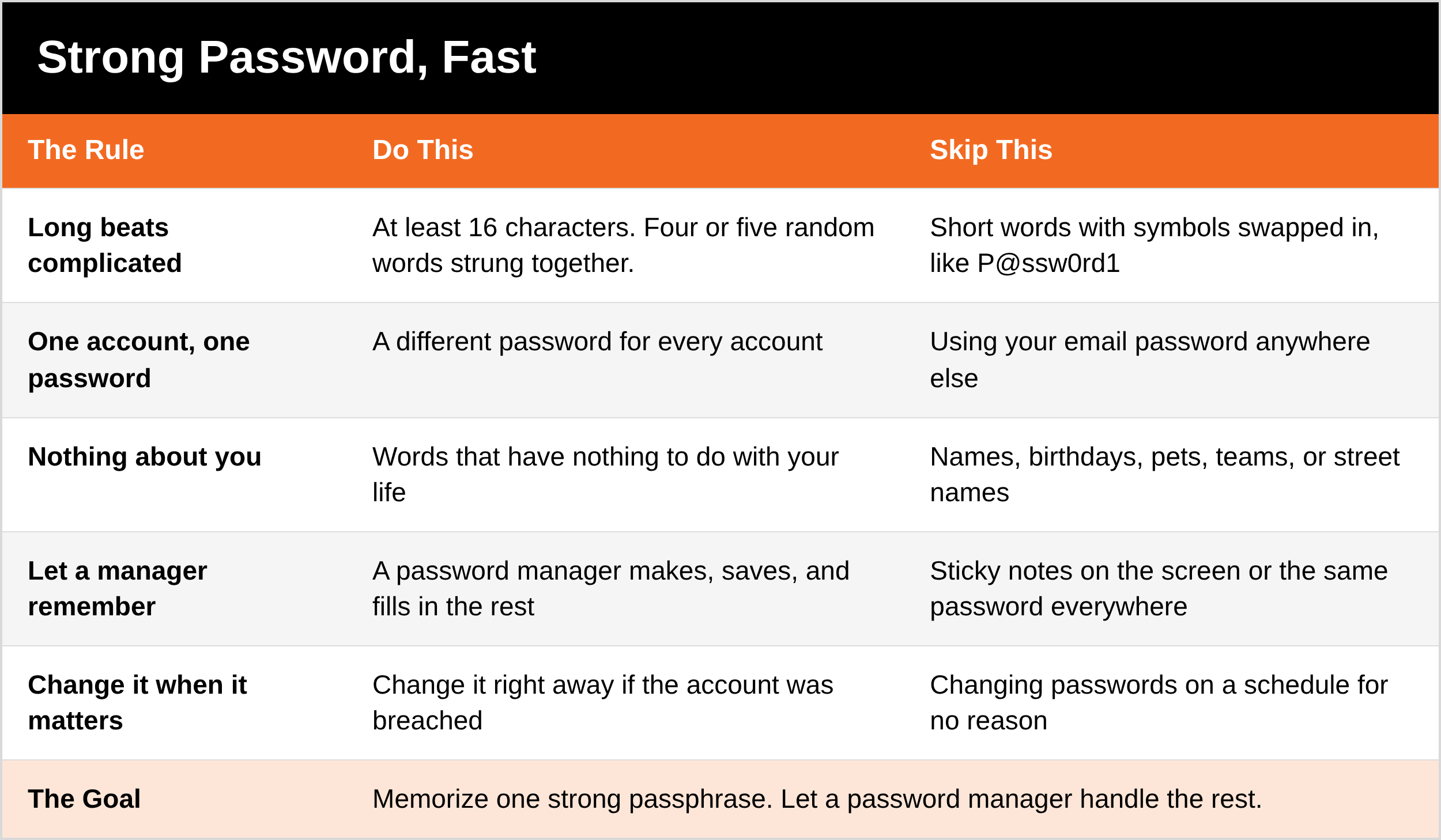
Forget everything you were taught about passwords. The old rules (a capital letter, a number, a symbol, change it every 90 days) made passwords hard for us to remember and easy for computers to guess.
The current federal guidance from NIST, the agency that sets the standard, says it plainly: length matters more than complexity, and you only need to change a password when there's a reason to, like a breach. CISA, the nation's cyber defense agency, recommends at least 16 characters.
The easiest way to get there is a passphrase: four or five random words strung together.
cactus-lantern-pickle-harbor-sunrise
That's 36 characters. It's easy to picture, easy to type, and very hard for a computer to crack. (Don't use that one. Make your own.)
Three rules make it work:
Random words. Words that have nothing to do with you. No kids' names, pets, birthdays, teams, or street names. Scammers check your social media first.
One account, one password. Your email password should never be used anywhere else. Ever.
If a site still demands a number or symbol, add one to the end. That's fine.
Now you're thinking, "Larry, I have 80 accounts. I can't remember 80 passphrases." You're right. Nobody can. That's what a password manager is for. It creates a strong password for every account, saves it, and fills it in for you. You remember one strong passphrase to open it, and it remembers the rest.
Your phone already has one built in, and that's a good start. Choosing the right password manager for your whole family, especially if some of you use iPhones and some use Android, is a bigger conversation. I walk through it in the Cyber Safety guide.
Get the free Scam Stopper Plan. The 4 D's and Stop, Verify, Tell in one plan, plus the red flags to watch for, what to do if you already clicked, and a fridge card for every adult in the house. Get it free here
Lock 2: Turn On Two-Factor Sign-In
A strong password is your first lock. Two-factor authentication is the deadbolt.
It means signing in takes two things: something you know (your password) and something you have (your phone). Even if a scammer has your password, they're stuck at the door without the second piece. The FTC calls it one of the best ways to protect your accounts.
You'll see it called two-factor authentication, 2FA, two-step verification, or multi-factor authentication. It's all the same idea. Most sites offer it, but you usually have to turn it on yourself. Look in the account's security settings.
Start With Your Email
If you only do one account tonight, make it your email.
Your email is the master key to your whole digital life. Every "forgot your password?" link goes there. If a scammer gets into your email, they can reset the password on your bank, your shopping accounts, and your social media, and lock you out of all of them.
Email first. Then your bank and credit cards. Then everything else.
Which Second Lock Should You Use?
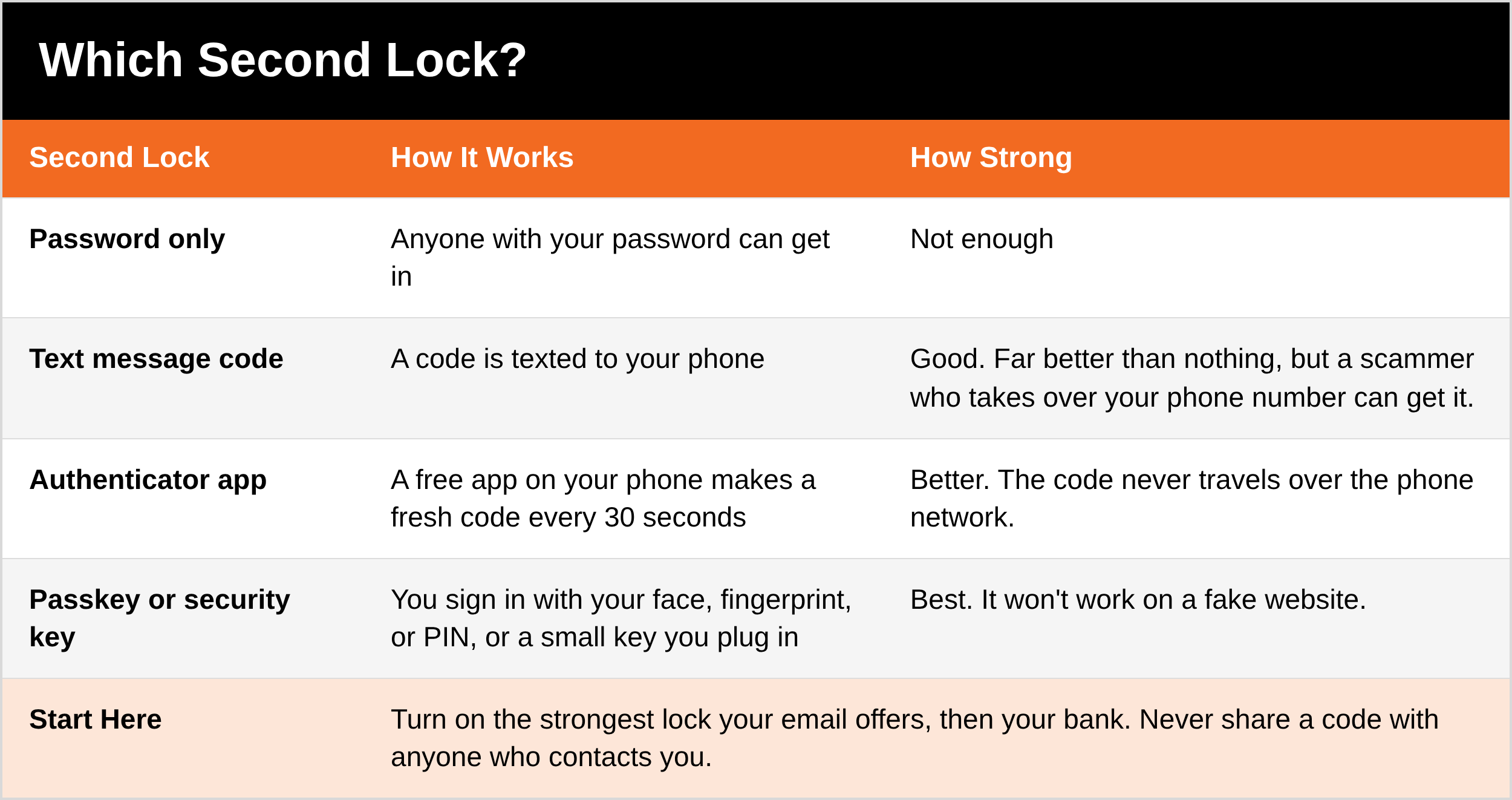
Not all second locks are equal.
A text message code is good, and far better than nothing. The FTC says it's the least secure option, because a scammer who takes over your phone number can get your texts too.
An authenticator app is better. Free apps like Google Authenticator and Microsoft Authenticator make a fresh code on your phone every 30 seconds, and the code never travels over the phone network.
A passkey or a security key is best. A passkey signs you in the same way you unlock your phone, with your face, fingerprint, or PIN. CISA calls this kind of sign-in the gold standard, because it won't work on a fake website.
Use the strongest option the account offers. If text codes are all it has, use text codes.
The Scam That Goes After Your Code
Once you turn on two-factor sign-in, scammers have one move left. They try to get you to hand them the code.
It usually comes right after they try to sign in as you. Your phone dings with a real code. Then a text or call shows up:
WARNING
FRAUD ALERT: We blocked a suspicious sign-in on your account. To confirm it's really you and keep your account open, reply with the 6-digit code we just sent.
This is what the fake verification code text looks like. It's a scam. Never share the code.
It sounds like your bank protecting you. It's the opposite. That code is the second key to your account, and they're asking you to hand it over.
The FTC's rule is simple: anyone who asks you for a verification code is a scammer. Your bank will never call or text and ask you to read it back. If you get one of these, don't reply. Call your bank using the number on the back of your card.
The Prepared Protector locks the front door first.
You wouldn't put a deadbolt on the garage and leave the front door open. Your email is the front door to your family's digital life. Give it a strong passphrase that's used nowhere else, turn on the second lock, and make sure your parents' email has both too. The Prepared Protector is someone who's decided that loving someone means being ready for them, not just hoping things go fine.
What to Say
To anyone who asks for a code from your phone: "I don't share codes." Then hang up.
To your parents: "If anyone ever asks you for the code that came to your phone, it's a scam, even if they say they're the bank. Don't read it to them. Hang up and call me."
To your kids: "Your passwords are like your toothbrush. Don't share them, not even with your best friend."
Ask Yourself
Do I use my email password anywhere else?
If someone stole my password today, is there a second lock stopping them?
Do my parents have two-factor sign-in on their email and bank?
5 Quick Wins You Can Start Today
Turn on two-factor sign-in for your email tonight.
If your email password is used anywhere else, change it to a new passphrase of at least 16 characters.
Open your phone's built-in password manager and look at its security warnings. It flags passwords that are reused or were found in a breach.
Download a free authenticator app and move your most important accounts to it.
Make it a family rule: nobody ever shares a verification code, with anyone.
Remember
Your password will get out someday. The goal is that it doesn't matter when it does. One strong passphrase on your email, a second lock on every important account, and a family rule that nobody shares a code.
Coming Up in Part 5
Catch Fraud Early: Alerts, Credit Freezes, and Virtual Cards. How to get a heads-up the minute something looks wrong, why a credit freeze is one of the best free tools you have, and how virtual card numbers keep your real card safe when you shop online.
Quick Answers
How long should a password be?
At least 16 characters, according to CISA. The easiest way to get there is a passphrase of four or five random words. Length matters more than mixing in symbols, and each account should have its own password.
Is it safe to save passwords on my phone or in my browser?
The password managers built into your phone, like Apple's Passwords app and Google Password Manager, are encrypted and far safer than reusing the same password everywhere. A dedicated password manager is often the better choice for families who use different kinds of devices.
What is two-factor authentication?
Two-factor authentication means signing in takes two things: something you know, like your password, and something you have, like your phone. Even if a scammer steals your password, they can't get in without the second piece.
Are text message codes safe enough?
A text code is much better than no second lock at all. The FTC calls it the least secure option, though, because a scammer who takes over your phone number can get your texts. An authenticator app, a passkey, or a security key is stronger.
Get Started Today
Get the free Scam Stopper Plan. The 4 D's, Stop, Verify, Tell, the red flags to watch for, what to do if you already clicked, a family plan page, and a fridge card for every adult in the house. [Get it here: https://www.preparednotparanoid.com/downloads-cyber-safety]
Go Deeper
Cyber Safety: A Beginner's Guide to Securing Your Digital Footprint and Avoiding Online Scams. This post gives you the two locks. The guide gives you the whole system: how to choose a password manager, more on two-factor sign-in and where to use it, how SIM swapping works, extra protection tips, and how to shrink your digital footprint, all in plain language. Get it here
The Family Safety Toolkit. 20 complete safety checklists, including Family Tech Rules, with the devices and accounts steps every household should have in place. Get it here
Tools I recommend: Tools that help protect your family's devices and accounts are in my Cyber Safety Amazon store.
The Full Series
Part 1: The 4 D's That Stop Most Scams
Part 2: Toll Texts, Missed Packages, and the QR-Code Mystery Box
Part 4: Passwords and Two-Factor Sign-In (you are here)
Part 5: Catch Fraud Early: Alerts, Credit Freezes, and Virtual Cards
Part 6: Your Mailbox and Your Glove Box (coming next)
Related Reading
Cyber Safety- Part 3: The Fake Virus Pop-Up and Tech Support Scams
Scam Proofing the People You Love, Part 2: "This Is Your Bank Calling"
References
National Institute of Standards and Technology, SP 800-63B-4, Digital Identity Guidelines: Authentication and Authenticator Management (July 2025): https://pages.nist.gov/800-63-4/sp800-63b.html
CISA, Secure Our World: Use Strong Passwords: https://www.cisa.gov/secure-our-world/use-strong-passwords
CISA, More than a Password (multifactor authentication): https://www.cisa.gov/MFA
CISA, Implementing Phishing-Resistant MFA (fact sheet): https://www.cisa.gov/sites/default/files/publications/fact-sheet-implementing-phishing-resistant-mfa-508c.pdf
Federal Trade Commission, Creating Strong Passwords and Other Ways To Protect Your Accounts: https://consumer.ftc.gov/articles/creating-strong-passwords-and-other-ways-protect-your-accounts
Federal Trade Commission, Use Two-Factor Authentication To Protect Your Accounts: https://www.consumer.ftc.gov/articles/use-two-factor-authentication-protect-your-accounts
Federal Trade Commission (MilitaryConsumer), What's a verification code and why would someone ask me for it?: https://www.militaryconsumer.gov/blog/whats-verification-code-why-would-someone-ask-me-it
FIDO Alliance, Passkeys: https://fidoalliance.org/passkeys/
FIDO Alliance, The State of Passkeys 2026: Global Consumer and Workforce Report: https://fidoalliance.org/the-state-of-passkeys-2026-global-consumer-and-workforce-report/
These suggestions are intended to help you and your family build awareness, confidence, and safer decision-making habits. No safety plan, checklist, or training can guarantee 100% protection. There will always be people who try to exploit vulnerability, opportunity, trust, or positions of power. The goal is not to create fear, but to help guide families toward more informed, prepared, and practical safety decisions in everyday life. This article is not legal, financial, or technical advice. Reporting rules vary, so check your state and county for the exact rules where you live. As an Amazon Associate, I earn from qualifying purchases.
If you are in immediate danger, call 911. If someone got into your accounts or you shared a code, call your bank right away, then report it at ReportFraud.ftc.gov or IdentityTheft.gov. Adults 60 and older can call the National Elder Fraud Hotline at 1-833-FRAUD-11 (1-833-372-8311).
Awareness gives you time. Time gives you options.
The Prepared Protector is someone who's decided that loving someone means being ready for them, not just hoping things go fine.
Prepared Not Paranoid. Protecting the Most Vulnerable Among Us.