The Three Scams Showing Up on Your Phone and at Your Front Door, and How to Check Them Yourself
By Larry Betz | Prepared Not Paranoid https://www.preparednotparanoid.com/
A toll text scam, a fake delivery notice, and a box you didn't order all work the same way: they give you a small problem and a fast fix. The fix is the trap. Don't use the link or the code. Go check it yourself.
"Final notice: You have an unpaid toll balance of $6.99. Pay today to avoid a $50 late fee and suspension of your driving privileges." There's a link.
The next day: "USPS: Your package could not be delivered due to an incomplete address. Update your information within 12 hours." Another link.
A week later, a small box shows up on the porch. Your name, your address, no return address. Inside is something cheap you never ordered and a card that says, "Scan to see who sent you this gift."
Three different stories. Same goal: get you to tap a link or scan a code before you stop and think.
Why These Scams Work
These scams don't ask for much. A few dollars for a toll. A dollar to redeliver a package. A quick scan to solve a mystery. That's the hook. Small amounts don't set off alarms, and fixing a small problem fast feels responsible.
The money was never the point. The page behind the link asks for your card number, your name, your address, and sometimes your driver's license number. Now they can do a lot more damage than $6.99.
The numbers back it up. The Federal Trade Commission reports that fake package delivery problems were the most reported text scam, and that people reported losing $470 million to scams that started with a text message in 2024, more than five times the 2020 number. Fake unpaid toll texts were also among the most reported text scams.
Toll Texts
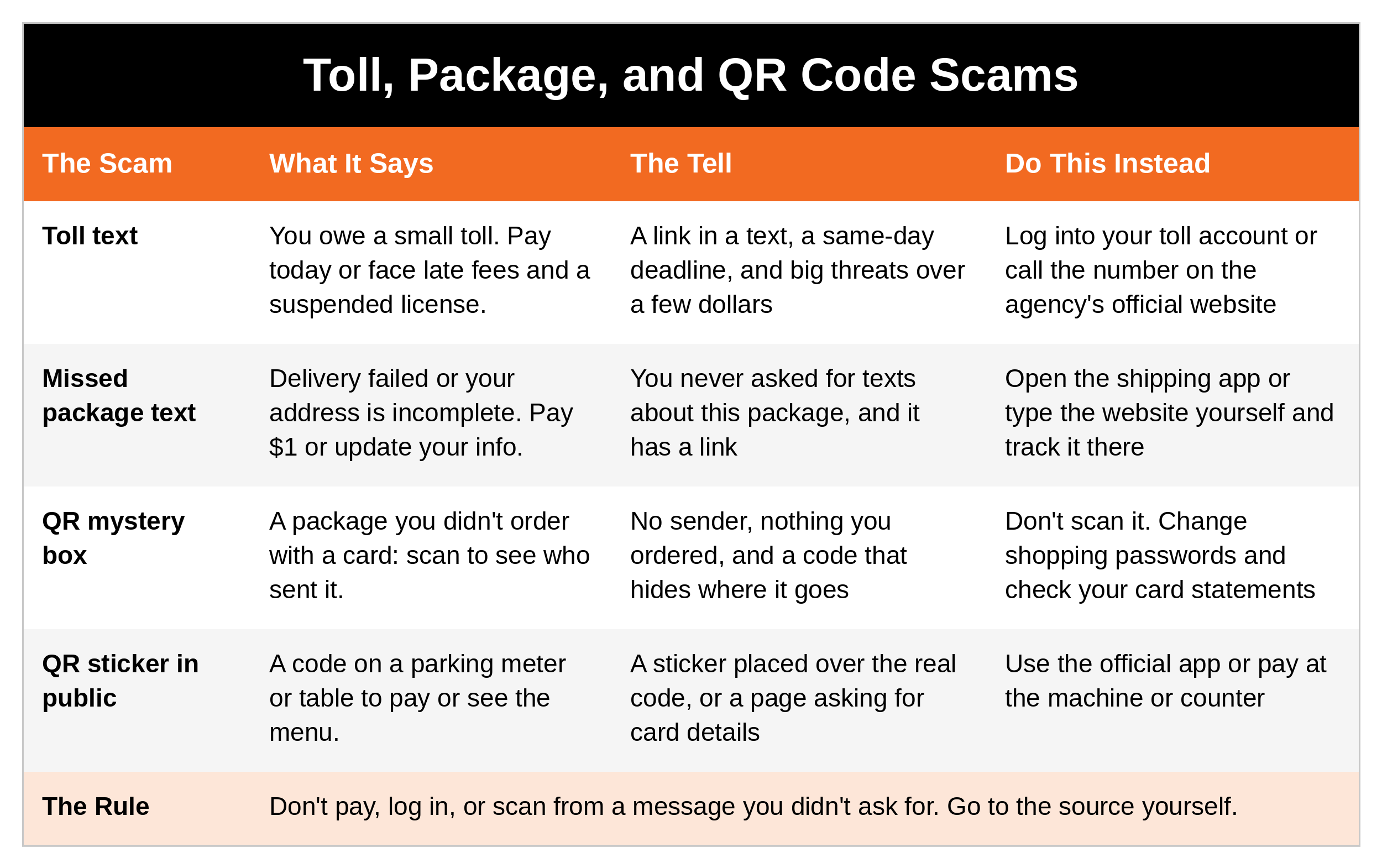
The message says you owe a toll, a late fee is coming, and your registration or license could be suspended. Both the FBI and the FTC have warned about this one. The texts look almost identical from state to state, and the link leads to a fake toll payment page.
"How did they know I drove a toll road?" They didn't. These texts go out by the millions to random numbers. If you just drove through a toll, it feels personal. If you didn't, it's an easy catch. I live in Arizona now, and I've never been on a toll road here. Back when I lived in New York, it felt like everything had a toll. A toll text is easy to spot when you know you haven't driven one. The trouble comes when you just got back from a trip where you did pay tolls.
The tell: A real toll bill goes to the address on file for your vehicle, or to your toll account. Threats of losing your license over a few dollars, a same-day deadline, and a link in a text are all signs of a scam.
Missed Package Texts
"Delivery attempt failed." "Address incomplete." "Pay $1.00 to reschedule." These work because almost everyone has something on the way, especially this time of year.
The tell: The U.S. Postal Inspection Service says USPS won't text you unless you asked for tracking on a specific package, and those tracking texts won't contain a link. UPS, FedEx, and Amazon scams follow the same pattern. If you didn't sign up for texts about that package, don't trust the text.
The QR-Code Mystery Box
This one shows up at your door. A package you didn't order, often something cheap and random, sometimes with no sender information at all. Inside is a card with a QR code: "Scan to find out who sent this," or "Scan to process your return."
The old version of this is called a brushing scam. Sellers ship cheap items to real addresses so they can post fake "verified" reviews. The FTC and FBI now warn that some of these boxes include QR codes that lead to fake sites built to steal your passwords and card numbers, or that try to get malware onto your phone.
The tell: A QR code hides where it's sending you. You can't read it the way you can read a link. The same trick shows up on fake stickers placed over real QR codes on parking meters and restaurant tables.
Get the free Scam Stopper Plan. The 4 D's and Stop, Verify, Tell in one plan, plus the red flags to watch for, what to do if you already clicked, and a fridge card for every adult in the house. Get it free here
Check It Yourself
This is the 4 D's from Part 1 in action. Don't click the link. Don't scan the code. Then verify through a website, app, or number you already trust.
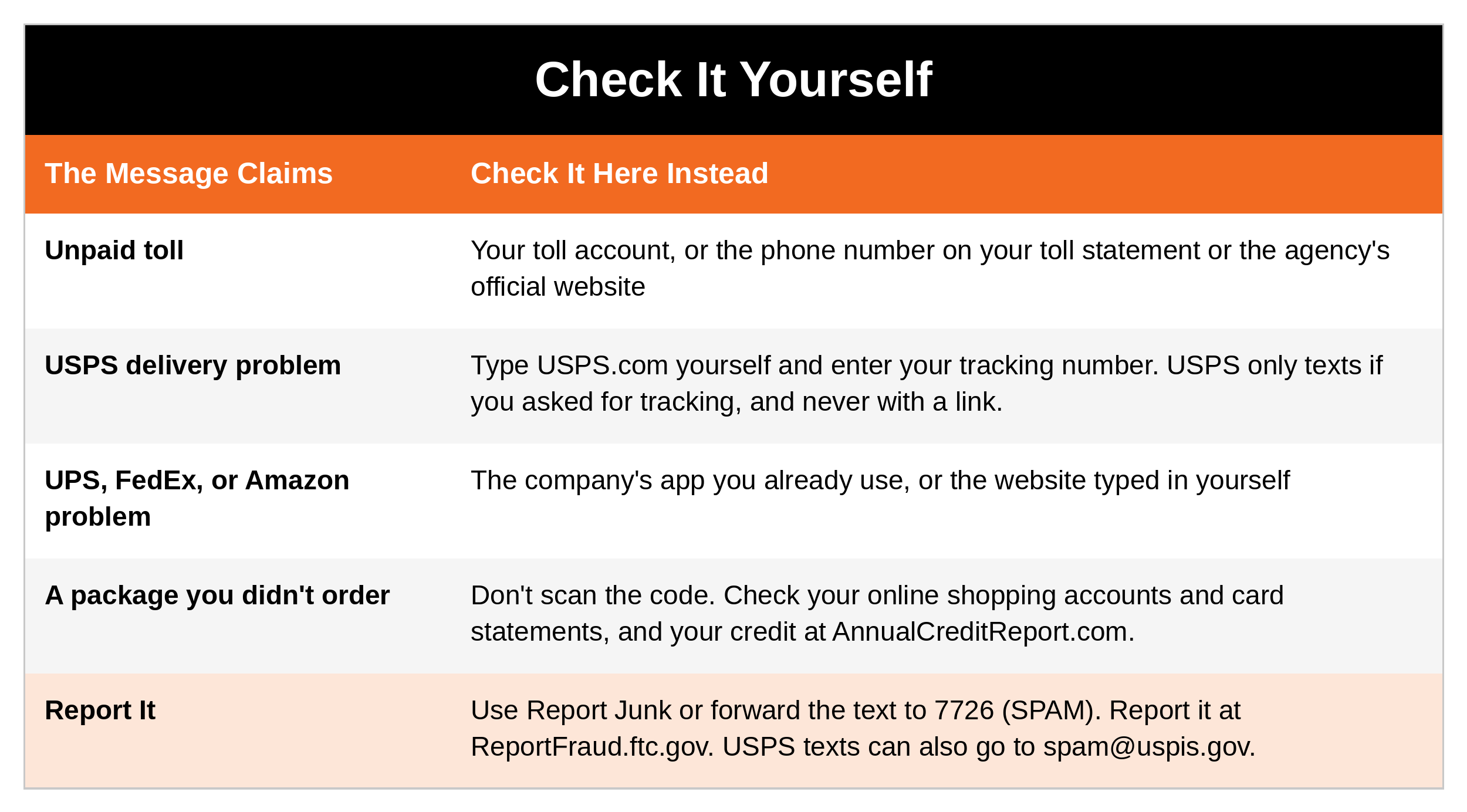
If you got a package you didn't order: You don't have to pay for it or send it back. Don't scan the code. Change the passwords on your online shopping accounts, check your card statements, and report it at ReportFraud.ftc.gov. A brushing package can be a sign that someone has your name and address, so it's a good time to check your credit reports at AnnualCreditReport.com.
If you already clicked or scanned: Go straight to the steps in Part 1: If You Already Clicked. Call your bank first.
The Prepared Protector checks the source, not the message. Scammers can copy a logo, a tracking number, and a toll agency's name. They can't change where the real account lives. Type the website yourself, open the app you already have, or call the number on your statement. The Prepared Protector is someone who's decided that loving someone means being ready for them, not just hoping things go fine.
What to Say
To your parents: "If you get a text about a package or a toll, don't tap it. Call me, or open the app you already use. The real company will still be there."
To your teens: "If a text says you owe money or a package is stuck, screenshot it and show me. Never pay from a link."
To the whole family: "If a box shows up that nobody ordered, nobody scans the code. We look at it together."
Ask Yourself
Did I sign up for text alerts about this package or this toll account?
Is the message pushing a deadline that's measured in hours?
Can I check this by opening the app or typing the website myself?
5 Quick Wins You Can Start Today
Sign up for USPS Informed Delivery on USPS.com, so you can see what's really coming.
Bookmark your toll account and the shipping sites you use, and check there instead of in texts.
Use your phone's "Report Junk" option, or forward scam texts to 7726 (SPAM), then delete them.
Make a family rule: nobody scans a QR code that came in a box nobody ordered.
Before you scan a QR code in public, check that it isn't a sticker placed over the real one.
Remember
Small bill, short deadline, and a link you didn't ask for? Don't pay it from the text. Go to the source yourself. The real problem, if there is one, will be waiting there.
Coming Up in Part 3
The Fake Virus Pop-Up and Tech Support Scams. The frozen screen, the warning siren, and the "Microsoft" phone number. What to do when your computer says it's infected, and why you should never let a stranger connect to it.
Quick Answers
Is a text about unpaid tolls a scam?
Almost always. The FTC and FBI have both warned about fake toll texts that link to fake payment pages. Check your balance by logging into your toll account or calling the number on the agency's official website, never through the link.
Does USPS send text messages about deliveries?
Only if you asked for tracking on a specific package, and the U.S. Postal Inspection Service says those texts won't contain a link. An unexpected USPS text with a link is a scam.
What should I do if I get a package I didn't order with a QR code inside?
Don't scan it. You don't have to pay for or return it. Change your online shopping passwords, check your card statements, and report it at ReportFraud.ftc.gov.
How do I report a scam text?
Use your phone's "Report Junk" option or forward it to 7726 (SPAM), then delete it. You can also report it at ReportFraud.ftc.gov. USPS-related texts can be reported to the Postal Inspection Service at spam@uspis.gov.
Get Started Today
Get the free Scam Stopper Plan. The 4 D's, Stop, Verify, Tell, the red flags to watch for, what to do if you already clicked, a family plan page, and a fridge card for every adult in the house. Get it here
Go Deeper
Cyber Safety: A Beginner's Guide to Securing Your Digital Footprint and Avoiding Online Scams. This post covers toll, package, and QR scams. The guide covers the full playbook: identity theft, phishing texts and calls, AI voice scams, passwords and two-factor sign-in, account monitoring, and secure networks, in plain language. Get it here
The Family Safety Toolkit. 20 complete safety checklists, including Protecting Older Adults from Scams and Financial Exploitation and Family Tech Rules, so the whole family has the same plan. Get it here
Tools I recommend: Call blockers, privacy screens, and other tools that help protect your family's devices and information are in my Cyber Safety Amazon store.
The Full Series
Part 1: The 4 D's That Stop Most Scams
Part 2: Toll Texts, Missed Packages, and the QR-Code Mystery Box (you are here)
Part 4: Passwords and Two-Factor Sign-In (coming next)
Part 5: Catch Fraud Early: Alerts, Credit Freezes, and Virtual Cards
Part 6: Your Mailbox and Your Glove Box
Related Reading
Scam Proofing the People You Love, Part 2: "This Is Your Bank Calling"
Scam Proofing the People You Love, Part 4: Build Your Family's Fraud Plan
References
Federal Trade Commission, Data Spotlight: Top text scams of 2024 (April 2025): https://www.ftc.gov/news-events/data-visualizations/data-spotlight/2025/04/top-text-scams-2024
Federal Trade Commission, Got a text about unpaid tolls? It's probably a scam (January 2025): https://consumer.ftc.gov/consumer-alerts/2025/01/got-text-about-unpaid-tolls-its-probably-scam
Federal Trade Commission, That unexpected package you got could be a brushing scam (August 2026): https://consumer.ftc.gov/consumer-alerts/2026/08/unexpected-package-you-got-could-be-brushing-scam
FBI Internet Crime Complaint Center, Unsolicited Packages Containing QR Codes Used to Initiate Fraud Schemes, I-073125-PSA (July 2025): https://www.ic3.gov/PSA/2025/PSA250731
U.S. Postal Inspection Service, Smishing: Package Tracking Text Scams: https://www.uspis.gov/news/scam-article/smishing
FCC, Sample Toll Road Scam Text: https://www.fcc.gov/node/268957
These suggestions are intended to help you and your family build awareness, confidence, and safer decision-making habits. No safety plan, checklist, or training can guarantee 100% protection. There will always be people who try to exploit vulnerability, opportunity, trust, or positions of power. The goal is not to create fear, but to help guide families toward more informed, prepared, and practical safety decisions in everyday life. This article is not legal or financial advice. Reporting rules vary, so check your state and county for the exact rules where you live. As an Amazon Associate, I earn from qualifying purchases.
If you are in immediate danger, call 911. If you've been scammed, report it at ReportFraud.ftc.gov or IC3.gov. Adults 60 and older can call the National Elder Fraud Hotline at 1-833-FRAUD-11 (1-833-372-8311).
Awareness gives you time. Time gives you options.
The Prepared Protector is someone who's decided that loving someone means being ready for them, not just hoping things go fine.
Prepared Not Paranoid. Protecting the Most Vulnerable Among Us.