What to Do When Your Screen Says You've Been Hacked, and Why You Never Let a Stranger Connect to Your Computer
By Larry Betz | Prepared Not Paranoid https://www.preparednotparanoid.com/
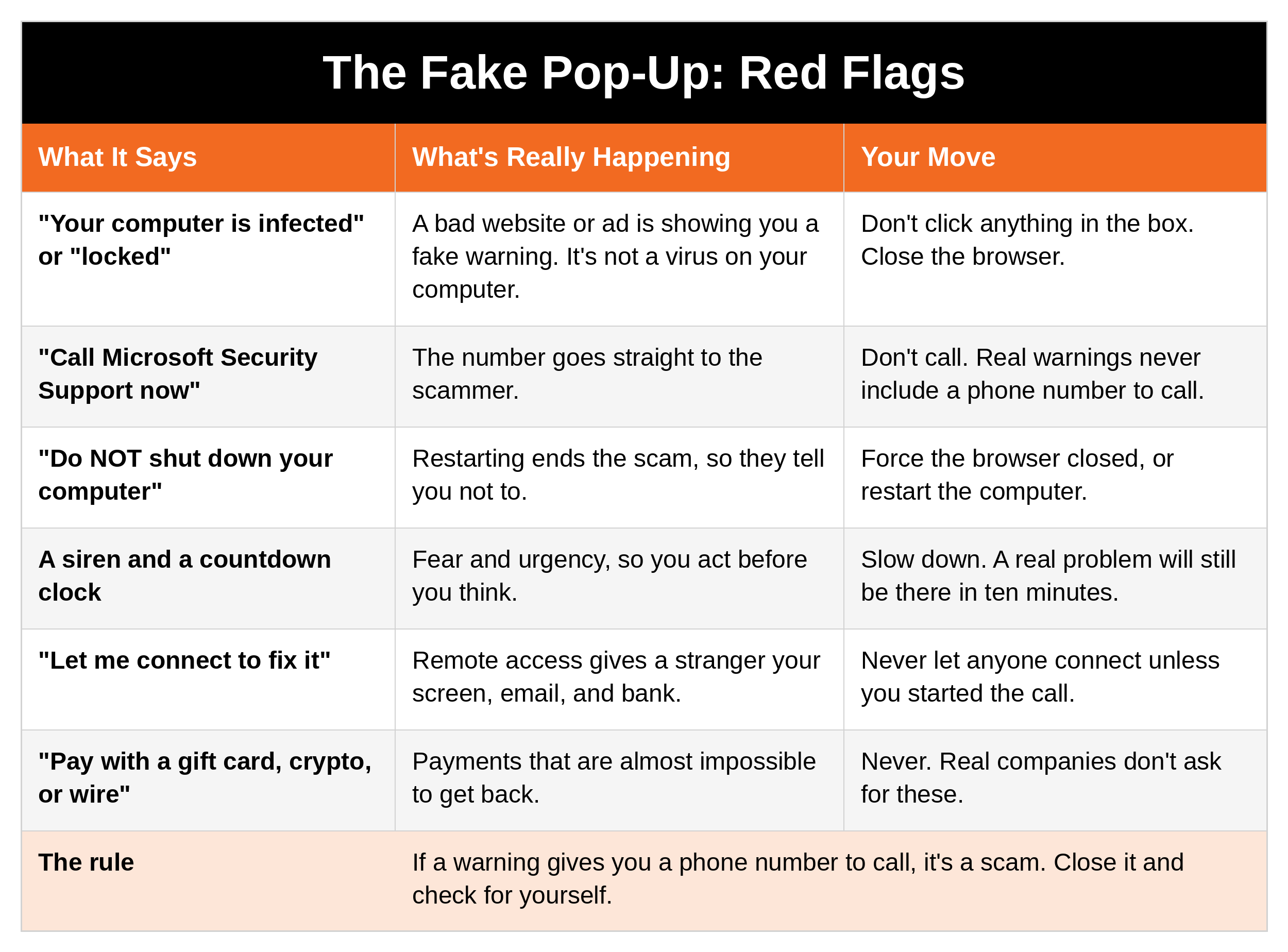
A tech support scam starts with a loud warning that your computer is infected and a phone number to call for help. Real security warnings from Microsoft, Apple, and other tech companies never ask you to call a phone number. Don't call it. Close the browser or restart the computer, and check for yourself.
You're reading the news or looking up a recipe. The screen goes red. A siren starts blaring through the speakers. A box fills the screen:
WARNING
Your computer has been locked due to suspicious activity. Your files, photos, and passwords have been compromised. Call Microsoft Security Support now. Do NOT shut down your computer or you may lose all data.
This is what the fake pop-up looks like. It's a scam. Don't call.
There's a phone number. A countdown clock. Your mouse barely moves.
It's built to make your heart race. That's the whole point.
Have you seen the movie The Beekeeper? This is the exact scam that kicks off the whole story. A retired teacher is on her laptop when a pop-up says her computer has a virus. She calls the number, and a friendly, helpful "support" agent picks up and talks her through letting him into her computer. By the time the call ends, her life savings and the $2 million charity fund she manages are gone. The rest of the movie is Hollywood. That opening scene isn't. It happens to real families every day.
Why This Scam Works
Most of us don't know exactly how our computers work, and we don't need to. That's what the scammers count on. When a screen says something is badly wrong, a phone number that promises help feels like a lifeline.
The pop-up checks every box from Part 1: urgency (a countdown clock), fear (your files are being stolen), authority (Microsoft's name and logo), and pressure to act before you think ("Do NOT shut down").
Here's the truth: your computer isn't infected. The pop-up is the scam. It usually comes from a bad website or a bad ad, not from a virus on your machine.
The numbers show how well it works. The FBI's Internet Crime Complaint Center reports that tech support and customer support scams cost Americans $2.1 billion in 2025. People 60 and older lost about $1 billion of that, the second-largest loss for any scam type in that age group.
The Call
If you call the number, a friendly, patient "technician" answers. They sound professional. They might give you a name and an employee ID number.
Then they ask to connect to your computer "to run a scan." They walk you through downloading a remote access program. Once it's installed, they can see your screen and move your mouse.
Next comes the "scan." They show you normal system files and call them viruses. They tell you hackers have been inside your accounts. Then they offer to fix it for a fee, or sell you a "security plan." Often they want the payment by gift card, wire transfer, or cryptocurrency.
The tell: Microsoft says its real error and warning messages never include a phone number, and it never calls you out of the blue to fix your computer. The FTC says the same about all real tech companies: they won't call, email, or text you to say there's a problem with your computer, and their security warnings will never ask you to call a phone number. Any contact has to start with you.
When It Gets Worse: The Three-Step Scam
The FBI has warned about a bigger version that it calls the "Phantom Hacker" scam. It starts with the same pop-up or call, and it's built to take everything.
The "tech support" step. The fake technician connects to your computer and tells you hackers have gotten into your bank account.
The "bank" step. A second scammer calls, pretending to be from your bank's fraud department. They say your money isn't safe and you need to move it.
The "government" step. A third scammer, pretending to be from the Federal Reserve or another agency, tells you where to send the money to "protect" it.
Each step makes the next one feel more real. The FBI says victims of this scam have lost their entire life savings, and older adults suffer most of the losses.
No real bank, government agency, or tech company will ever ask you to move your money to keep it safe. If you hear that, it's a scam, every time. My Scam Proofing Part 2 post covers the fake bank call in detail.
The Refund Scam
Here's one more twist. Weeks or months after a tech support scam, someone calls about a "refund." The company is going out of business, or you were overcharged, and they want to send money back.
They ask to connect to your computer to "process the refund." Then they claim they sent too much by mistake and need you to send the difference back. They didn't send you anything. They moved your own money around to make it look that way.
The FTC warns about this exact scam. If someone calls to offer a refund you didn't ask for, hang up.
Get the free Scam Stopper Plan. The 4 D's and Stop, Verify, Tell in one plan, plus the red flags to watch for, what to do if you already clicked, and a fridge card for every adult in the house. Get it free here
What to Do When the Pop-Up Shows Up
This is the 4 D's from Part 1 in action: don't click, don't call. Then take back control of your screen.
Don't call the number, and don't click anything in the box. Not even the X or "Close." Some fake boxes use those buttons too.
Close the browser. If it won't close, force it closed. On Windows, press Ctrl + Alt + Delete and open Task Manager. On a Mac, press Command + Option + Escape.
If the screen still won't respond, restart the computer. Hold the power button until it shuts off. The fake warning says not to. That's how you know it's fake.
Run a scan with the security software you already have, from its own icon or menu, not from anything the pop-up shows you.
Still worried something's wrong? Call a company you already do business with, using the number on its official website or your receipt. Or ask a trusted family member or a local repair shop you know.
If You Already Called
It happens to smart, careful people every day. These scammers are professionals. What matters now is how fast you move.
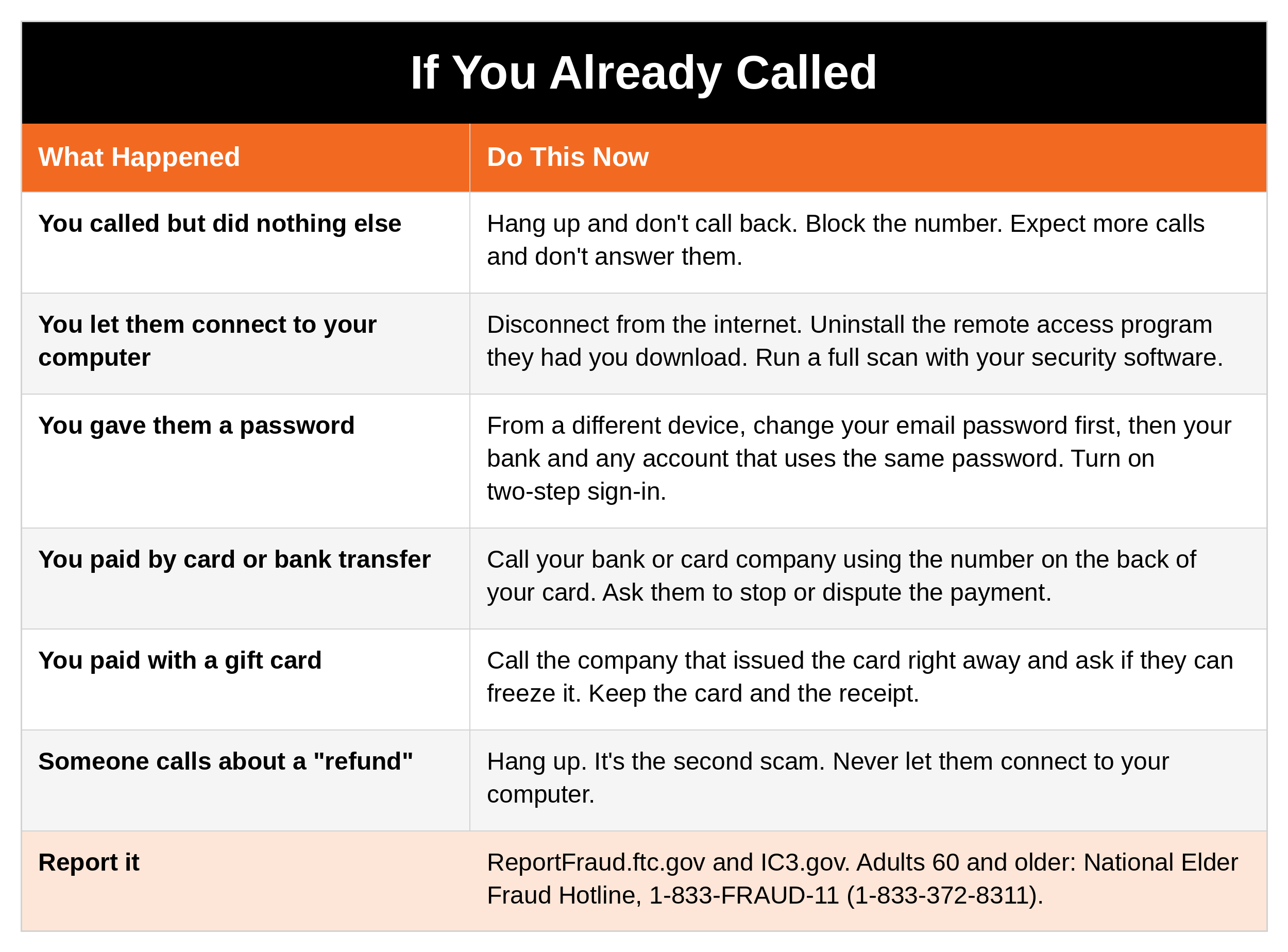
If you let them connect to your computer: Disconnect from the internet right away. Uninstall the remote access program they had you download. Run a full scan with your security software. Then, from a different device you trust, change your email password first, followed by your bank and any account that shares the same password.
If you paid or gave them your card number: Call your bank or card company using the number on the back of your card. Ask them to stop or dispute the charge. Paid with a gift card? Call the company that issued the card right away and ask them to freeze it.
Then report it at ReportFraud.ftc.gov and IC3.gov. Adults 60 and older can call the National Elder Fraud Hotline at 1-833-FRAUD-11 (1-833-372-8311). For the rest of the first-hour steps, go to Part 1: If You Already Clicked.
The Prepared Protector doesn't let a stranger drive. Your computer is like your car. You wouldn't hand your keys to someone who called you out of nowhere and said your brakes were bad. Remote access gives a stranger the wheel to your email, your bank, and your photos. Only let someone connect if you started the call, to a company you already know. The Prepared Protector is someone who's decided that loving someone means being ready for them, not just hoping things go fine.
What to Say
To the pop-up: Nothing. Close it.
To a caller who says your computer has a problem: "I don't take tech support calls I didn't ask for." Then hang up.
To your parents: "If your computer ever starts yelling at you to call a number, don't call. Shut it off and call me. Nothing on that screen is real."
To yourself, if someone asks to move your money to keep it safe: "That's the scam." Hang up and call your bank on the number on your card.
Ask Yourself
Did I contact this company first, or did they contact me?
Is a "warning" telling me not to turn off my own computer?
Is anyone asking for remote access, a gift card, crypto, or a wire transfer?
5 Quick Wins You Can Start Today
Turn on automatic updates for your computer, phone, and web browser.
Make sure your computer's built-in security is turned on (Microsoft Defender on Windows; Apple's protections are built into a Mac).
Save the real support numbers for your bank, phone carrier, and internet provider in your phone, with clear names.
Put the Scam Stopper fridge card where your parents will see it, right next to the computer.
Make a family rule: nobody lets a stranger connect to a computer or phone without calling a family member first.
Remember
A real warning will never give you a phone number to call. If your screen is yelling at you to call for help, the call is the trap. Close it, restart if you have to, and check for yourself.
Coming Up in Part 4
Passwords and Two-Factor Sign-In. The easiest way to lock scammers out of your accounts, even if they get your password. How to build passwords your family can actually remember, and how to turn on the second lock.
Quick Answers
Is a pop-up saying my computer is infected real?
Almost never when it includes a phone number. Microsoft says its real error and warning messages never include a phone number to call. Don't call. Close the browser or restart the computer.
Will Microsoft or Apple call me about a virus?
No. Microsoft says it never makes unsolicited calls to fix your computer. If someone calls saying they're from tech support, hang up.
What should I do if I let a scammer connect to my computer?
Disconnect from the internet, uninstall the program they had you download, and run a security scan. From a different device, change your email and bank passwords. Call your bank if you paid or shared card information, and report it at ReportFraud.ftc.gov.
What is the Phantom Hacker scam?
A three-step scam the FBI has warned about. A fake tech support agent, a fake bank employee, and a fake government official work together to convince you to move your savings to "protect" it. No real agency ever asks you to move your money to keep it safe.
Get Started Today
Get the free Scam Stopper Plan. The 4 D's, Stop, Verify, Tell, the red flags to watch for, what to do if you already clicked, a family plan page, and a fridge card for every adult in the house. Get it here
Go Deeper
Cyber Safety: A Beginner's Guide to Securing Your Digital Footprint and Avoiding Online Scams. This post covers the fake pop-up and the tech support call. The guide covers the full playbook: ransomware, phishing emails and texts, AI voice scams, passwords and two-factor sign-in, computer security settings, and encryption, in plain language. Get it here
The Family Safety Toolkit. 20 complete safety checklists, including Protecting Older Adults from Scams and Financial Exploitation, with tech support red flags and exactly what to do if money was sent by bank transfer, gift card, or crypto. Get it here
Tools I recommend: Call blockers, privacy screens, and other tools that help protect your family's devices and information are in my Cyber Safety Amazon store.
The Full Series
Part 1: The 4 D's That Stop Most Scams
Part 2: Toll Texts, Missed Packages, and the QR-Code Mystery Box
Part 3: The Fake Virus Pop-Up and Tech Support Scams (you are here)
Part 4: Passwords and Two-Factor Sign-In
Part 5: Catch Fraud Early: Alerts, Credit Freezes, and Virtual Cards (coming next)
Part 6: Your Mailbox and Your Glove Box
Related Reading
Cyber Safety, Part 2: Toll Texts, Missed Packages, and the QR-Code Mystery Box
Scam Proofing the People You Love, Part 2: "This Is Your Bank Calling"
Scam Proofing the People You Love, Part 4: Build Your Family's Fraud Plan
References
FBI Internet Crime Complaint Center, 2025 Internet Crime Report (April 2026), summarized by AARP: https://www.aarp.org/money/scams-fraud/fbi-ftc-report-2025-losses.html
FBI Internet Crime Complaint Center, "Phantom Hacker" Scams Target Senior Citizens and Result in Victims Losing their Life Savings (September 2023): https://www.ic3.gov/PSA/2023/PSA230929
Microsoft, Protect yourself from tech support scams: https://support.microsoft.com/windows/protect-yourself-from-tech-support-scams-2ebf91bd-f94c-2a8a-e541-f5c800d18435
Microsoft, Warning signs of tech scams: https://support.microsoft.com/en-us/security/warning-signs-of-tech-scams
Federal Trade Commission, How To Spot, Avoid, and Report Tech Support Scams: https://www.ftc.gov/techsupportscams
Federal Trade Commission, How To Spot a Tech Support Scam (infographic): https://consumer.ftc.gov/articles/0557-infographic-how-spot-tech-support-scam
These suggestions are intended to help you and your family build awareness, confidence, and safer decision-making habits. No safety plan, checklist, or training can guarantee 100% protection. There will always be people who try to exploit vulnerability, opportunity, trust, or positions of power. The goal is not to create fear, but to help guide families toward more informed, prepared, and practical safety decisions in everyday life. This article is not legal, financial, or technical advice. If your files are locked or you're not sure your computer is clean, contact a reputable computer repair professional. Reporting rules vary, so check your state and county for the exact rules where you live. As an Amazon Associate, I earn from qualifying purchases.
If you are in immediate danger, call 911. If you've been scammed, report it at ReportFraud.ftc.gov or IC3.gov. Adults 60 and older can call the National Elder Fraud Hotline at 1-833-FRAUD-11 (1-833-372-8311).
Awareness gives you time. Time gives you options.
The Prepared Protector is someone who's decided that loving someone means being ready for them, not just hoping things go fine.
Prepared Not Paranoid. Protecting the Most Vulnerable Among Us.